What Is the RUA Tag? A Plain-English Explanation
Somebody sent you here because they typed "rua" into your DNS record and you nodded along without asking what it meant. Fair enough — it looks like a typo for something else. It isn't.
Here's the whole idea in one sentence before we go any further: the RUA tag tells mail services where to send you a daily heads-up about everyone who's been sending email pretending to be you.
That's it. No DNS degree required. Let's unpack why that matters, because the "pretending to be you" part is doing a lot of quiet work.
Picture your inbox as a shop with your name over the door
Anyone can print a delivery van with your shop's name on the side and drive it around town. Your customers wouldn't know the difference — the sign says what it says. That's roughly what happens with email. Someone can send a message that says it's from billing@yourcompany.com, and unless something checks that claim, it sails through looking exactly as legitimate as the real thing.
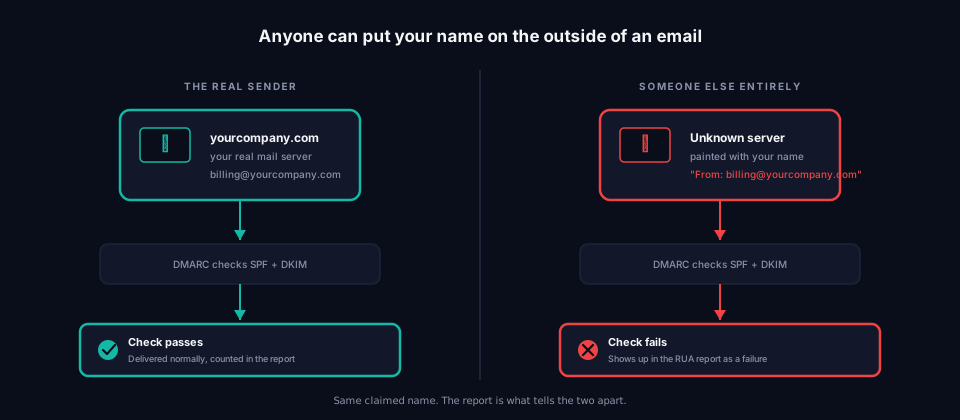
DMARC is the system that does the checking. And RUA is the part of DMARC that says: tell me what you found.
Not "block it." Not "stop it." Just — tell me. Every day, a little report lands in an inbox you chose, listing every server that sent mail using your name, and whether it passed the check or failed it. Think of it less like a lock and more like a security camera pointed at your own front door. It doesn't stop anyone from walking up. It just makes sure somebody's watching the footage.
If none of this is set up yet, that's not unusual — it's genuinely the most skipped step in the whole DMARC setup, and we've written before about why the next step after that gets skipped too.
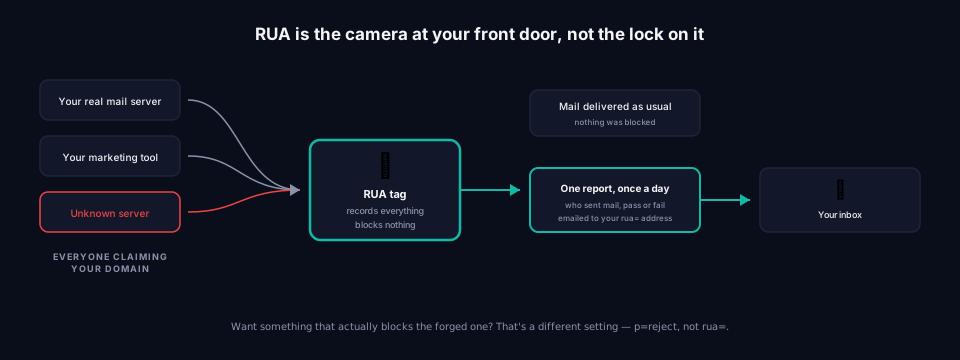
What it actually looks like
You won't stumble across a RUA tag by accident — it lives inside a longer line of text your domain publishes, one that most business owners never look at because a developer or IT company set it up years ago. Somewhere in that line sits something like:
rua=mailto:reports@yourcompany.com
Read out loud, that's just: send the reports to this email address. The word "mailto" in front is a formality — a way of telling computers "this next bit is an email address, not a website." Leave it off by accident and the whole thing quietly stops working, which is one of the more common ways this goes wrong without anyone noticing.
There's one more piece some records include, and it's worth knowing even though almost nobody uses it: a size cap, written as ! followed by a number and a letter, like !10m for 10 megabytes. It just tells the mail provider "don't send me anything bigger than this." A busy domain can generate a genuinely large report, and this is the escape hatch for an inbox that can't handle a big attachment. Most businesses never touch it, and you don't need to either unless someone tells you your reports keep bouncing.
How to add more than one address, and what actually happens when you do
Adding a second or third address isn't complicated — it's the same idea as adding names to the "to" field of an email, just written into your DNS record instead. You separate each mailto: address with a comma, like this:
rua=mailto:owner@yourcompany.com,mailto:it-provider@theiragency.com,mailto:backup@yourcompany.com
That one line asks for reports to go to all three inboxes. No extra tag, no special setup — just addresses, comma-separated, inside the same rua= value. Whoever manages your DNS (usually your website host, domain registrar, or IT provider) edits that one line and the change takes effect once it spreads across the internet, which is typically a few hours.
Here's the part that surprises people: nothing gets divided up. Every single address on that list receives its own complete copy of the report, every single day, from every server that sent mail as your domain. Three addresses doesn't mean each one sees a third of the picture — it means three separate inboxes, each getting the whole thing. That matters more than it sounds like it should, because it's the difference between "I'll add a few extra addresses just in case" and quietly filling three inboxes with daily mail nobody asked to receive.
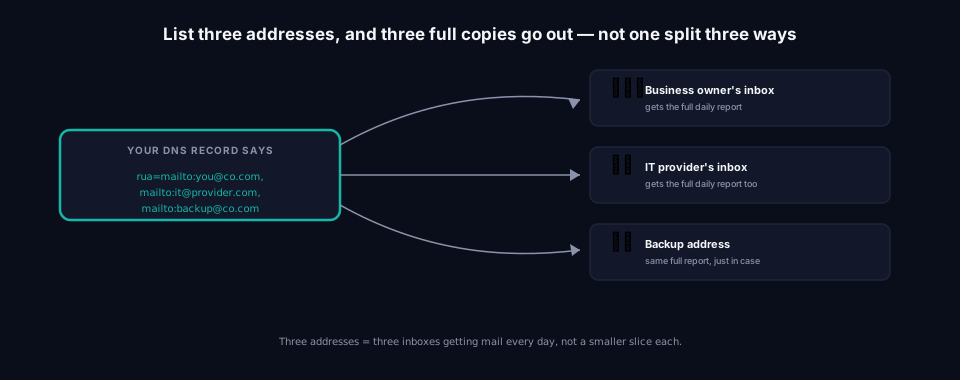
So why do it at all? Mostly for one of three reasons. An IT provider managing this on a customer's behalf wants their own copy, while the customer keeps one too — nobody wants to be locked out of their own data. Some businesses point one copy at a person and another at a tool built to actually make sense of the reports, since reading them by hand gets old fast (more on that in a second). And a few just want a backup address sitting there in case the main one is ever shut down without someone remembering to update the DNS record — which happens more than you'd guess.
There's also a quiet safety rule most people never hit: you can't just point your reports at a stranger's inbox. If you tried to redirect your reports to some other company's domain, most mail providers would ignore the request — otherwise anyone could aim a flood of reports at anybody else's mailbox. The receiving company has to explicitly agree to accept them first. It's the reason a DMARC provider or IT company can legitimately collect these reports on a customer's behalf without owning the domain themselves — there's a handshake happening in the background, not a loophole.
The part almost nobody actually reads
Here's the honest truth about these reports: they're not built for humans. They arrive as a dense, machine-readable file — no charts, no summary, nothing a normal person would open on purpose. Buried inside is useful information: which servers sent mail as your domain, how many messages, and whether each one passed or failed the check.
Translated into plain English, one finding inside a real report reads roughly like this: "On Tuesday, a server at Google sent 3,412 messages using your domain, and every one of them passed. A separate server, one nobody recognized, sent 6 messages the same day — all 6 failed." That second line is the one worth noticing. It's not proof of anything sinister on its own, but it's exactly the kind of entry that's easy to miss when a report like this arrives daily and gets skimmed, if it gets opened at all.
Most people open that file exactly once, feel their eyes glaze over, and never look again. We wrote a much more hands-on walkthrough for anyone who genuinely wants to sit down and decode one of these files line by line — Reading DMARC Aggregate Reports: A Field-by-Field Guide goes through a real one piece by piece. And if you want every remaining detail of the tag itself — full syntax, how third-party reporting authorization actually works, troubleshooting reports that never arrive — RUA Tag: The Complete Guide is the deep-dive version of everything on this page.
This is exactly the gap that turns "we technically have DMARC" into a check-the-box exercise nobody follows up on — the reports arrive, nobody reads them, and the record just sits there. It's a pattern we see constantly, and it's the whole reason a Hosted DMARC setup exists in the first place: something needs to actually read this stuff and flag the one server that doesn't belong, instead of leaving it to whoever last remembered the inbox password.
Its quieter, mostly retired sibling
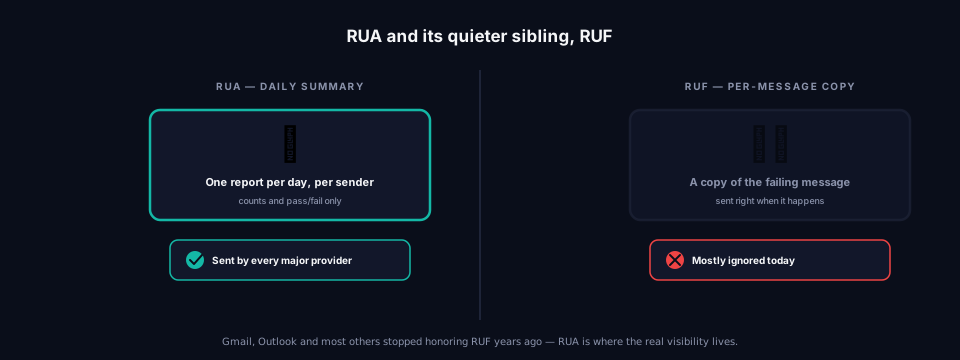
You'll sometimes spot a second tag sitting right next to RUA, called RUF. They sound like siblings and they sort of are, but RUF asks for something different — instead of a daily summary, it asks for a copy of the actual failing message, close to the moment it happens.
In theory that sounds more useful. In practice, almost nobody sends these anymore. The big mail providers — Gmail, Outlook, the rest — stopped honoring RUF requests years ago, mostly over privacy concerns about forwarding pieces of someone's actual email around the internet. If you spot RUF sitting in a domain's DNS record today, it's very likely doing nothing at all. RUA is where basically all of the real, working visibility comes from now. We go into the full history of why RUF quietly stopped working in RUF: The DMARC Tag Almost Nobody Still Uses.
Why you actually want this, even if you're not worried about forgers
Everything so far has been about catching someone else misusing your domain. There's a second, quieter reason to care about RUA, and it has nothing to do with attackers: it's the only window you get into your own mail before you flip on real enforcement.
Here's the trap people fall into. Someone reads about how weak p=none is — and it is weak, a policy that watches but never blocks — and decides the fix is to jump straight to p=reject, the setting that actually refuses mail that fails the check. That instinct is right in spirit and dangerous in practice, because p=reject doesn't ask "are you sure?" first. It just starts rejecting.
The problem is almost never the forged mail. It's the legitimate mail nobody remembered. An old accounting platform still sending invoices. A newsletter tool someone signed up for two years ago. A CRM quietly emailing renewal notices. None of those were ever properly authorized in your domain's SPF or DKIM setup, because nobody thought to. The moment p=reject goes live, all of that starts bouncing — silently, from the sender's side, with your customers simply never receiving the invoice or the notice they were expecting.
And here's the part that makes a missing RUA address so much worse than it sounds: without it, you won't know any of this is happening. There's no dashboard that pops up and says "hey, your accounting platform just got blocked." The only mechanism DMARC gives you to see that is the daily report your rua= address collects. Skip that address, or set it up after the fact, and enforcement is running with the lights off — you'll find out something broke when a customer calls asking where their invoice went, not before.
This is really the whole case for the tag in one sentence: RUA isn't a nice-to-have next to p=reject, it's the thing that tells you whether p=reject is safe to turn on in the first place. Get the address running weeks before you touch the policy setting, actually read what comes back, and enforcement becomes a calculated move instead of a gamble on what you hope nobody's using anymore.
Checking your own takes about ten seconds
You don't need to go digging through DNS settings by hand to find out whether any of this is even set up on your domain — it's public information, and checking it is instant. Paste your domain into the free DMARC Analyzer and it'll show you, in plain terms, whether a RUA address is there, whether it's written correctly, and where reports are currently heading. Not sure DMARC is even the right place to start? The Domain Scanner gives you the wider picture across everything protecting — or not protecting — your domain. And if nothing's published yet, the DMARC Builder will put together a correct record for you, RUA address included, without asking you to memorize any of this.
Frequently asked questions
What does RUA actually stand for? Reporting URI for Aggregate reports — a mouthful that just means "the address where the daily summary goes." Nobody says the full name out loud; everyone just calls it the RUA tag.
Do I need it, or can I skip it? You can technically skip it and your domain will still work. But skipping it is like installing a security camera and never plugging it in — the setup's there, the actual point of it isn't.
What's the difference between RUA and RUF? RUA sends you a daily summary of everyone who sent mail as your domain. RUF was meant to send you copies of individual failing messages, but the major mail providers stopped honoring it years ago over privacy concerns, so in practice it rarely does anything anymore.
Can I list a few different addresses instead of just one? Yes, and plenty of businesses do — usually to give an IT provider and the company itself their own separate copy. Just know each address gets a full copy, not a fraction of the reports.
Why isn't the report just... readable, like a normal email? Because it's built for software, not people. It's meant to be picked apart automatically. Reading one by hand is possible but tedious enough that almost nobody does it more than once — which is exactly why tools exist to do it instead.
Can I just set p=reject without bothering with rua=?
Technically, yes — DNS won't stop you. But it means you'll have zero visibility if a legitimate sender starts getting silently rejected, since the daily report is the only thing that would have told you. Get rua= running and actually read what comes back for a few weeks before you touch the reject setting, not after.
Where to go from here
If you've never actually checked what's published for your own domain, that's the natural next step — the DMARC Analyzer takes about as long as it took you to read this. And if it turns out reports are already arriving somewhere and nobody's been looking at them, that's worth fixing before it turns into the kind of gap we describe in why "we have DMARC" often means less than it sounds like.
About this article
I'm part of the team building grimDMARC, a managed DMARC, SPF and BIMI platform for MSPs and their customers. Spotted something above that doesn't match what you're seeing on your own domain — reach me at hello@grimdmarc.com.
Last updated: August 2026 · Reading time: 9 minutes