Our Analyzer Tools in Action: A Real Domain, Real Results
Screenshots of empty forms don't tell you much about what a tool actually does. So instead of mockups, here's what all four of our free analyzers return when pointed at a real, well-known domain — microsoft.com — plus a look at BIMI on a domain that actually publishes it, since Microsoft doesn't.
Every result below is live data, fetched the same way you'd get it if you ran the scan yourself right now.
Domain Scanner: the full picture in one scan
Domain Scanner runs two independent checks in parallel: whether the domain can be spoofed (SPF + DMARC), and whether mail to or from it can be intercepted or downgraded in transit (MTA-STS + TLS-RPT). Each gets its own score out of 10.
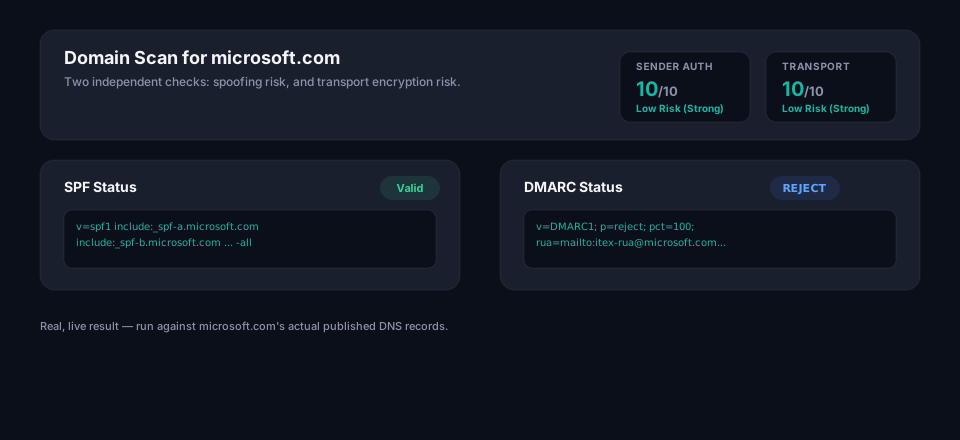
Microsoft scores 10/10 on both — SPF and DMARC are correctly configured, and MTA-STS is enforced, so mail can't be silently downgraded to unencrypted transport. That's the baseline every domain should be aiming for.
SPF Analyzer: lookups matter as much as syntax
A syntactically valid SPF record can still fail in production if it exceeds the 10 DNS lookup limit defined in RFC 7208 — see What is SPF? for why that limit exists and how easy it is to hit by accident. SPF Analyzer resolves the full include chain and counts every lookup, not just the top-level ones.
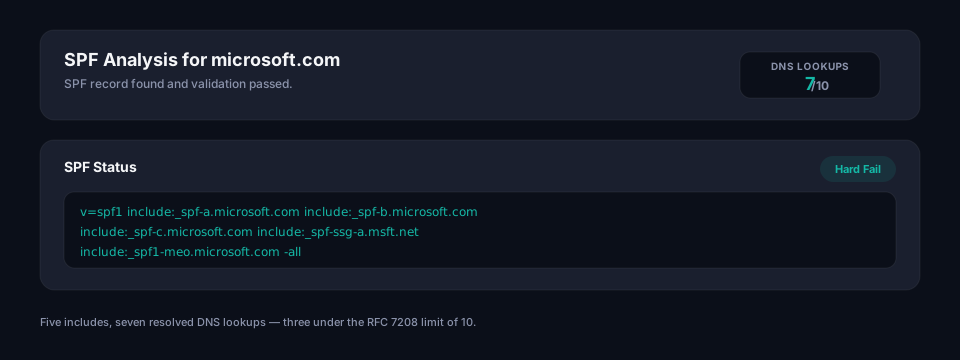
Microsoft's record resolves five include: mechanisms across their own SPF infrastructure for a total of 7 lookups — three under the limit, with a -all hard fail at the end. Comfortable headroom, which is exactly where you want to be before adding another sending platform.
DMARC Analyzer: catching deprecated tags on a domain this size
DMARC Analyzer parses every tag against the current specification, not just whether the record is present. This is where it gets interesting — even a domain the size of Microsoft's is carrying a tag that's been retired from the spec.
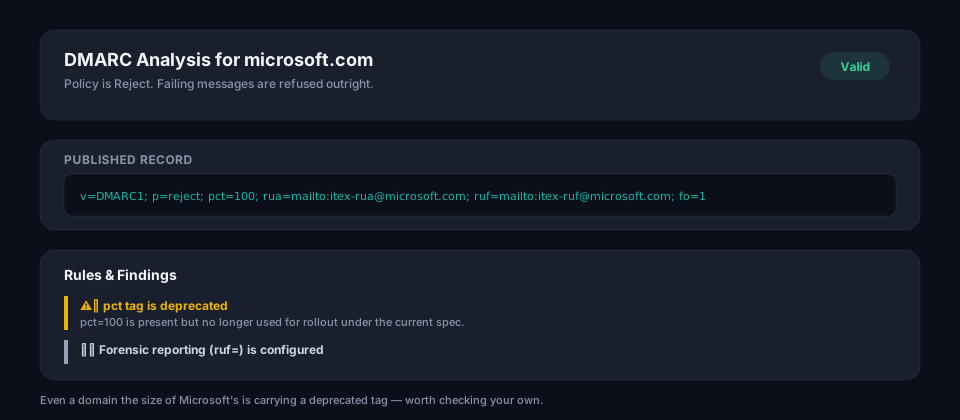
The policy itself is solid — p=reject, full enforcement. But the record still carries pct=100, which DMARCbis removed from the specification; staged rollout is handled through reporting and subdomain policy now, not a percentage tag. It's harmless at pct=100 specifically, but it's a good reminder that "our DMARC has worked for years" and "our DMARC matches the current spec" aren't always the same thing. If you're building a fresh record instead of auditing an old one, the DMARC Builder uses t=y in place of pct= from the start.
BIMI Analyzer: what a passing result actually looks like
Microsoft doesn't currently publish a BIMI record, so for this one we ran BIMI Analyzer against x.com, which does — a real, live, fully passing result, logo included.
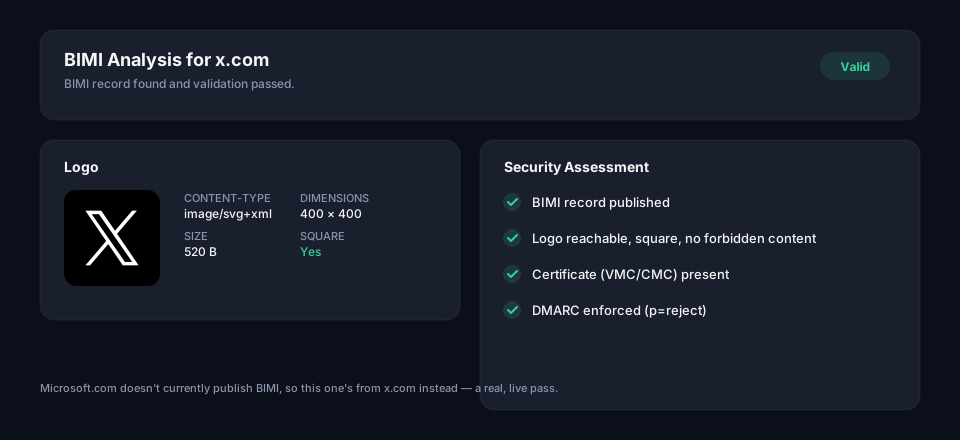
Every check passes: the logo is reachable, served as image/svg+xml, exactly square at 400×400, free of the scripts/raster embeds/external references the BIMI SVG profile forbids, backed by a valid certificate, and — the check most validators skip — DMARC is actually enforced at p=reject behind it. See What is BIMI? for why that last dependency exists and what happens when it's missing.
Try it on your own domain
- Domain Scanner — the full picture in one scan
- SPF Analyzer — record syntax and DNS lookup count
- DMARC Analyzer — policy, alignment and deprecated tags
- BIMI Analyzer — logo, certificate and DMARC readiness
No account, no email address required to see results. If any of these turn up something you'd rather not fix by hand, Hosted DMARC, Hosted SPF and Hosted BIMI handle the ongoing maintenance for you.
Frequently asked questions
Why does a domain as large as microsoft.com still carry a deprecated DMARC tag?
Because a DMARC record that's been working correctly for years has no reason to get revisited — the deprecated pct= tag is harmless at pct=100, since it just means "apply the policy to 100% of mail," which is the default behavior anyway. It's evidence that "our DMARC has worked for years" and "our DMARC matches the current spec" are two different claims. A domain can be fully enforcing (p=reject) and still be carrying dead weight from an older version of the standard.
Why would a BIMI check pass for x.com but not for microsoft.com in the same article?
Not every domain publishes a BIMI record, and Microsoft simply doesn't — BIMI is optional even for domains with fully enforced DMARC. The BIMI Analyzer result shown for x.com demonstrates what a complete, passing setup looks like: a reachable square SVG logo, no forbidden script or raster content, a valid certificate, and DMARC enforcement underneath it. A domain missing BIMI isn't misconfigured, it just hasn't opted into logo display yet.
What's the actual DNS lookup count that causes an SPF record to fail?
The limit is 10 DNS lookups total across the record's include:, a, mx, ptr, exists, and nested-include mechanisms, per RFC 7208 — not 10 include: statements, since some includes resolve to further nested lookups themselves. A record can look short and still exceed the limit if one of its includes points to a provider with a deep chain underneath. Going over the limit causes SPF to return a permanent error (permerror), which most mailbox providers treat as an outright SPF failure rather than a soft pass.