DMARC for MSPs: Why a Multi-Tenant Platform Beats a Single-Domain Tool
Monday. Forty-something customers. Each with one to five domains. Each domain sitting at a different stage of DMARC rollout — some stuck at p=none, some finally ready to tighten, one finance team asking again if they're actually protected from invoice fraud. You open the tool. Pick a customer from a dropdown. Read a report. Close it. Next customer. By the third one you've stopped looking for insight. You're just hunting for whichever tab has today's fire in it.
DMARC was never the hard part. Nobody burns out on the protocol. They burn out logging into the same tool twenty times a day, switching customer accounts, digging through a report for the one line that matters, then explaining to a customer why a single DNS change "just" ate three weeks.
That's not a technology problem. It's a design choice — and most vendors made the wrong one. Every major DMARC platform on the market was built around the same scenario: one organization, protecting its own domain.
MSPs are not that scenario. An MSP runs ten, fifty, five hundred customers' domains at once — each on its own risk clock, each needing its own answer the second an owner asks "are we protected?" That's portfolio-scale MSP email security, not single-mailbox hygiene. It needs a platform built around that job on day one. Not a single-domain product with a customer switcher duct-taped on afterward.
This is why that gap matters, what actually breaks as DMARC Management scales past a few dozen domains, and how grimDMARC was built as a multi-tenant DMARC platform from the first line of code — MSP workflow first, not bolted on later.
DMARC isn't the hard part
Say it plainly, because the industry won't:
DMARC isn't hard. Hundreds of domains is hard.
The standard itself is almost boring once you know it. Publish a DNS record telling receiving mail servers what to do with mail that fails SPF and DKIM. Ask for reports back so you can see what's actually going out under your name. Want the mechanics? What is DMARC? has the full breakdown.
Two report flavors exist, and only one matters day-to-day. Aggregate reports (RUA) are the workhorse — a daily rollup from every mailbox provider showing volume, pass, fail. That's your trend line: this sender's failed for three weeks straight, that customer's ready to tighten policy. Forensic reports (RUF) are narrower — one failing message, captured live, useful for a single incident. RUF has quietly died industry-wide; most mailbox providers stopped sending it years ago over the privacy mess of forwarding message content. So RUA-based trend monitoring is the entire day-to-day job for the vast majority of domains — which is exactly why an MSP platform needs to make sense of volume and pattern, not dump raw XML into a folder and call it done.
The wheels come off around domain forty. That's when:
- Every customer runs a different stack of email, marketing, and invoicing vendors — each one adding a fragile new line to an SPF record
- Some customers answer a DNS request in an hour. Others take three weeks. Some never answer at all.
- Policy has to climb
p=none→p=quarantine→p=rejectper domain, on its own timeline, never forced - Every customer needs their own clean view — zero bleed into anyone else's data
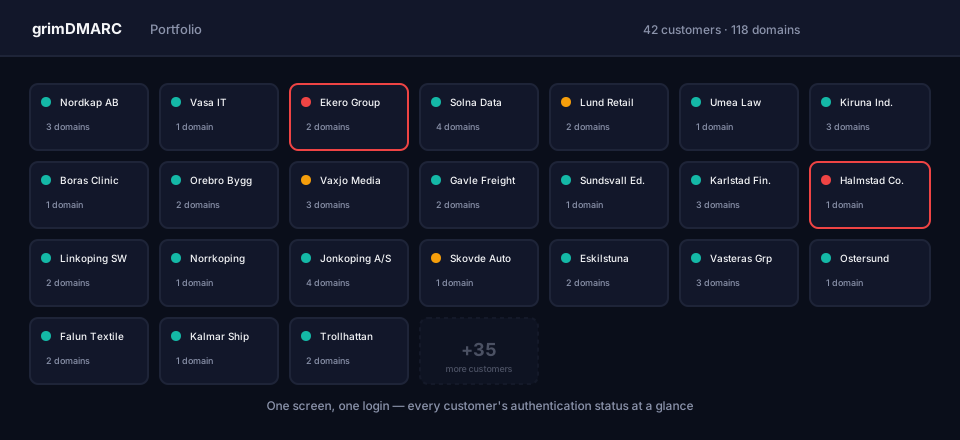
- MSP leadership wants one view across the whole book. Not five hundred separate logins.
Administration at scale is the actual problem. Most DMARC tools were never built to solve it, because they were built for one sender protecting one domain — not for someone protecting hundreds of other people's domains at once.
Why "built for everyone" gets heavy at scale
PowerDMARC. EasyDMARC. Valimail. dmarcian. Real names, real track records. They got thousands of organizations their first record published, their first reports flowing. Credit where it's due.
But almost every one of them shares the same original sin: the core object in the system is the domain, not the customer. Multi-tenant support got layered on top, later, on a product designed for one org managing one domain.
You feel it every day, in the same three ways.
Navigation is a customer switcher, not a customer hierarchy. No first-class customer object with its own domains, services, contacts. Just an "active customer" dropdown that hands you the same view the customer themselves would see. Fine at five customers. At a hundred, it's a papercut you get every single day.
Reports, not action. The underlying data is fine — aggregate and forensic reports, all present and accounted for. Wrong presentation, though, for a technician with five minutes between meetings who needs one thing: which of my eighty customers needs me right now, and what do I actually do about it?
Scale was never in the room when the product got designed. An interface that feels reasonable at ten domains turns hostile at a thousand — because nobody building it ever imagined a technician scrolling five hundred rows every week.
None of this makes those platforms bad. It makes them built for a different customer. Optimize for one audience, and you'll feel heavy the second a completely different audience shows up.
Side by side, it's a difference in what got optimized for from day one:
| Capability | Traditional DMARC Platforms | grimDMARC |
|---|---|---|
| Multi-tenant design | Bolted on later, over a single-domain core | The base architecture, day one |
| Primary dashboard | Report-focused | Action-focused (ranked work queue) |
| DNS First workflow (DMARC, SPF, BIMI, MTA-STS, TLS-RPT) | Separate tools, separate flows | One coordinated workflow |
| White-label reporting | Depends on vendor, depends on tier | Included, branding inherits top-down |
| MSP workflow design | Customer management as an afterthought | Core design principle |
| Policy automation | Hit or miss | Included, opt-in per domain |
How we actually built grimDMARC
We didn't start with "how do we build a good DMARC product." Wrong question. We started with: what does an MSP's actual Monday look like, and what has to be true for that Monday to stop hurting?
That single reframe touches almost every decision below.
1. MSP first — the workflow is the starting point
The whole information architecture mirrors how an MSP actually works: one MSP, many customers, each customer with one or more domains, each domain with services attached. Not a DMARC product with customer management welded on. An MSP platform where DMARC happens to be the first service.
You feel it the moment you log in. Customers and domains are first-class, front and center — not buried in a menu. You see the whole portfolio. Not one customer pretending to be the entire system.
2. Multi-tenant from the ground up
Managing hundreds of customers from one portal isn't a feature we added. It's the foundation everything else sits on. Move between customers without losing your place. See status rolled up across the whole book. And every customer's data stays hard-walled off from every other customer's — always.
Sounds obvious. It isn't. There's a real gap between multi-tenancy as a day-one architectural decision and multi-tenancy as an access-control patch sitting on top of a single-domain database. Every domain, report, and audit entry is scoped to its owning organization at the data layer — not filtered after the fact by the UI pretending to be careful. Role-based access control decides what a given technician can touch inside that organization. And a tamper-evident audit log — every write hash-chained to the last — means "who touched this customer's DNS last Tuesday" has a real answer. Not a shrug.
The hierarchy currently stops at your own team — customers see what you send them, no self-service login of their own, yet. A customer-facing portal is the deliberate next layer on this same foundation, not a rebuild. MSP → Customer → Domain → Service was designed to support it from the start, whenever it ships.
3. One work queue, ranked by what actually matters
Probably the single biggest difference you'll feel in daily use.
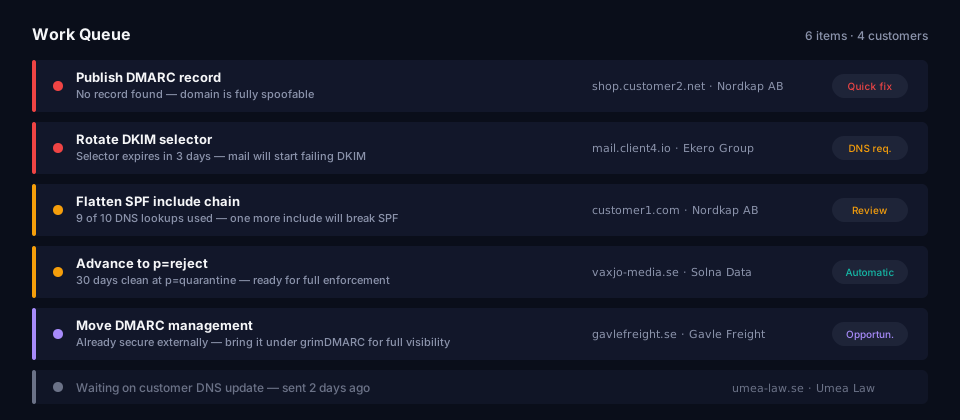
No wall of stats waiting for you at login. One ranked work queue, spanning every customer you manage. Which domain's SPF record is about to snap? Which customer is finally ready to move from p=none to the next stage? Where did an unauthorized sender just show up out of nowhere? Critical before warning. Warning before opportunity. Opportunity before "waiting on the customer." The technician never guesses what's next — the queue already decided.
Fifty customers, one technician, zero time to go hunting. The platform finds the problem. You just fix it.
4. Fast onboarding — and a real path in from wherever you already are
Adding one new customer should never feel like a project. Add the domain, verify it, see the recommended DNS records, done.
Bringing in an existing book of two hundred customers is a different animal entirely — and it's the exact moment most MSPs talk themselves out of switching tools. Nobody wants to re-key two hundred customers by hand. So CSV import matches incoming rows against customers you already have instead of quietly duplicating them — and, this part matters, it checks each domain's real current DNS posture instead of assuming everyone starts from zero. Already protected somewhere else? Shows up as already protected. Not flagged as a blank slate you have to redo from scratch. Migrating in doesn't reset anyone's progress.
That's commercial, not just technical: the faster you onboard, the faster you're billing for email security as its own line item.
5. DNS First — one coordinated touch, not five separate ones
Deliberate departure from the pack here, and worth explaining why.
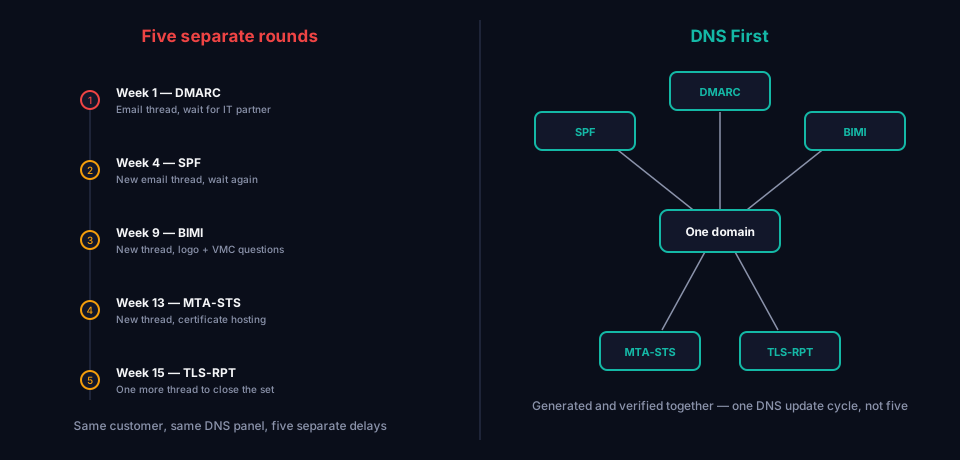
Email security in 2026 is bigger than DMARC alone. SPF, DKIM, DMARC, BIMI, MTA-STS, TLS-RPT — a small constellation of DNS records working together to stop spoofing, improve deliverability, and, with BIMI, put a verified logo in the inbox.
Most tools handle those one at a time, in separate flows. In practice that means a customer's DNS gets touched again and again over months — once for DMARC, once for BIMI, once for MTA-STS — each round its own email thread, its own wait, its own chase.
DNS First folds all of it into one coordinated flow, so whoever actually controls that DNS — a stretched-thin internal IT contact, or an outside partner buried in their own backlog — touches it as few times as humanly possible on the way to fully protected. Fewer rounds, faster rollout, fewer "we'll circle back on that" replies stalling a project in the middle.
6. Hosted — no infrastructure for you to babysit
grimDMARC is hosted, full stop. No report ingestion pipeline to run. No parsing infrastructure to maintain. No storage to plan for. That sits with us. You own the customer relationship and the advice. We run the plumbing nobody wants to think about at 2am.
Every system an MSP runs itself is a cost center in waiting — maintenance, support tickets, someone's Saturday. A managed DMARC service removes that layer entirely. No mail servers. No XML parsers. No storage capacity planning as the book grows.
7. Automation you switch on — never a black box
Raw aggregate data is half the job. Knowing what it means and what to do next is the other half, and it's the half most tools leave to you.
grimDMARC surfaces recommendations straight from what real mail traffic is doing, and offers Automation Mode, per domain, opt-in. Flip it on, and grimDMARC advances the next safe policy step itself once traffic proves it's ready — instead of a human needing to notice and click "apply" across eighty domains one at a time. Turning it on is a deliberate choice, every time, always logged. Never a silent default. Never running unattended without a human who chose it first.
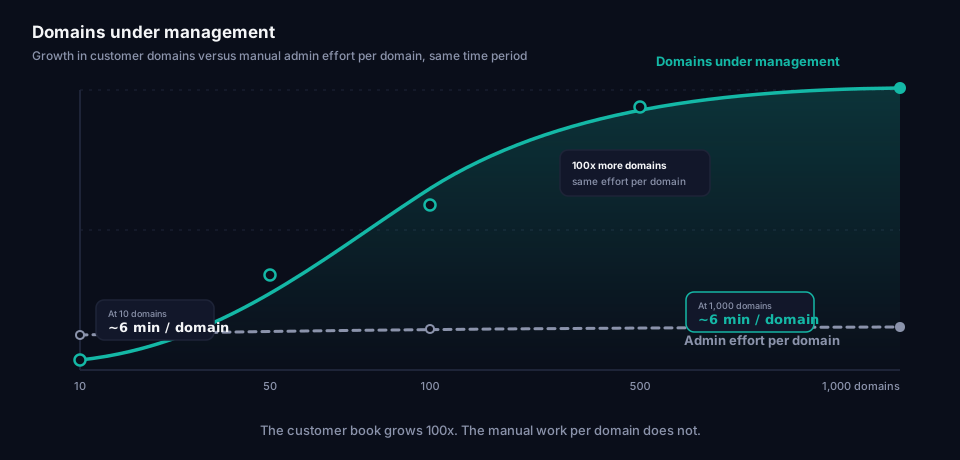
8. Built to scale — same experience at 10 and at 1,000
A platform that's smooth at ten domains and a mess at a thousand solved half a problem. grimDMARC treats large-scale use as the baseline, not something to retrofit after the customer base already outgrew the product. Navigation, lists, search, the work queue — all built to hold their shape whether you're running ten domains or ten thousand.
9. White-label reporting
White label gets dismissed as cosmetic — swap a logo, pick a color, move on. For an MSP, it's a revenue decision wearing a design costume.
Every report a customer opens is a touchpoint. Put a vendor's name on it instead of yours, and you just did the trust-building work and handed the credit to somebody else's brand. Dozens of reports a year, per customer — that gap between value delivered and value perceived compounds fast.
White-label closes it. It lets you package DMARC, SPF, BIMI, MTA-STS, and TLS-RPT monitoring as your own email security service — sold, billed, supported under your name. Not a visible pass-through to someone else's tool. That distinction isn't cosmetic either:
- The customer sees you as the security provider. Not a reseller. That's what makes email security a defensible line item on an invoice instead of a feature the customer assumes came free.
- Every report reinforces your brand. Small, repeated trust deposit, compounding over years — instead of leaking to a vendor name the customer never otherwise deals with.
- It fuels recurring revenue. A white-labeled monthly report is a visible reminder of a service being actively delivered — same logic as a managed backup report or managed EDR report, applied to email authentication.
- It kills churn risk. A customer who ties their protection to your name has a harder time rationalizing a switch than one who's been staring at someone else's logo the whole time.
grimDMARC's customer reports inherit your org branding by default — your name, your contacts — with room to override per customer where it's needed. Set it once at the org level, every report picks it up automatically. What lands in a customer's inbox looks like it came from you. Because it did.
10. Built around the workflow, not just the tech
One idea underneath all of it: the real problem was never DMARC. It's administration at scale.
An MSP that understands DMARC cold can still drown in the day-to-day if the tool wasn't built to handle dozens of customers at wildly different stages of maturity, on wildly different timelines. That's the exact gap grimDMARC closes.
What this means if you're an MSP or IT consultant
Already selling email security, DNS management, or Microsoft 365 services? You've hit some version of this. Maybe not DMARC specifically — the shape of it, though, you know: fine for five customers, a headache by fifty.
That's not you doing something wrong. That's the tool never having been built for your reality.
The question isn't "does this handle DMARC." Most tools do, technically. The real question: "is this built for how I actually work, across dozens or hundreds of customers at once?"
Every decision in grimDMARC answers that question first.
Frequently asked questions
Is grimDMARC only for MSPs, or can a single company use it too?
A single organization protecting one domain works fine here — DMARC, SPF, BIMI, MTA-STS, TLS-RPT setup runs the same either way. The multi-tenant, work-queue, and white-label features are what separate the experience once you're managing more than one organization's domains.
Do I need to migrate all my customers at once?
No. Add them one at a time, or bring them in together via CSV import — which checks each domain's real current DNS posture instead of assuming nobody's configured anything yet. An already-compliant domain gets recognized as such from day one. Not flagged as a fresh start.
What happens to a customer's existing DMARC setup if I bring them into grimDMARC?
If they're already publishing a working DMARC record elsewhere, grimDMARC detects it and lets you adopt management without resetting policy. Nothing gets overwritten. Nothing restarts at p=none.
Does "automation" mean grimDMARC changes a customer's DNS without anyone approving it?
No. Automation Mode is opt-in, per domain, and switching it on is always a deliberate, logged action by someone on your team. Once enabled, it advances policy through the standard safe stages as real traffic proves it's ready — it never touches a domain that hasn't explicitly been switched into Automation Mode first.
See it in practice
The fastest way to feel the difference between a DMARC tool built for one domain and a multi-tenant DMARC platform built for an entire customer portfolio: run it against your own data, your own scenarios.
Book a demo. We'll walk through the work queue, the multi-tenant structure, the DNS First workflow — and exactly how fast you could onboard your first customer, or your hundredth, onto a hosted DMARC platform built for MSP email security from day one.
Got questions about how this fits your specific operation? Reach out directly. We'd rather talk through your workflow before we talk through the tech.