BIMI Explained: Why Some Company Logos Show Up in Gmail (And Yours Might Not)
You've probably noticed it without really thinking about it: some emails in your inbox show the sender's actual logo — a neat little icon next to their name — while most just show a plain gray circle with a letter in it. That's not random, and it's not something the sender paid Gmail for. It's a specific, technical setup called BIMI, and this guide explains what it is, why most companies don't have it, and what's actually involved in getting it — without a single DNS record in sight.
Who this is for:
- Marketing and brand teams who've noticed competitors' logos showing up in the inbox and want to know how
- Business owners and executives who've been asked "should we set this up" and want the plain-language version first
- Anyone who wants to understand what BIMI is before diving into the technical setup guide
The one-sentence version
BIMI is what lets your company's real logo show up next to your emails in your customers' inboxes — but only once you've already proven, through separate email security settings, that nobody else can send email pretending to be you.
That second half is the part almost everyone misses at first. Keep reading and it'll make complete sense.
Why a marketing team would care about something this technical
BIMI sits in a strange spot. It's set up through the same technical channels as spam filtering and email security — the kind of thing that normally never crosses a marketing or brand team's desk. But unlike almost everything else in that category, BIMI is the one part that's actually visible. Customers see it. It shows up in the exact place where your brand competes for attention every single day: the inbox.
Think about what that little logo actually communicates to someone scanning their inbox:
- Recognition — a real logo catches the eye in a list of gray initials, the same way a familiar face stands out in a crowd
- Trust — a verified logo signals "this is really us," which matters more than ever when phishing emails try to impersonate real companies
- Professionalism — it's a small detail, but it's the kind of small detail that makes a company look like it has its act together
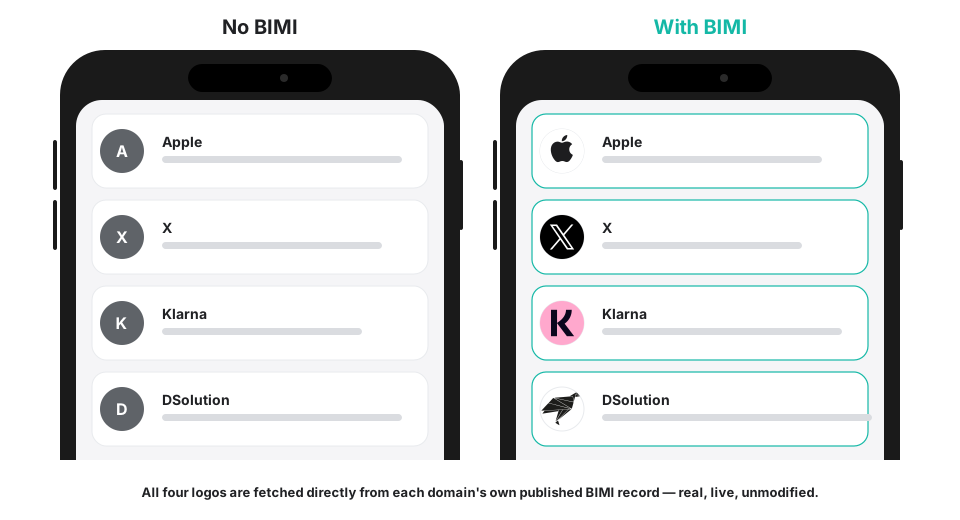 Every logo above is fetched directly from each domain's own published BIMI record — real, live, unmodified.
Here's the part that makes this worth understanding rather than just delegating entirely to IT: BIMI isn't something you can simply turn on with a logo upload, the way you might add a profile picture to a social account. It has a real prerequisite, and understanding that prerequisite is the difference between a project that takes a week and one that quietly stalls for months because nobody realized what had to happen first.
How it actually works
The easiest way to understand BIMI is to compare it to something you've almost certainly seen before: the verified checkmark badge on a social media account.
Platforms don't hand out that checkmark to just anyone who asks. Before they'll display it, they need to already be confident the account is who it claims to be — a real, established, legitimate presence, not an impersonator. The checkmark isn't what creates that trust. It's a visible reward for trust that was already established some other way.
BIMI works on exactly the same principle. Mailbox providers like Gmail, Yahoo and Apple Mail won't show your logo just because you ask nicely and upload a file. They need to already be confident that email claiming to come from your company is genuinely from your company — and that confidence comes from a completely separate email security setting called DMARC, which most companies set up (or should set up) long before anyone starts thinking about logos at all.
DMARC is what stops other people from successfully sending email that looks like it's from you. Once DMARC is actively blocking or flagging impersonation attempts — not just quietly watching, but actually taking action — mailbox providers treat your domain as trustworthy enough to hand out the visible reward. Before that point, BIMI simply does nothing, no matter how perfect your logo file is.
If your company hasn't gotten to that point yet, DMARC Explained: A Simple Guide for Non-Technical Teams covers exactly what that setup involves, in the same plain-language style as this guide. It's genuinely the right place to start if you're not sure where your company currently stands.
The two things you actually need
Once the DMARC prerequisite is out of the way, getting your logo showing comes down to two separate pieces. Neither one is optional, and both of them trip people up in ways that have nothing to do with technical skill.
1. A logo file in a very specific format
This is the single most common place BIMI setups go wrong, and it has nothing to do with DNS — it's entirely about the image file itself.
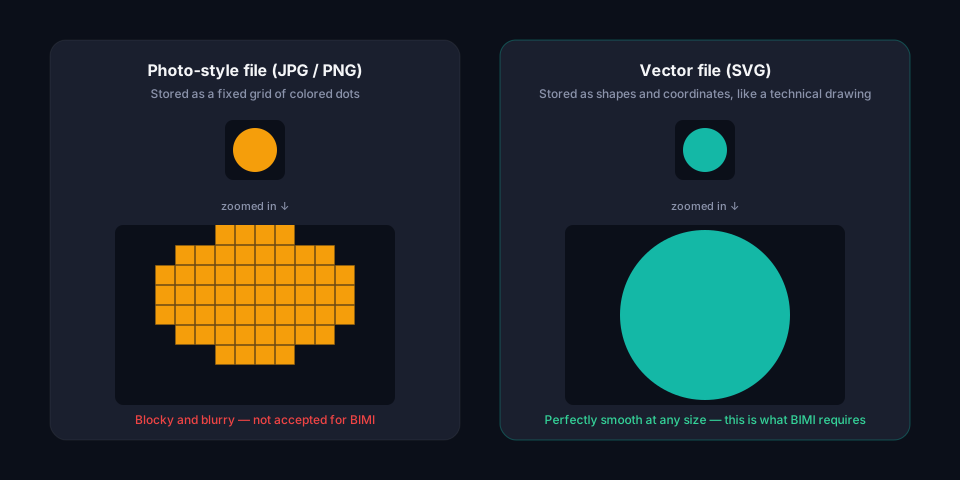
Every logo your design team has ever produced — the one on your website, the one in your email signature, the one on your business cards — is almost certainly a "photo-style" file: a JPG or a PNG. Those formats work by storing an image as a fixed grid of colored dots. Zoom in far enough on any photo-style image and you'll eventually see the individual dots — it turns blocky and blurry, because there's only so much detail actually stored in the file.
BIMI doesn't accept that format. It requires what's called a vector file — specifically, a particular flavor of a format called SVG. Instead of storing a grid of colored dots, a vector file stores a logo as a set of shapes and coordinates, more like a set of instructions for redrawing the logo from scratch than a photograph of it. Because it's built from math rather than dots, it stays perfectly crisp no matter how large or small it's displayed.
There's a second reason mailbox providers insist on this specific format, and it's a security one rather than a visual one: because a properly formatted vector file is just shapes and coordinates — no embedded photos, no hidden code, nothing that can "do" anything on its own — mailbox providers can inspect it and be confident there's nothing malicious hiding inside. A photo-style file, or even a loosely formatted vector file, doesn't offer that same guarantee.
In practice, this means the logo your company already uses everywhere else usually can't just be uploaded as-is. It typically needs to be:
- Redrawn as a clean vector file by a designer or a specialized conversion tool — not just "saved as SVG" from whatever software originally made it, since a general-purpose export usually still fails the stricter format BIMI requires
- Cropped to a square — a wide horizontal logo with a company name next to an icon won't fit the frame; most companies end up using just the icon or monogram portion of their brand for this specific purpose
- Checked against the actual requirements rather than just confirmed to "open fine" in a browser, since browsers are far more forgiving than what mailbox providers actually check for
This is usually a half-day task for a designer who's done it before, not a major project — but it is a real task, not a checkbox.
2. A certificate proving you actually own the logo
Here's the part that surprises almost everyone the first time they hear it: for most mailbox providers, having a compliant logo file isn't enough on its own. You also need a certificate — issued by an independent, trusted third party — that proves you're legally entitled to use that logo.
Think of it like getting a document notarized. A notary doesn't create the truth of what's in the document; they're a neutral, trusted party who confirms it really is what it claims to be, so nobody else has to just take your word for it. A BIMI certificate plays exactly that role for your logo: it lets a mailbox provider skip trusting you blindly and instead trust an independent verification.
There are two types of certificate, and the difference between them comes down to one thing: how strong a legal claim you can show to the logo.
VMC (Verified Mark Certificate) requires a genuine, registered trademark on the logo. This is the more established, more widely accepted option, but it only works if your company has actually gone through trademark registration for the mark in question.
CMC (Common Mark Certificate) is a newer, lower-cost alternative for companies that have a registered logo but haven't gone through the full trademark process. It's a real, legitimate path to the same visible result — just with a lower bar to clear and, correspondingly, less universal acceptance so far among mailbox providers.
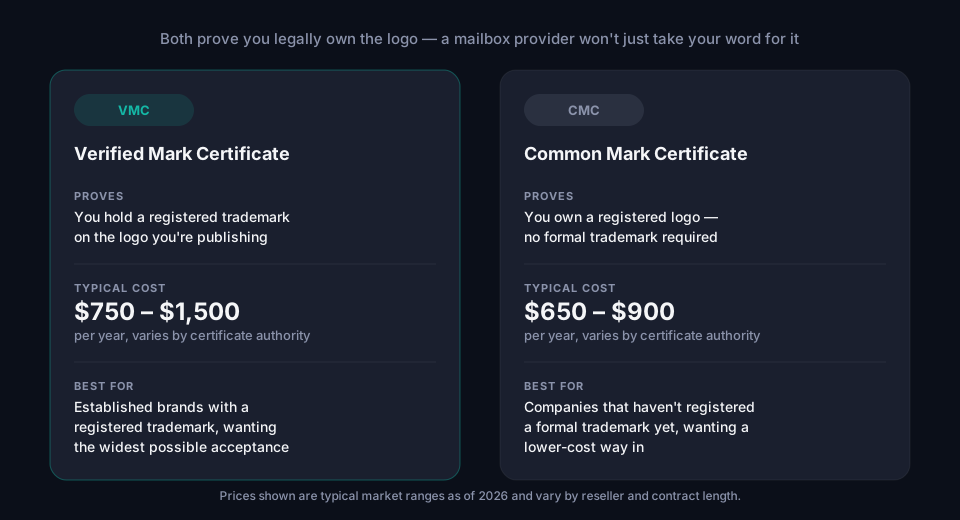
A few things worth knowing about cost and choice here:
- Pricing for both certificate types varies by issuer and reseller, and changes over time — treat the ranges above as a current ballpark, not a fixed price list
- Multi-year purchases sometimes come with a discount, similar to how a website security certificate might be cheaper if you buy two or three years at once
- If your company already holds a registered trademark on its logo, a VMC is generally the safer default, since it's accepted by the widest range of mailbox providers
- If a formal trademark isn't realistic for your organization right now, a CMC is a legitimate way to still get a verified logo showing, at a meaningfully lower cost
Neither certificate is something you can buy directly from Google or Apple — they're issued by a small number of independent certificate authorities that specialize in this kind of verification, the same general category of company that issues the security certificates that make websites show a padlock in the browser.
What this looks like once it's actually working
Picture a customer who does business with dozens of companies by email — invoices, shipping notifications, newsletters, account alerts. Their inbox is a wall of gray circles with letters in them, mostly indistinguishable at a glance.
Now picture your company's email landing in that same inbox, with your actual logo sitting right next to it — recognizable instantly, without the customer even having to read the sender name. That's the entire value of BIMI in one sentence: in a wall of identical gray circles, you're the one thing that doesn't look generic.
It's a small detail, and it doesn't change whether your email actually gets delivered — that part is entirely handled by the DMARC setup underneath it. What it changes is how your company is perceived in the split second before someone decides whether to open, ignore, or trust what they're looking at.
Questions worth asking before you start
Since this involves both a design task and a legal/certificate decision, it helps to walk in with a few answers already:
- "Is our DMARC setup actually enforced yet, or just monitoring?" This is the single most important question. If the answer is "we're not sure" or "it's still in the early testing stage," that's the actual starting point — not the logo.
- "Do we have, or can we get, a clean square version of our logo?" A full horizontal logo with wordmark and icon together usually won't work as-is.
- "Do we have a registered trademark on this logo, or would we be starting from a lower-cost certificate instead?" This determines whether a VMC or a CMC is the realistic option.
If your team can't confidently answer the first question, that's not a sign anything has gone wrong — DMARC enforcement genuinely takes time to roll out safely, usually a few months. DMARC Explained walks through why that timeline exists and what a safe rollout actually looks like.
Frequently asked questions
Does every company need a certificate (VMC or CMC) to get BIMI working? It depends on which mailbox providers matter most to you, and their requirements have shifted over time — some have displayed logos without a certificate in certain cases, others require one. Since this changes, it's worth checking current requirements for the specific providers your customers actually use rather than assuming a fixed answer either way.
Will our logo show up in every email app once this is set up? Not necessarily. Support varies by mailbox provider — Gmail, Yahoo and Apple Mail are among those that support it, but not every email client does, and requirements (including whether a certificate is needed) can differ between them.
Does BIMI stop phishing or improve email deliverability? No — and this is a common misconception. BIMI is purely visual. The actual protection against impersonation and the actual delivery of your email are both handled by DMARC, working alongside two other technical settings called SPF and DKIM. BIMI is the visible reward layered on top, not a security measure itself.
How much does all of this cost in total? Beyond the certificate cost covered above, there's typically a one-time design cost to produce a compliant square vector logo if you don't already have one, plus whatever your IT team or provider charges to manage the ongoing setup. There's no cost to the BIMI standard itself — it's an open specification, not a paid product.
Can our marketing team do this without IT? The certificate application and logo preparation can often be driven by marketing or brand teams, but the underlying DMARC enforcement and the technical publishing step both require IT or an email security provider. It's genuinely a two-team effort.
We don't have DMARC enforcement yet — should we get the logo ready in the meantime? There's no harm in preparing a compliant logo file early, but there's no rush either — it won't do anything until DMARC enforcement is in place, so it's reasonable to treat it as a parallel task rather than a blocker.
What to do next
You don't need to become an expert in any of this yourself — that's the job of whoever manages your company's email security. What's useful is knowing enough to ask the right questions and recognize where your company actually stands:
- Not sure if your DMARC setup is enforced yet? Run your domain through the free DMARC Analyzer — it checks this in seconds, no account required.
- Want to see whether BIMI is already working (or already published but broken)? The free BIMI Analyzer checks your logo, your certificate, and whether DMARC enforcement actually clears the bar behind it — all in one pass.
- Ready for the technical detail behind all of this — the actual DNS record, the exact logo specification, and a step-by-step setup guide? What is BIMI? A Complete Guide to Displaying Your Verified Logo in Inboxes covers that ground for whoever's handling the technical side.
- Want someone else to handle the logo conversion, the certificate decision, and the technical publishing? Hosted BIMI is built to take that whole process off your plate — once your DMARC enforcement is genuinely ready for it.
About this guide
This guide was written by the team building grimDMARC, a managed DMARC, SPF and BIMI platform for MSPs and their customers. If you have questions about BIMI or feedback on this guide, reach us at hello@grimdmarc.com.
Last updated: July 2026 · Reading time: 11 minutes · Reviewed by: grimDMARC team