DMARC Explained: A Simple Guide for Non-Technical Teams
If your IT team or MSP has mentioned "DMARC" and you nodded along without really knowing what it does, this guide is for you. No DNS records, no acronyms you need to memorize — just what DMARC actually protects, and why it matters to anyone who sends or receives business email.
Who this is for:
- Executives and managers who keep hearing about DMARC but haven't needed the technical details
- Marketing, sales, or finance teams who want to understand why IT is asking questions about "email authentication"
- Anyone who wants the plain-language version before (or instead of) the technical guide
The one-sentence version
DMARC is a setting that stops other people from successfully sending email that looks like it came from your company.
That's it. Everything else in this guide is just explaining why that matters and how it actually works behind the scenes.
Why this isn't just an IT problem
Most people assume email fraud looks obviously fake — bad spelling, strange links, a sender address that's clearly wrong. Modern attacks don't look like that anymore. Attackers can send an email that appears to come from your CEO's exact email address, sent to your finance team, asking for an urgent payment. To the person reading it, there is nothing suspicious about it at all — the name, the address, everything looks right.
DMARC exists to close that gap. Without it, anyone can send email that claims to be from your company. With it, only your company's actual, authorized systems can successfully do that.
This affects more than IT:
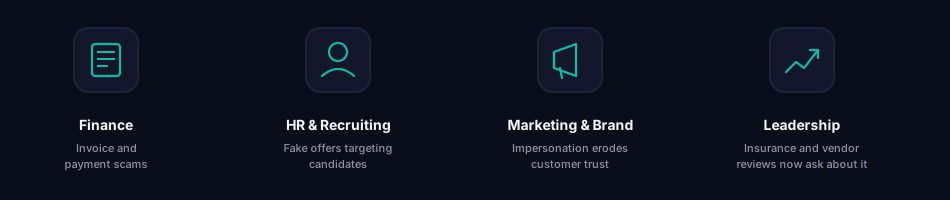
- Finance — invoice and payment scams almost always rely on a spoofed sender address
- HR and recruiting — fake job offers and "signing bonus" scams impersonate real companies to steal candidates' banking details
- Marketing and brand — every successful impersonation of your company damages trust with customers and partners, whether or not it was your fault
- Leadership — DMARC has become a standard question in cyber insurance applications, vendor security reviews, and compliance checklists
How it actually works
The easiest way to picture this is through an analogy.
Imagine your company is a well-known restaurant. Every day, orders go out and deliveries arrive, and customers trust that anyone claiming to represent the restaurant actually does. Because the restaurant is trusted, some people try to impersonate it — showing up with fake deliveries that look like they came from the real business.
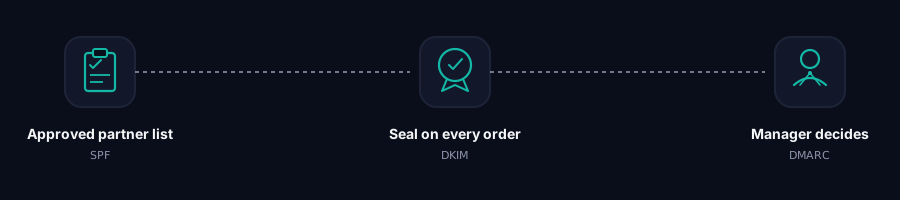
A list of approved delivery partners The restaurant keeps a list of delivery companies it actually works with. When someone shows up claiming to deliver on the restaurant's behalf, the question is simple: are they on the approved list? If not, that's the first sign something is wrong.
A seal on every real order Every legitimate order leaves the kitchen with a seal attached. Anyone receiving a delivery can check that seal to confirm two things: it really came from the restaurant, and nothing was tampered with along the way. A missing or broken seal is the second sign something is wrong.
A manager who decides what happens next The manager doesn't personally inspect every delivery. Instead, the manager sets the rule staff follow the moment something doesn't check out — trust it anyway, hold it back for a closer look, or turn it away at the door. That decision is what DMARC actually is.
Without an approved partner list, anyone can claim to deliver for the restaurant. Without a seal, there's no way to tell if something was tampered with. And without a manager setting clear rules, staff have no idea what to do when something looks wrong. DMARC is what turns "something looks off" into an actual decision.
The three settings, in restaurant terms
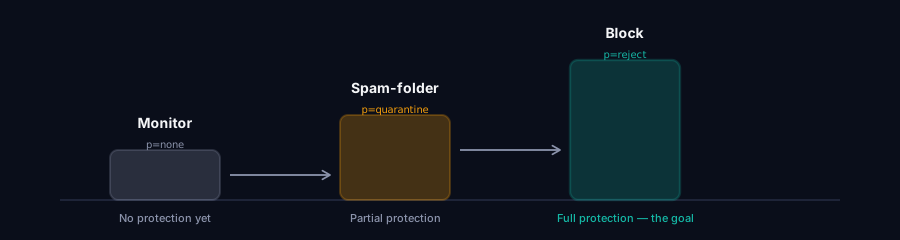
The manager can choose between three standing rules for what happens to anything that fails the checks above. This maps directly to the three settings your IT team or MSP will mention:
Monitor mode (technical name: p=none)
Staff keep accepting every delivery as normal, but they start keeping a written record of anything suspicious. Nothing is stopped yet — the restaurant is just learning who's really out there. This is always the first step, and it's meant to be temporary.
Spam-folder mode (technical name: p=quarantine)
Suspicious deliveries get set aside in a separate area instead of going straight to customers. Not trusted, but not turned away either — someone can still take a closer look.
Block mode (technical name: p=reject)
Suspicious deliveries are refused at the door. They never reach anyone. This is the strongest setting, and the one every company should eventually reach.
A common mistake is staying in monitor mode indefinitely because it feels safer — but monitor mode provides zero actual protection. It only keeps a record; it doesn't stop anything. Real protection starts at spam-folder mode and is only complete at block mode.
What "protected" actually looks like
A mid-sized company once had no protection in place at all. An attacker sent an email to their accounting department that appeared to come directly from the CFO, asking for an urgent supplier payment to a "new" bank account. Everything about the email looked legitimate, because nothing was stopping someone from using the company's name.
The payment was sent. The money was gone within two days.
With block mode in place, that email would never have reached the accounting team's inbox at all — it would have been refused before delivery, automatically, with no one needing to notice anything was wrong.
Questions your IT team or MSP might ask you
Since getting to full protection takes some coordination, you may get asked things like:
- "Do we know every service that sends email on our behalf?" (marketing tools, invoicing software, HR platforms, etc. — these all need to be accounted for before moving to block mode)
- "Can we confirm no legitimate email has been affected during the test period?"
- "Are we ready to move from monitor mode to spam-folder mode?"
These questions exist because moving too fast can accidentally send legitimate email to spam or block it entirely — so a careful rollout, usually over a few months, is normal and expected. It is not a sign that something is going wrong.
How to tell if your IT team or MSP has good tooling for this: DMARC produces a steady stream of technical reports every day, and reading them by hand is genuinely painful — they arrive as raw data files, not anything human-readable. If your provider can show you a clear dashboard or a plain-language summary of who's sending email on your behalf, that's a good sign they've invested in proper tooling (platforms like grimDMARC exist specifically to turn that raw data into something a person can actually use). If the answer to "how's our email authentication going" is a shrug, that's worth asking about.
Frequently asked questions
Does DMARC cost money? The underlying technology is free — it's a standard, not a product. What usually costs money is the tooling that makes it manageable: dashboards, alerts, and reporting, rather than reading raw data by hand.
Do we have to manage this ourselves? No. This is normally handled by your IT team or MSP. Your role is understanding what it does and asking the right questions, not configuring anything.
Is DMARC the same as a spam filter? No. A spam filter judges the content of an email — is it trying to sell something, does it contain suspicious links. DMARC judges who's allowed to send using your company's name in the first place, regardless of what the message says.
How long does it take to get full protection? Realistically, a few months. Rushing it risks blocking legitimate email — invoices, newsletters, automated notifications — so a careful, staged rollout is normal, not a delay.
What's the difference between this guide and the technical one? This guide skips DNS records and configuration entirely. If you want to see exactly how it's set up — the technical settings, the tags, a step-by-step rollout plan — read What is DMARC? A Practical Guide for IT Teams and MSPs.
Seeing it laid out step by step
If you're curious what this actually looks like in practice — not the restaurant version, but the real mechanics — here's the same idea traced through an actual email, from a legitimate sender and from an attacker impersonating them:
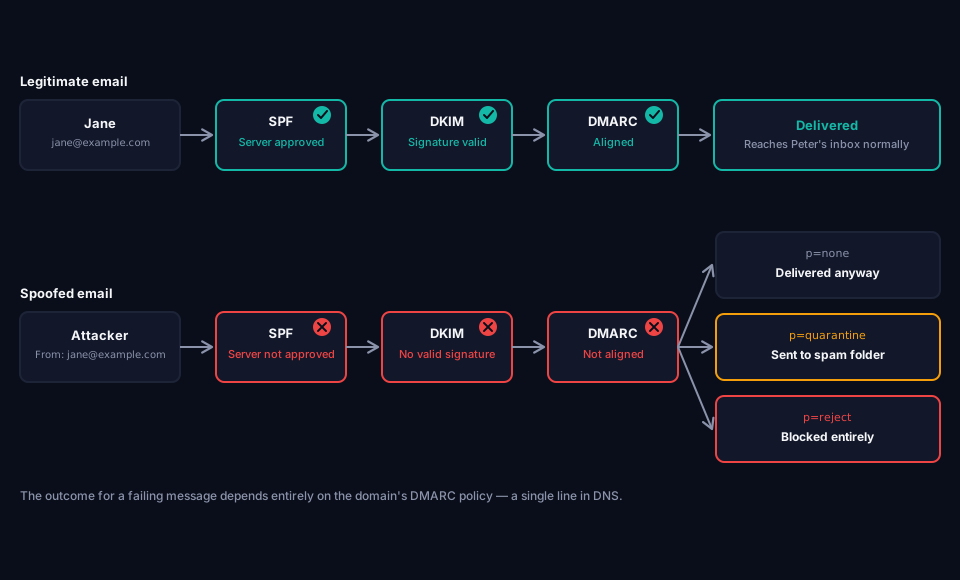
The three checks in the diagram map directly onto the analogy above: the approved partner list is SPF, the seal is DKIM, and the manager's decision is DMARC itself.
What to do next
You don't need to configure anything yourself — that's the job of your IT team or MSP. What's useful is knowing enough to ask the right question:
- Curious where your own domain stands right now? grimDMARC's free Domain Scanner checks your current SPF, DKIM and DMARC setup in one pass, and the DMARC Analyzer breaks down exactly what your DMARC record is doing today, in plain language.
- If your company has no DMARC setup at all, ask when monitor mode will be turned on.
- If it's already in monitor mode, ask how long it's been running, and when the move to spam-folder or block mode is planned.
- If you want the technical detail behind all of this — DNS records, the exact settings, a realistic implementation timeline — the full guide covers that: What is DMARC? A Practical Guide for IT Teams and MSPs.
About this guide
This guide was written by the team building grimDMARC, a managed DMARC platform for MSPs and their customers. If you have questions about DMARC or feedback on this guide, reach us at hello@grimdmarc.com.
Last updated: July 2026 · Reading time: 6 minutes · Reviewed by: grimDMARC team