What is DMARC? A Practical Guide for IT Teams and MSPs
DMARC is the email authentication protocol that tells receiving mail servers what to do when a message fails verification. Published as a simple DNS record, it prevents attackers from impersonating your domain in phishing attacks — but only when configured correctly.
This guide explains DMARC in plain terms, walks through implementation step by step, and covers the mistakes that leave organizations vulnerable even after they think they are protected.
Who this is for:
- IT managers responsible for email security
- MSPs managing DMARC across multiple customer domains
- Anyone whose organization was recently spoofed
Need to explain this to a non-technical team first? See DMARC Explained: A Simple Guide for Non-Technical Teams.
What you will learn:
- How DMARC works technically and why it matters
- The three policy modes and when to use each
- A realistic implementation timeline
- How to avoid mistakes that make DMARC ineffective
- Why DMARC is table stakes for MSPs in 2026
What is DMARC?
DMARC (Domain-based Message Authentication, Reporting and Conformance) is a DNS record that tells receiving mail servers three things:
- Whether emails claiming to be from your domain should pass SPF and DKIM checks
- What to do if a message fails verification (accept, quarantine, or reject)
- Where to send reports about who is sending mail on your behalf
Without DMARC, anyone can send email that appears to come from your domain. With DMARC set to p=reject, only authorized senders can successfully deliver mail using your domain — and receiving servers reject impersonation attempts before they reach inboxes.
For MSPs, DMARC is not optional anymore. Google and Yahoo now require it for bulk senders, insurance companies ask about it in cyber policies, and NIS2 compliance in the EU treats email authentication as a baseline control.
How DMARC works
The clearest way to see how DMARC works is to follow a single email from sender to inbox.
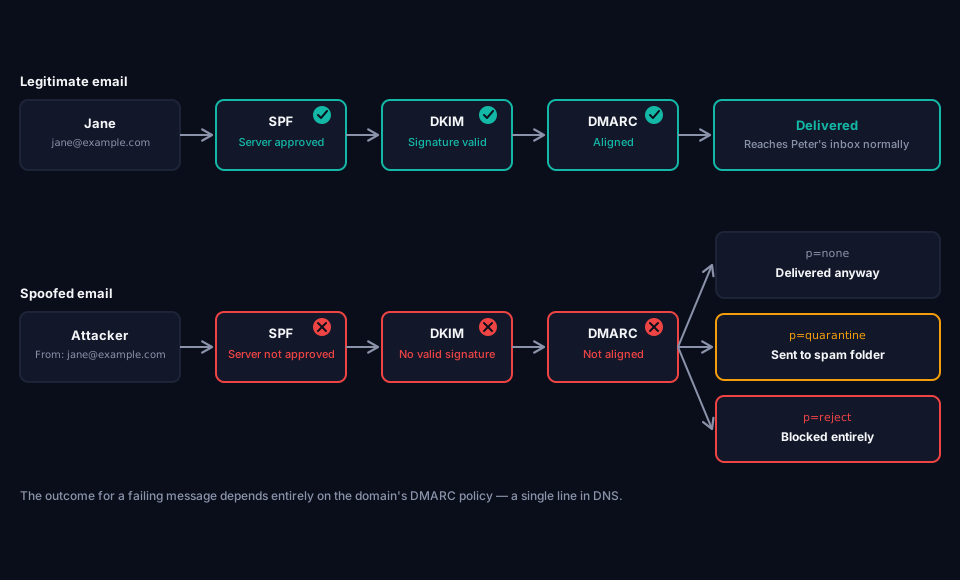
Jane sends a real email to Peter
Jane works at example.com and emails Peter an invoice from jane@example.com. The message leaves through example.com's real mail servers, and two checks happen automatically before it reaches Peter:
- SPF check — Peter's mail server looks up example.com's SPF record and confirms the sending server is on the approved list. SPF passes.
- DKIM check — Jane's email carries a cryptographic signature. Peter's mail server verifies it against example.com's public key and confirms nothing was altered in transit. DKIM passes.
- DMARC check — DMARC checks whether the domain in Jane's From address (example.com) aligns with the domain that passed SPF and DKIM. It does, so DMARC passes. The email lands in Peter's inbox normally — none of this is visible to Jane or Peter.
An attacker pretends to be Jane
Now imagine an attacker emails Peter with the From address forged to look exactly like jane@example.com, sent from the attacker's own servers instead of example.com's.
- SPF check — The attacker's server is not on example.com's approved list. SPF fails.
- DKIM check — The attacker doesn't have example.com's private signing key, so the message is either unsigned or signed by an unrelated domain. DKIM fails.
- DMARC check — Neither SPF nor DKIM aligns with the From domain. DMARC fails.
 What happens next depends entirely on example.com's policy
This is where DMARC actually does its job — deciding what Peter's mail server does with a message that just failed:
- If example.com's policy is
p=none, the email still reaches Peter's inbox. example.com receives a report about the failed attempt, but Peter sees nothing unusual. - If the policy is
p=quarantine, the email is redirected to Peter's spam folder — he might still see it, marked as suspicious. - If the policy is
p=reject, Peter's mail server refuses the message outright. It never reaches his inbox at all.
The difference between those three outcomes is a single line in example.com's DNS. That is the entire point of DMARC — not stopping attackers from trying, but making sure the domain owner has already decided what happens when they do.
DMARC record structure
DMARC lives as a TXT record in your DNS at a specific location: _dmarc.yourdomain.com.
A basic record looks like this:
_dmarc.example.com TXT "v=DMARC1; p=none; rua=mailto:dmarc-reports@example.com"
A more complete real-world record might look like this:
_dmarc.example.com TXT "v=DMARC1; p=reject; sp=reject; np=reject; rua=mailto:rua@example.com; ruf=mailto:ruf@example.com; adkim=s; aspf=s; fo=1"
Let me break down what each part means.
The tags explained
v=DMARC1 Required. Tells receiving servers this is a DMARC record. Always the first tag.
p= (policy) The core instruction. This is what tells receiving servers what to do when a message fails verification.
p=none— Do nothing, just report. Monitoring mode.p=quarantine— Send failing messages to spam folder.p=reject— Refuse failing messages entirely. They never reach the recipient.
sp= (subdomain policy)
Same as p= but for subdomains. If not set, subdomains inherit the main policy. Explicitly setting this prevents accidental gaps.
np= (non-existent domain policy) Applies your policy specifically to subdomains that do not exist, closing a gap that let attackers spoof forgotten or unregistered subdomains. This is the current, correct way to protect non-existent subdomains.
rua= (aggregate reports) Where to send daily aggregated reports about authentication results. This is how you see who is sending on behalf of your domain.
ruf= (forensic reports) Where to send detailed reports about individual failed messages. Rarely used today because most receiving servers no longer send these due to privacy concerns.
adkim= (DKIM alignment) How strictly DKIM alignment is enforced.
adkim=r— Relaxed. Subdomains are allowed to match parent domains.adkim=s— Strict. Domains must match exactly.
aspf= (SPF alignment)
Same as adkim= but for SPF alignment.
fo= (failure reporting options) When to generate forensic reports.
fo=0— Generate reports if all authentication methods failfo=1— Generate reports if any authentication method fails (recommended)fo=d— Generate reports only for DKIM failuresfo=s— Generate reports only for SPF failures
psd= (public suffix domain) Tells receivers what type of domain this record belongs to, and controls where the DNS Tree Walk stops when determining organizational boundaries.
psd=y— This is a public suffix domain (used by TLD and registry operators)psd=n— This is an ordinary organizational domainpsd=u— Unknown. This is the default behavior if the tag is omitted.
t= (testing mode) Signals that a deployment is being tested. It does not override enforcement and does not replace the monitoring practices described below.
Tags no longer used: pct=, rf=, and ri= have been removed from the specification. Historically, pct= let you apply your policy to only a percentage of failing messages during rollout, rf= set the format of forensic reports, and ri= set how often aggregate reports were sent. Modern deployments handle rollout through reporting and validation instead, so none of these three tags appear in a correctly configured DMARC record today.
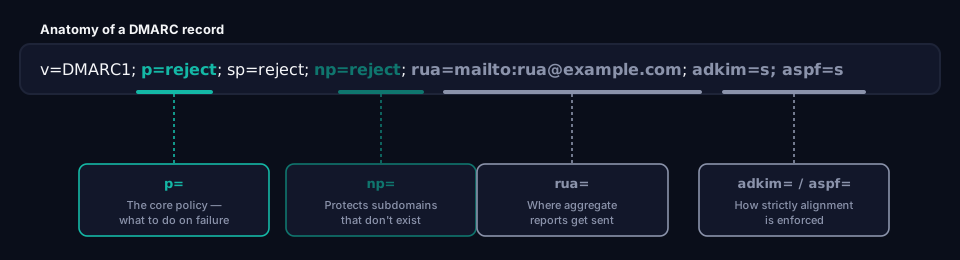
You can see this exact breakdown applied to your own domain with grimDMARC's free DMARC Analyzer — it parses every tag, checks alignment settings, and flags deprecated tags like pct= automatically. If you're managing this across more than a handful of domains, Hosted DMARC makes policy changes from a dashboard instead of hand-editing DNS for each customer.
DMARCbis: what changed in 2026
In May 2026, the IETF published a revised version of the DMARC specification, informally known as DMARCbis. It arrives as three separate documents — RFC 9989 (the core protocol), RFC 9990 (aggregate reporting), and RFC 9991 (failure reporting) — which together replace the original RFC 7489 from 2015 and promote DMARC to a Proposed Standard for the first time.
Nothing breaks. Every v=DMARC1 record published today keeps working exactly as before. DMARCbis is a clarification and modernization of the standard, not a new version that requires you to redo your setup.
The practical changes — the new np=, psd=, and t= tags, and the retirement of pct=, rf=, and ri= — are covered in the tag list above, since that is the current, correct set to use.
One change worth knowing about but not acting on: DMARCbis replaces the old dependency on the Public Suffix List with a DNS-native mechanism called DNS Tree Walk, used to determine organizational domain boundaries. For nearly every domain owner, this operates entirely behind the scenes.
The takeaway: if you are setting up DMARC today, use the tag set described above. DMARCbis is worth being aware of, particularly if you are building tooling around DMARC, but it does not change what you need to do to protect your domain right now.
DMARC policy modes
Understanding when to use each policy is the difference between DMARC that actually protects you and DMARC that gives false security.
p=none (monitoring)
The record exists, reports are collected, but nothing happens to failing messages. They still get delivered.
Use this when:
- You just started with DMARC
- You need to identify all legitimate senders before enforcing
- You want data before making decisions
Do not stay here permanently.
A domain stuck on p=none provides no protection. Attackers can still spoof the domain freely. This is a common mistake — organizations publish DMARC, tick the box, and never move to enforcement.
p=quarantine
Failing messages are sent to the spam folder. Recipients still see them but they are marked as suspicious.
Use this when:
- You have identified all legitimate senders through monitoring
- You want a soft rollout before full rejection
- You are handling a domain where false positives could hurt (customer service replies, transactional mail)
The trap with quarantine:
Many users have training to always check their spam folder. Quarantined phishing emails still reach victims — just with an extra warning that gets ignored. Real protection starts at p=reject.
p=reject
Failing messages are refused entirely. The receiving server tells the sending server "no thanks" and the message never reaches the recipient.
Use this when:
- You are ready for real protection
- You have confirmed no legitimate mail fails DMARC
- You want to prevent all impersonation of your domain
This is the goal.
Every domain that sends email should eventually reach p=reject. Anything less is asking to be spoofed. Reaching enforcement here is also what unlocks BIMI — your verified logo showing up next to your emails in supporting inboxes — which doesn't work at all until this step is done.
Real-world DMARC failures
Abstract security explanations rarely convince decision makers. Here is what actually happens to organizations without proper DMARC.
The manufacturing invoice scam
A mid-sized manufacturing company had no DMARC record. An attacker registered a similar-looking domain, but instead of using it, they simply spoofed the real domain in the From field.
They sent an "updated payment information" email to the accounting department, appearing to come from the CFO. The email requested that the next scheduled supplier payment of $35,000 be sent to a new bank account.
The accounting team followed procedure, verified the email was from the CFO (it appeared to be), and processed the payment.
The money was gone within 48 hours. DMARC at p=reject would have prevented the email from being delivered at all.
The recruitment fraud
A consulting firm was recruiting for a senior position. Their domain had DMARC set to p=none — monitoring only.
Attackers noticed the domain was spoofable and targeted final-stage candidates with fake "signing bonus" emails, requesting bank details for direct deposit.
Two candidates provided banking information. Both had accounts drained within days.
The company's brand was damaged. Candidates' search results now include warnings about their recruitment process.
The invoice supplier compromise
A logistics company's suppliers were spoofed. Attackers sent fake invoices to the logistics company appearing to come from real suppliers.
The logistics company had DMARC on their own domain but no DMARC awareness in procurement. They paid 12 fake invoices before catching on. Total loss: $85,000.
The lesson: DMARC on your own domain protects your customers. But your team also needs to know that DMARC exists so they check whether incoming vendor emails are actually authenticated.
DMARC implementation timeline
Anyone telling you DMARC can be implemented in a day is either lying or setting you up for problems. Here is a realistic timeline.
A note on rollout: older guides (and older versions of this one) recommend a gradual rollout using the pct= tag — for example p=quarantine; pct=25, then increasing to pct=100 over time. pct= is a deprecated tag under DMARCbis (see the tag list earlier in this guide) and no longer part of the current specification. The timeline below reflects today's standard: rollout is staged through reporting and, where extra caution is needed, through subdomains — not through percentages.
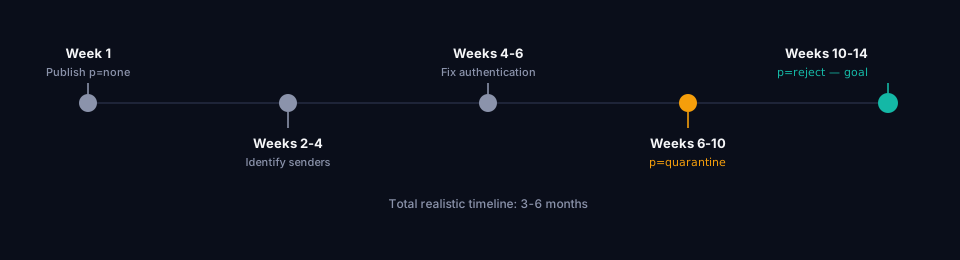
Week 1: Publish p=none and start collecting data
Before you add anything, it helps to know where you currently stand — grimDMARC's free Domain Scanner checks your existing SPF, DKIM and DMARC configuration in one pass.
Add a DMARC record with p=none and a valid rua address. This starts data collection without breaking anything.
_dmarc.yourdomain.com TXT "v=DMARC1; p=none; rua=mailto:rua@yourdomain.com"
You will start receiving XML reports from major email providers within 24 hours. These reports show:
- Who is sending email claiming to be from your domain
- Whether SPF and DKIM checks pass
- IP addresses and volume of messages
Do not try to read raw XML reports. They are painful. Use a service that parses them into human-readable dashboards — this is exactly what grimDMARC does.
Weeks 2-4: Identify legitimate senders
Review the incoming reports to build a list of every service that legitimately sends email as your domain. Common ones:
- Microsoft 365 (main mail platform)
- Google Workspace (main mail platform)
- Mailchimp (marketing)
- HubSpot (marketing and CRM)
- Salesforce (CRM and marketing)
- QuickBooks or Xero (invoicing)
- SendGrid (transactional)
- Amazon SES (transactional)
- Zendesk (support tickets)
- Custom applications sending automated notifications
For each legitimate sender, ensure they are properly authorized in your SPF record and configured to send DKIM-signed mail.
Weeks 4-6: Fix authentication failures
Some legitimate senders will show up in reports as failing SPF or DKIM. This is where the real work happens:
- Update SPF to include all legitimate services
- Configure DKIM for services that support it
- Set up custom domain sending for services that use their own domain by default
Common problems you will find:
- SPF over 10 DNS lookups (breaks the standard)
- Missing DKIM configuration on marketing platforms
- Legacy services sending unauthenticated mail
- Employees using personal Gmail to send "official" communications
Weeks 6-10: Move to p=quarantine
Once all legitimate senders authenticate correctly, move to p=quarantine and protect non-existent subdomains at the same time.
_dmarc.yourdomain.com TXT "v=DMARC1; p=quarantine; np=reject; psd=n; rua=mailto:rua@yourdomain.com"
Watch the aggregate reports closely for the first week — if no legitimate mail is being quarantined, you are ready to move on. If you want extra caution before enforcing across your whole domain, apply p=quarantine to a lower-risk subdomain first (for example, a marketing or notifications subdomain) before rolling it out to your primary sending domain.
Weeks 10-14: Move to p=reject
After running successfully at p=quarantine for at least two weeks with no false positives in your reports, move to p=reject.
_dmarc.yourdomain.com TXT "v=DMARC1; p=reject; np=reject; psd=n; rua=mailto:rua@yourdomain.com"
For a cautious rollout, apply p=reject to a single subdomain first, confirm your reports show no legitimate mail affected, then apply it to the rest of your domain.
Total realistic timeline: 3-6 months
Anyone who tells you differently either has trivially simple mail configurations or does not care about breaking legitimate mail.
Common DMARC mistakes
Mistake 1: Staying on p=none forever
The most common mistake. Organizations publish DMARC, receive reports, and never enforce.
Impact: Zero protection against spoofing. Your domain remains fully spoofable.
Fix: Set a calendar reminder to move to p=quarantine within 90 days of starting, and to p=reject within 180 days. grimDMARC's DMARC Analyzer flags a domain stuck on p=none with no reporting address configured, so it's an easy thing to check on periodically.
Mistake 2: Jumping straight to p=reject
The opposite mistake. Enthusiastic implementers publish p=reject on day one.
Impact: Legitimate mail from unknown-to-you services gets rejected. Support tickets, marketing campaigns, and internal notifications disappear silently.
Fix: Always monitor with p=none first. Real domains have more legitimate senders than you think.
Mistake 3: Ignoring subdomain policy
DMARC without sp= lets subdomains inherit the parent policy. But some organizations have subdomain.example.com sending mail from services that are not in the parent domain's SPF.
Impact: Attackers can spoof finance.example.com even when example.com is protected.
Fix: Explicitly set sp=reject to close this gap, then verify no legitimate subdomain mail is affected.
Mistake 4: SPF over 10 DNS lookups
The SPF standard allows a maximum of 10 DNS lookups when resolving your record. If you exceed this, SPF returns a permerror and DMARC fails — see What is SPF? for exactly how this limit works and why it's so easy to hit.
Impact: Your DMARC record can be perfect, but if SPF is broken, DMARC still fails for legitimate mail.
Fix: Use SPF flattening or grimDMARC's hosted SPF. Regularly audit which include: statements you actually need — grimDMARC's SPF Analyzer shows your current lookup count and flags stale includes before they cause a permerror.
Mistake 5: Forgetting BIMI
BIMI (Brand Indicators for Message Identification) requires DMARC at p=quarantine or p=reject. Without proper DMARC, you cannot display your verified logo in Gmail, Yahoo, or Apple Mail inboxes.
Impact: Missed brand visibility opportunity, lower email trust signals.
Fix: Once at p=reject, add BIMI records with a verified logo and (optionally) a Verified Mark Certificate. The BIMI Analyzer checks whether your DMARC enforcement actually clears the bar for an existing record. See What is BIMI? for the full logo and VMC requirements, or Hosted BIMI for a managed logo and VMC setup.
Mistake 6: No monitoring of reports
Setting DMARC and never looking at the reports is like installing security cameras but never watching them.
Impact: You miss new legitimate senders being added, spoofing attempts targeting you, and gradual authentication drift.
Fix: Use a DMARC monitoring service that alerts you to changes. Review reports at least weekly during rollout, then monthly after full enforcement.
DMARC for MSPs at scale
If you manage email for one domain, implementing DMARC is a project. If you manage email for 200 customer domains, it becomes an operational nightmare.
Consider the reality of MSP work:
- Each customer has a different DNS provider (Cloudflare, GoDaddy, Namecheap, plus the customer's old web agency)
- Each policy change means logging into different DNS control panels
- Reports arrive as XML files from dozens of providers per day per customer
- Customer requests to add new email services (Mailchimp, HubSpot, whatever) require SPF updates
- One mistake in the DNS panel breaks the customer's email flow
Traditional DMARC tools help with reporting but leave the operational work manual. The MSP still logs into each DNS provider for every change.
The hosted DMARC approach
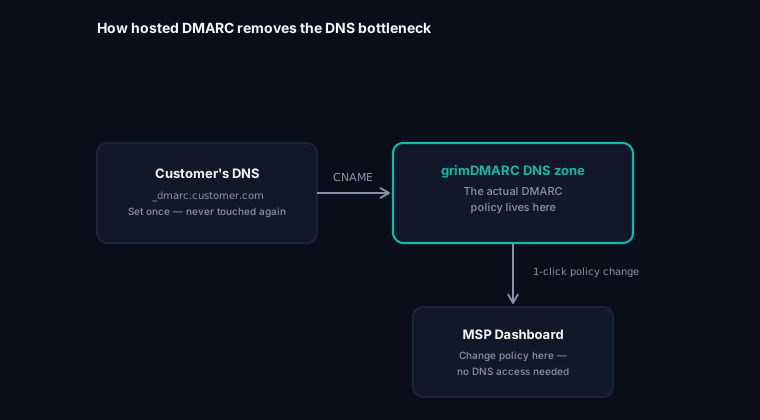
There is a smarter pattern that eliminates the DNS operational work. It works like this:
The customer publishes a single CNAME record pointing _dmarc.customer.com to a hosted DMARC service:
_dmarc.customer.com CNAME id-x8f4c2._dmarc.grimdmarc.com
The actual DMARC policy lives in the hosted service's DNS zone. When the MSP wants to change policy from p=none to p=quarantine, they click a button in the dashboard. The change happens in the hosted zone. The customer's DNS never needs to be touched again.
Combined with hosted SPF using include chains, this eliminates 90% of the operational work involved in managing DMARC across many customers.
This is the model grimDMARC is built on, purpose-built to eliminate exactly this kind of operational overhead for MSPs managing many customer domains.
Frequently asked questions
Does DMARC cost anything?
DMARC itself is a free standard. Any DNS provider allows you to add DMARC records at no cost.
What costs money is the tooling to make DMARC actually useful: services that parse XML reports, provide dashboards, alert on changes, and manage the operational work.
Free tiers exist for small volumes. Managed services start around 5-50 EUR per domain per month depending on features and volume.
Does DMARC work with Microsoft 365?
Yes. Microsoft 365 is one of the best-behaved email platforms for DMARC. Both SPF and DKIM work out of the box, and DMARC alignment is straightforward. See SPF and DKIM for Microsoft 365 for the exact DNS records and Defender admin center steps.
What happens if I do not have DMARC?
Anyone can send email that appears to come from your domain. Modern phishing attacks rely heavily on domain impersonation. Without DMARC:
- Google and Yahoo may deliver these emails to spam or block them (helping you accidentally)
- But smaller providers, corporate mail servers, and older systems will deliver spoofed mail directly to inboxes
- Your customers may receive convincing phishing emails that appear to come from you
- Your brand takes the reputational hit when victims blame you
Can DMARC block legitimate emails?
Yes, if configured incorrectly. This is why you monitor with p=none first.
Common causes of false positives:
- SPF missing a legitimate sender
- DKIM not configured for a marketing service
- Employees using personal accounts to send "as" the company
- Third-party services sending on behalf without proper authorization
Proper monitoring during the p=none phase catches these before you enforce.
Do I need forensic reports (ruf)?
Probably not. Forensic reports contain the actual failing message content, which raises privacy concerns. Most major providers (Google, Microsoft) no longer send forensic reports at all.
Aggregate reports (rua) provide enough information for 99% of DMARC management tasks. You can safely omit the ruf= tag.
How does DMARC handle mail forwarding?
Mail forwarding is DMARC's weakest spot. When someone forwards email to another mailbox, the SPF check fails because the forwarding server was not in your original SPF record.
DKIM usually survives forwarding, which is why DMARC only requires either SPF or DKIM to pass — not both. As long as DKIM is set up correctly, forwarded mail typically passes DMARC.
What about mailing lists?
Mailing lists that modify the message (adding footers, tags in subjects) can break DKIM signatures, causing DMARC to fail.
Modern mailing lists handle this by rewriting the From address to the list address, effectively re-sending the message on behalf of the list rather than the original sender. This is called ARC (Authenticated Received Chain) and it solves the forwarding problem.
Is DMARC at p=reject enough on its own?
For stopping spoofing, yes. For protecting the message itself, no. DMARC — along with SPF and DKIM — confirms who sent a message and that it wasn't altered. None of the three say anything about whether the connection carrying it was actually encrypted. Standard SMTP encryption is opportunistic, meaning a network attacker between two mail servers can strip it, and the message gets delivered in plain text rather than refused. A domain at p=reject can't be impersonated and can still have every legitimate message readable to anyone positioned on the wrong network path. That gap is closed by a separate pair of standards, MTA-STS and TLS-RPT — not by anything DMARC itself does.
Next steps
If you have read this far, you probably want to move from theory to action. Here is a clear path:
If you have zero DMARC today:
- Publish
p=nonewith a validrua=address this week - Set up a monitoring service to read the reports
- Give yourself 4 weeks to identify legitimate senders
If you are stuck on p=none:
- Review your reports for the past month
- Identify which senders are legitimate but failing
- Fix authentication for those services
- Move to
p=quarantinewithin 30 days, starting with a lower-risk subdomain if you want extra caution
If you manage DMARC for many customers:
- Evaluate whether your current tool eliminates operational DNS work or just reports on failures
- Consider grimDMARC's hosted DMARC and hosted SPF for scale
- Standardize your customer onboarding process for DMARC
If you want to learn more:
- What is SPF? — Understanding the sender policy framework
- What is DKIM? — Cryptographic email signing explained
- What is MTA-STS? — Encrypting mail in transit, a separate concern from spoofing
- What is BIMI? — Displaying your verified logo in inboxes
- /for-msps — Managing DMARC across many customer domains
About this guide
This guide was written by the team building grimDMARC — a managed DMARC platform for MSPs and their customers. If you are looking for a tool to help you implement and manage DMARC without the operational headache, we are launching soon. Until then, this guide is our way of contributing to better email security across the internet.
If you have questions about DMARC or feedback on this guide, reach us at hello@grimdmarc.com.
Last updated: July 2026 Reading time: 15 minutes Reviewed by: grimDMARC team