What is DKIM? A Complete Guide to Email Signing for IT Teams and MSPs
DKIM (DomainKeys Identified Mail) attaches a cryptographic signature to outgoing email, so the receiving server can confirm two things: the message really was sent by your domain, and nothing in it was altered along the way. Where SPF checks which server sent a message, DKIM checks what's inside it.
This guide covers how DKIM signing and verification actually work, how to read both the DNS record and the signature header it produces, the mistakes that quietly break it, and where it fits alongside SPF and DMARC.
Who this is for:
- IT managers who have SPF and DMARC set up and are working through DKIM next
- MSPs configuring DKIM signing across multiple customer domains and mail platforms
- Anyone troubleshooting a
dkim=failresult in a DMARC report
What you will learn:
- How DKIM signing and verification work end to end
- How to read a DKIM DNS record and a DKIM-Signature header
- Why a domain can (and usually should) have several DKIM records at once
- The mistakes that break DKIM without anyone noticing until reports show it
- How DKIM fits together with SPF and DMARC
What is DKIM?
DKIM adds a digital signature to an outgoing email, generated with a private key that only the sending mail server holds. The corresponding public key is published in DNS. When the message arrives, the receiving server fetches that public key and uses it to verify the signature — confirming the message was signed by the claimed domain and that the signed parts of the message haven't changed since.
That's the whole mechanism: a signature, a public key in DNS, and a check. DKIM doesn't look at the sending server's IP address at all, which is what makes it survive situations SPF doesn't — a forwarded message, for instance, still carries its original signature intact.
Why DKIM exists
DKIM has a slightly unusual origin: it's a merger of two separate, competing proposals. Yahoo developed DomainKeys around 2004, and Cisco developed a similar scheme called Identified Internet Mail around the same time. Rather than compete, the two efforts combined, and the result was standardized as RFC 4871 in 2007. It was later refined and republished as RFC 6376 in 2011, which is the current specification.
The problem it solves is different from SPF's. SPF authorizes servers but has no way to detect tampering — a message could pass SPF and still have its subject or body altered somewhere between sender and recipient. DKIM closes that gap with a signature that breaks the moment the signed content changes, giving receiving servers a way to detect both forgery and in-transit modification.
How DKIM works (Jane/Peter)
The same example from our SPF and DMARC guides applies here: Jane, at example.com, emailing Peter.
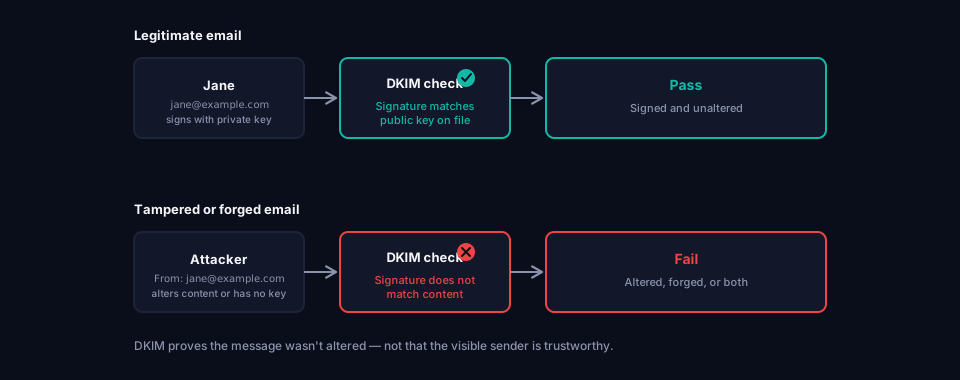
Jane sends a real email to Peter
When Jane's message leaves example.com's mail server, the server signs it using a private key it holds. That signature covers specific parts of the message — normally the body and a defined set of headers like From, Subject and Date — and gets added as a new header called DKIM-Signature.
When the message reaches Peter's mail server, it:
- Reads the
d=tag in the DKIM-Signature header to find out which domain claims to have signed it, and thes=tag to find out which selector's key to use. - Looks up the matching public key in DNS.
- Uses that public key to verify the signature against the message content it received.
Everything checks out, so DKIM passes.
An attacker alters the message, or forges it entirely
If an attacker intercepts the message and changes even one signed word in the body or subject, the signature no longer matches the altered content, and verification fails. If an attacker sends an entirely new message pretending to be from Jane, they don't have example.com's private key, so they either can't produce a valid signature at all, or they sign it with their own domain's key — which won't match the d= value they're claiming.
Either way, DKIM fails, and Peter's mail server now has evidence that something about this message doesn't add up.
What is a DKIM record
A DKIM record is a DNS TXT record that publishes a public key. Unlike SPF and DMARC, it doesn't live at a fixed, predictable location — it lives at a selector-specific address:
selector._domainkey.yourdomain.com
The selector is an arbitrary label chosen by whichever platform generated the key. Microsoft 365 might use selector1 and selector2. Google Workspace typically uses google. A domain sending mail through three different platforms will usually have three different DKIM records, each at its own selector, each with its own key pair.
This is a meaningful difference from SPF: there's no such thing as "checking the DKIM record" for a domain in one lookup, because you first need to know which selector a given message was signed with. That selector is only visible in the message's own DKIM-Signature header — you can't discover it by guessing.
DKIM record syntax
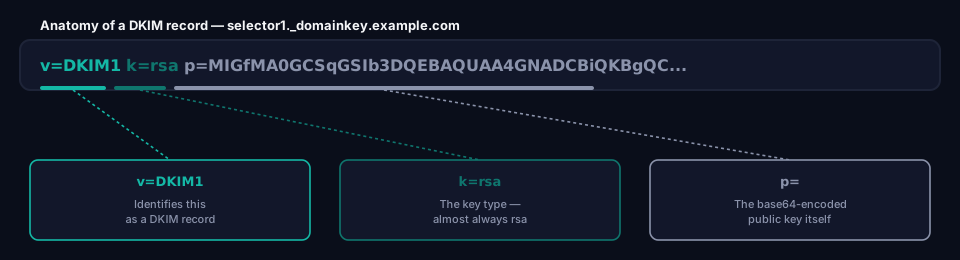
A basic DKIM DNS record looks like this:
selector1._domainkey.example.com TXT "v=DKIM1; k=rsa; p=MIGfMA0GCSqGSIb3DQEBAQUAA4GNADCBiQKBgQC..."
The tags explained
v=DKIM1 Identifies this as a DKIM record. Optional per the specification, but virtually every real-world record includes it.
k=
The key type. Almost always rsa. Ed25519 keys are supported by the standard but rarely used in practice, since not all receiving servers implement them yet.
p= The public key itself, base64-encoded. This is the long block of characters that makes DKIM records look intimidating — it's just the key, not a mechanism to understand.
t=
Optional flags. t=y marks the key as being in test mode, meaning verification failures shouldn't be treated as a hard fail. Useful while rolling out DKIM, but it should be removed once signing is confirmed working.
h=
Restricts which hashing algorithms are acceptable (sha256 is standard today; sha1 is deprecated and shouldn't appear in a new record).
The DKIM-Signature header
The DNS record only holds half the picture. The other half is the DKIM-Signature header that gets added to every outgoing message. It's worth being able to read one, since this is what actually shows up in a raw email or in a DMARC failure report.
A real one looks something like this:
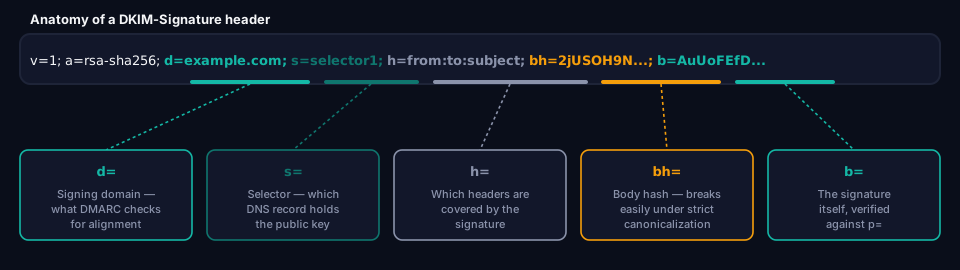
DKIM-Signature: v=1; a=rsa-sha256; c=relaxed/relaxed; d=example.com;
  s=selector1; h=from:to:subject:date; bh=2jUSOH9NhtVGCQWNr9BrIAPreKQjO6Sn7XIkfJVOzv8=;
  b=AuUoFEfDxTDkHlLXSZEpZj79LICEps6eda7W3deTVFOk4yAUoqOB4nujc7YopdG5dWLSdNg6xNAZpOPr+kHxt1IrE...
The tags explained
v=
The DKIM version. Always 1.
a=
The signing algorithm. rsa-sha256 is standard.
c= Canonicalization — how tolerant the signature is of formatting changes made in transit. Covered in detail below.
d= The signing domain. This is what DMARC checks for alignment against the visible From address.
s=
The selector. Combined with d=, this tells the receiving server exactly which DNS record to fetch.
h= The list of headers that were included in the signature. Only headers in this list are protected — anything not listed could theoretically be altered without breaking the signature.
bh= The body hash: a hash of the message body, included so the signature also covers the content, not just the headers.
b= The signature itself.
Why a domain can have multiple DKIM records
Every platform that sends mail on your behalf — your main mailbox provider, your marketing platform, your invoicing software, your helpdesk — needs its own key pair if it's going to sign its own mail. Each one publishes its public key at its own selector, so none of them collide.
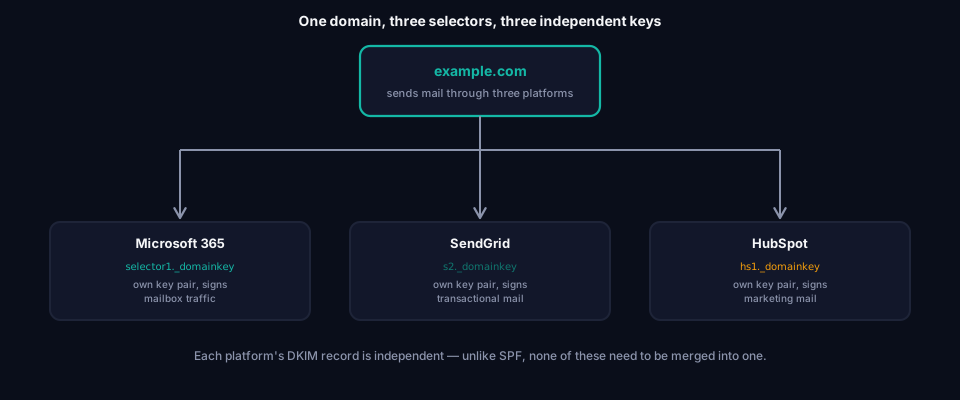
This is the opposite of SPF, where every sending platform has to be merged into a single record. With DKIM, each platform simply gets its own selector and its own key, and none of it needs coordinating in one place. The tradeoff is that there's no single record to audit — you have to know which selectors are actually in use to check them all.
Canonicalization
Canonicalization (the c= tag) determines how strictly the signature treats formatting. It has two independent settings, one for the header and one for the body, written as header/body:
simple— Requires an exact, byte-for-byte match. Even a single added space or a line-ending change breaks the signature.relaxed— Tolerates minor whitespace normalization (collapsing multiple spaces, trimming trailing whitespace) without breaking the signature.
c=relaxed/relaxed is the standard choice today, and for good reason: mailing lists, forwarding services and some intermediate mail servers routinely make small formatting adjustments in transit. A signature set to simple/simple breaks on contact with any of that, which produces DKIM failures that have nothing to do with anything actually being wrong.
DKIM key length
DKIM keys are almost always 2048-bit RSA today. 1024-bit keys are still technically valid under the specification, but they're considered weak by modern standards, and major mailbox providers increasingly treat mail signed with them with more suspicion.
The practical complication with 2048-bit keys is DNS itself: a single TXT string is limited to 255 characters, and a 2048-bit public key encoded in base64 is longer than that. The record has to be split into multiple quoted strings that DNS concatenates back together:
selector1._domainkey.example.com TXT ("v=DKIM1; k=rsa; "
  "p=MIIBIjANBgkqhkiG9w0BAQEFAAOCAQ8AMIIBCgKCAQEAw6L..."
  "...continues across multiple quoted segments...")
Most DNS providers and mail platforms handle this splitting automatically when you paste in the key, but if you're ever constructing a record by hand, forgetting to split it — or splitting it in the wrong place — is a common way to end up with a record that simply doesn't verify.
Common DKIM mistakes
Mistake 1: Never rotating keys
A DKIM key pair gets generated once during setup and then never touched again, sometimes for years.
Impact: Not an immediate failure, but a growing security exposure. If a private key is ever compromised, there's no expiry forcing it out of use.
Fix: Rotate DKIM keys periodically — annually is a reasonable baseline for most organizations. Many platforms support publishing a second selector, switching signing over to it, and only then removing the old one, so rotation doesn't cause a gap in valid signatures.
Mistake 2: Truncated or malformed public key records
The public key gets cut off, mis-split across TXT strings, or has a stray character introduced when it was copied from the platform's setup page.
Impact: DKIM fails to verify for every message from that selector, even though the record technically exists.
Fix: Copy the exact value your mail platform provides rather than retyping it, and check the record with a DNS query tool immediately after publishing it.
Mistake 3: Leaving t=y in production
t=y is meant for testing, but it's easy to set it once during rollout and forget it's there.
Impact: Not directly harmful on its own, but it signals to some receivers that the key isn't fully trusted yet, and it's a sign the setup was never properly finished.
Fix: Remove t=y once you've confirmed signing and verification are working correctly.
Mistake 4: Assuming DKIM alone stops spoofing
DKIM confirms a message was signed by a domain and wasn't altered. It says nothing about whether that domain matches the address the recipient actually sees.
Impact: An attacker who controls a lookalike or unrelated domain can sign their own mail with valid DKIM for that domain, then still forge the visible From address. DKIM passes for the attacker's domain; it just isn't the domain the recipient thinks they're looking at.
Fix: This is exactly the gap DMARC closes, by requiring the d= domain in a passing DKIM signature to align with the visible From address. See What is DMARC? for how alignment works.
Mistake 5: Signature breaking on mailing lists and forwarders
Some mailing lists and forwarding services modify message content — adding a footer, rewriting the subject line — in ways that go beyond what relaxed canonicalization tolerates.
Impact: Legitimate mail fails DKIM after being forwarded or relayed through a list, through no fault of the original sender.
Fix: There's no DKIM-side fix for this — it's a structural limitation. Modern mailing lists address it using ARC (Authenticated Received Chain), which preserves a record of the original authentication results as the message passes through. DMARC can also fall back to a passing SPF result when DKIM fails this way, provided SPF and DKIM aren't both broken by the same hop.
Why DKIM alone is not enough
DKIM verifies signing and integrity, not identity in the way a recipient experiences it. A signature can be entirely valid and still belong to a domain that has nothing to do with the one shown in the From address — DKIM has no concept of "does this match what the user sees."
That's the same gap SPF has, and it's closed the same way: DMARC ties DKIM's result (and SPF's) to the visible From address through alignment, then applies a policy to whatever doesn't line up. DKIM and SPF each authorize something different — a signature and a server, respectively — and DMARC is what turns either of those into an actual delivery decision.
DKIM vs SPF vs DMARC
| SPF | DKIM | DMARC | |
|---|---|---|---|
| Checks | Which servers can send | Whether the message was signed and unaltered | Alignment + policy enforcement |
| Method | IP address against a DNS list | Cryptographic signature verified against a public key | Combines SPF/DKIM results with the visible From address |
| Survives forwarding | No | Usually, if canonicalization is relaxed | Depends on SPF/DKIM |
| Location in DNS | One record at the domain root | One record per selector, per signing platform | One record at _dmarc |
| On its own, stops spoofing? | Partially | Partially | Yes — it's the enforcement layer |
None of the three replaces the others. SPF authorizes servers, DKIM authorizes content, and DMARC is what turns their combined results into an actual accept, quarantine or reject decision. None of them say anything about whether the connection carrying the message was actually encrypted — that's a separate layer entirely, covered by MTA-STS.
Frequently asked questions
Does DKIM alone stop spoofing?
Not completely. DKIM confirms a message was signed by a specific domain and wasn't altered, but it doesn't check whether that domain matches the address the recipient actually sees. DMARC is what ties the two together.
Why does my domain have more than one DKIM record?
Because each mail platform sending on your behalf signs with its own key at its own selector. That's expected and correct — unlike SPF, DKIM doesn't need to be merged into a single record.
What happens if I don't rotate my DKIM key?
Nothing breaks immediately. The risk is purely that an old, never-rotated key is a larger and longer-lived target if it's ever compromised. Most organizations rotate annually as routine hygiene rather than in response to a specific problem.
Can DKIM fail even though nothing is wrong with my setup?
Yes — mailing lists and some forwarders modify messages in ways that break a signature, particularly under strict simple canonicalization. This is a known structural limitation, not a misconfiguration, and it's part of why DMARC only requires SPF or DKIM to pass rather than both.
Do I need DKIM if I already have SPF and DMARC?
Yes. DMARC requires either SPF or DKIM to pass and align — but relying on SPF alone means losing authentication entirely the moment a message is forwarded, since SPF doesn't survive that. DKIM does. Having both gives DMARC a working path in either situation.
Conclusion
DKIM solves a problem SPF can't: proving a message wasn't altered, and doing it in a way that survives forwarding. The tradeoff is that it's inherently more fragmented than SPF or DMARC — every platform gets its own selector and key, there's no single record to check, and canonicalization settings quietly determine whether ordinary mail handling breaks a signature or not.
Getting DKIM right means signing with every platform that legitimately sends on your behalf, keeping canonicalization set to relaxed, rotating keys on a routine schedule, and treating a DKIM failure in your DMARC reports as something to investigate rather than ignore. Combined with SPF and enforced through DMARC, it closes the gap either one leaves open on its own.
If you haven't already, What is DMARC? covers how DKIM's results, alongside SPF's, get turned into an actual enforcement decision. And if SPF is still the piece you're working through, What is SPF? covers the DNS-side half of email authentication that DKIM doesn't touch.
About this guide
This guide was written by the team building grimDMARC — a managed DMARC and SPF platform for MSPs and their customers. If you have questions about DKIM or feedback on this guide, reach us at hello@grimdmarc.com.
Last updated: July 2026 Reading time: 13 minutes Reviewed by: grimDMARC team