What is MTA-STS? A Complete Guide to Email Transport Security and TLS Reporting
MTA-STS (SMTP MTA Strict Transport Security) makes encrypted delivery to your domain mandatory instead of optional. TLS-RPT (TLS Reporting) is its companion standard, telling you when a sending server failed to deliver mail to you securely. Together they close a gap that SPF, DKIM and DMARC don't touch at all: none of those three say anything about whether a message was actually encrypted while it traveled between mail servers.
This guide covers the downgrade attack MTA-STS exists to stop, how to read both the DNS record and the hosted policy file it depends on, why TLS-RPT is what makes a safe rollout possible, and the mistakes that leave a domain publishing a policy that doesn't actually do anything.
Who this is for:
- IT managers who have SPF, DKIM and DMARC in place and are looking at what's left
- MSPs who want to stop transport-layer downgrade attacks, not just spoofing
- Anyone who assumed "email is encrypted these days" and wants to check whether that's actually true for their domain
What you will learn:
- Why standard SMTP encryption is optional by default, and what that allows an attacker to do
- How to read an MTA-STS DNS record and the policy file it points to
- The difference between testing and enforce mode, and why staying in testing forever provides no protection
- How TLS-RPT reports make it safe to move to enforce
- Why this is a different category of protection than SPF, DKIM and DMARC
What is MTA-STS?
MTA-STS lets a domain publish a policy saying: mail delivered to me must use TLS, the certificate must be valid, and it must come from one of these specific mail servers. Any sending server that respects the policy will refuse to complete the delivery if it can't meet those conditions — instead of quietly sending the message unencrypted, which is what standard SMTP does by default when encryption isn't available.
That last part is the whole reason MTA-STS exists. Email's encryption-in-transit was never designed to be mandatory.
Why MTA-STS exists
SMTP servers have supported encrypting the connection between them since 2002, using an extension called STARTTLS. The catch is in the name: it's an upgrade a server offers, not a requirement. If the receiving server doesn't offer STARTTLS, or an attacker positioned between the two servers interferes with that offer, the sending server just continues in plain text. This is called opportunistic TLS, and it was a deliberate design choice — early SMTP compatibility mattered more than mandatory encryption, and at the time that tradeoff made sense.
It also creates an obvious weakness. An attacker sitting on the network path between two mail servers can intercept the STARTTLS negotiation and strip it out before it reaches the sending server, making it look like the receiving server never offered encryption at all. Opportunistic TLS is built to fail open for compatibility, so the sending server just delivers the message in plain text rather than refusing to send it. Neither side is necessarily aware anything happened — the message goes through, it just goes through unencrypted, readable to anyone who intercepted that connection.
This is a real, well-documented attack class, generally referred to as STARTTLS stripping. The IETF's response was MTA-STS, standardized as RFC 8461 in 2018, alongside TLS-RPT as RFC 8460 the same year. Together they turn "we'll encrypt this if we can" into "we require this to be encrypted, and we want to know if that ever fails."
How MTA-STS works (Jane/Peter)
The same characters from our other guides apply here, but the hop that matters is different from SPF, DKIM or DMARC: it's the connection between Jane's outgoing mail server and Peter's domain's receiving mail server, not anything happening on Jane's laptop.
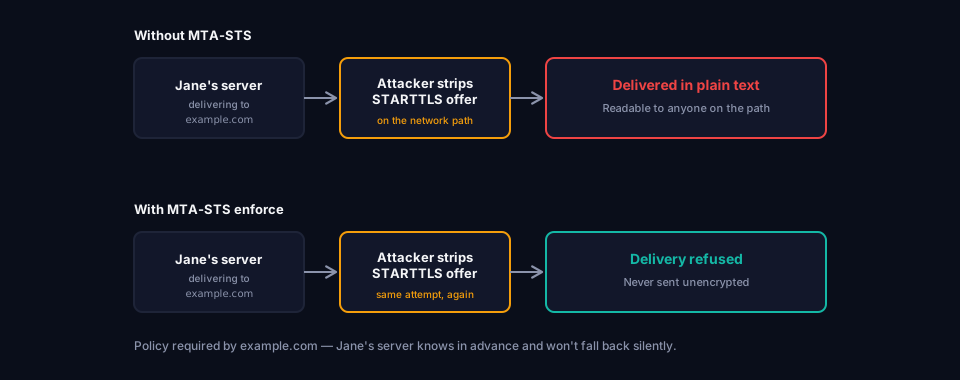
Without MTA-STS
Jane's mail server tries to deliver a message to example.com, Peter's domain. It offers STARTTLS to encrypt the connection. If an attacker sitting between the two servers — on a compromised network hop, not on Jane's own wifi — intercepts and strips that offer, Jane's server sees what looks like a receiving server with no encryption support. Because opportunistic TLS fails open, Jane's server sends the message anyway, in plain text. The attacker reads it in transit. Nobody involved gets an error.
With MTA-STS in enforce mode
Before attempting delivery, Jane's server checks whether example.com publishes an MTA-STS policy. It does, and it's set to enforce. Jane's server now knows two things in advance: delivery must use a validated TLS connection, and it must go to one of the specific mail servers example.com has authorized. If the attacker strips STARTTLS this time, or presents a certificate for the wrong host, Jane's server refuses to deliver the message in plain text at all. The message gets queued for retry or eventually bounces — which is a real operational cost, but it's a cost paid instead of silently exposing the message.
What is an MTA-STS record
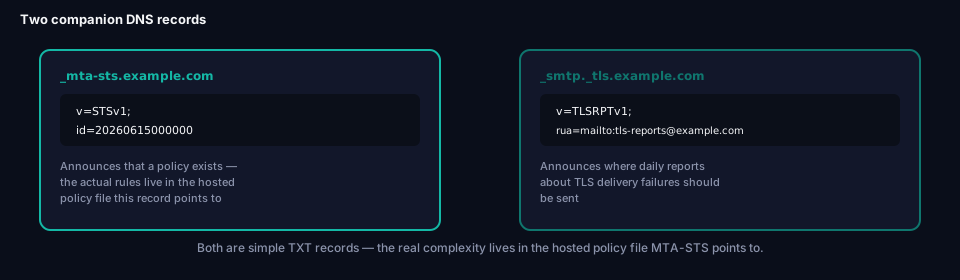
Like DMARC, MTA-STS uses a fixed, predictable DNS location — but unlike SPF or DMARC, the DNS record itself doesn't hold the actual policy. It just announces that one exists and points at where to find it.
_mta-sts.example.com TXT "v=STSv1; id=20260615000000"
v=STSv1 Identifies this as an MTA-STS record.
id=
An arbitrary string that changes every time the policy file itself changes. Senders cache the policy file for a while (governed by max_age, below), and the id value is how they know a cached copy is stale. Forgetting to change it after updating the policy is one of the most common ways MTA-STS quietly stops working.
The actual policy lives somewhere else entirely: a plain text file, hosted over HTTPS, at a fixed well-known path.
https://mta-sts.example.com/.well-known/mta-sts.txt
That URL has to be reachable and served with a valid, trusted TLS certificate — which means you need working HTTPS infrastructure just to publish a policy about requiring encryption in the first place. For most domains already running a normal website, this is a small addition. For a domain with no web presence at all, it means standing up a minimal HTTPS host for exactly this purpose.
The MTA-STS policy file
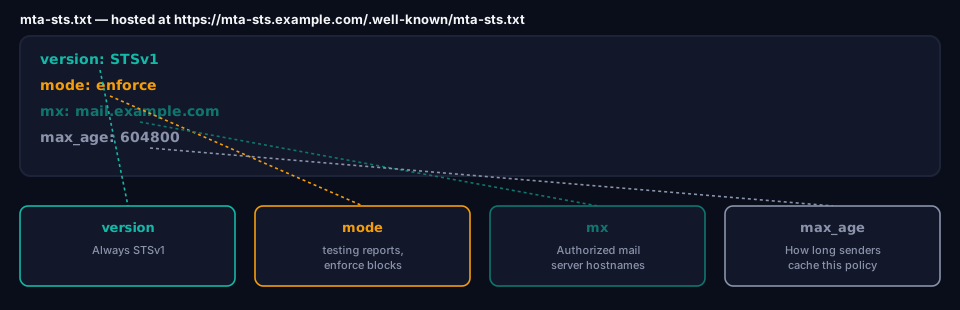
The policy file is where the actual rules live:
version: STSv1
mode: enforce
mx: mail.example.com
mx: mail2.example.com
max_age: 604800
version
Always STSv1.
mode The core setting — covered in detail below, since getting this wrong is the single biggest risk with MTA-STS.
mx
One or more authorized mail server hostnames. Wildcards are allowed (mx: *.example.com). This list has to be kept in sync with your actual MX records — if you switch mail providers and forget to update it, legitimate mail starts getting refused for the wrong reason.
max_age
How long, in seconds, a sending server should cache this policy before checking for updates. A common value is 604800 (one week). Longer caching means fewer lookups but slower propagation when you change something — which is exactly why the id= tag in the DNS record exists, to force a refresh sooner when needed.
MTA-STS modes
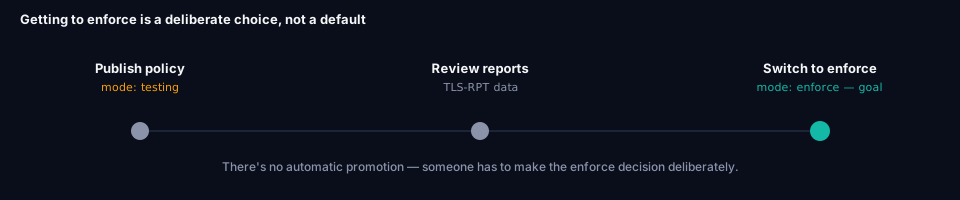
This is the part worth understanding properly, because the default starting point provides no actual protection on its own — and moving past it requires a deliberate decision, not something that happens automatically.
mode: testing
The policy is published and evaluated, but nothing is blocked. If a delivery would have failed the policy's requirements, it's still delivered — but if TLS-RPT is also configured, a report about that failure gets sent to you. This is the correct way to start: it tells you what would break before you turn on real enforcement.
Do not treat this as a finished setup. A domain sitting in testing mode indefinitely has published a policy that does nothing except generate reports nobody acts on. It looks configured. It isn't protecting anything.
mode: enforce
Delivery failures are now real failures. A sending server that can't establish a validated, encrypted connection to an authorized host will not deliver the message in plain text — it queues, retries, and eventually bounces instead. This is the mode that actually stops the downgrade attack described above.
This requires an active choice. There's no automatic promotion from testing to enforce. Someone has to look at the TLS-RPT reports, confirm nothing legitimate is failing, and change mode: testing to mode: enforce in the policy file themselves.
mode: none
Enforcement is explicitly disabled. This exists mainly for winding a policy down in a controlled way, not as a normal operating state.
What is TLS-RPT
TLS-RPT is what makes moving to enforce mode something you can do with confidence instead of guessing. Without it, testing mode collects failures that nobody ever sees.
_smtp._tls.example.com TXT "v=TLSRPTv1; rua=mailto:tls-reports@example.com"
v=TLSRPTv1 Identifies this as a TLS-RPT record.
rua= Where reports get sent — a mailto address, an HTTPS endpoint, or both.
Reports arrive as JSON, typically once a day, from mail providers who attempted delivery to your domain. Each one breaks down how many connections succeeded, how many failed, and — critically — categorizes why a failure happened: an expired or mismatched certificate, a hostname that doesn't match the policy's mx list, STARTTLS simply not being offered, or a connection timeout. That detail is what tells you whether a testing-mode failure is a real problem to fix or just noise from a sender that was never actually going to be affected by enforce mode.
Why this is a different kind of protection than SPF, DKIM and DMARC
SPF, DKIM and DMARC all answer some version of the same question: can this domain be impersonated. MTA-STS and TLS-RPT answer a completely unrelated question: can mail to this domain be intercepted or silently downgraded while it's in transit between servers.
A domain can have SPF passing, DKIM signing every message, and DMARC enforced at p=reject — full marks on identity — and still have every legitimate message readable to anyone positioned on the wrong network path, if MTA-STS isn't configured. Neither problem fixes the other. That's also why our Domain Scanner reports on them as two separate scores rather than folding everything into one number: a domain that can't be spoofed but can still be silently eavesdropped on on the way to the recipient isn't actually fully protected, and blending the two together would hide exactly which one still needs work.
Common MTA-STS mistakes
Mistake 1: Jumping straight to enforce
Enthusiastic rollout, no testing period, mode: enforce from day one.
Impact: Any legitimate sender with a certificate mismatch, an unlisted MX host, or incomplete STARTTLS support gets their mail to you silently queued or bounced, with no warning it was going to happen.
Fix: Always start in mode: testing, and don't move off it until TLS-RPT reports show a clean picture.
Mistake 2: Never leaving testing mode
The opposite mistake — testing mode gets published once during setup and nobody ever revisits it.
Impact: Zero actual protection. The policy exists, reports may even be arriving, but nothing is stopping the downgrade attack this was meant to prevent.
Fix: Set a review point. Once reports show no legitimate delivery failing, switch to enforce deliberately.
Mistake 3: Forgetting to bump id= after changing the policy
The policy file gets updated — a new MX host added, mode changed — but the id= value in the DNS record stays the same.
Impact: Senders that already cached the old policy under the old id have no signal to refetch it, so your change doesn't reliably propagate until their cache naturally expires.
Fix: Change id= every time the policy file content changes, even for small edits.
Mistake 4: Policy file not properly hosted
The .well-known/mta-sts.txt file isn't reachable, isn't served over valid HTTPS, or is returned with the wrong content type.
Impact: Sending servers can't fetch or trust the policy at all. The DNS record exists, but MTA-STS has no actual effect.
Fix: Verify the policy file loads correctly over HTTPS from an external connection, not just from inside your own network.
Mistake 5: mx list falling out of sync with real MX records
Mail infrastructure changes — a new provider, an added server — and the actual DNS MX records get updated, but the mx: list inside the policy file doesn't.
Impact: Legitimate mail gets refused because the real receiving host isn't on the policy's authorized list, which looks identical to an attack from the sending server's point of view.
Fix: Treat the policy file's mx: list as part of the same change process as your MX records, not a separate task that's easy to forget.
Mistake 6: No TLS-RPT record at all
MTA-STS is published, but TLS-RPT isn't.
Impact: Testing mode collects failure data that nobody ever sees, which means there's no reliable way to know whether enforce mode is safe to turn on.
Fix: Publish TLS-RPT alongside MTA-STS from the start, not as an afterthought.
MTA-STS and TLS-RPT vs SPF vs DKIM vs DMARC
| SPF / DKIM / DMARC | MTA-STS | TLS-RPT | |
|---|---|---|---|
| Protects against | Domain impersonation | Silent downgrade to unencrypted delivery | Nothing directly — it's visibility |
| Direction | Applies to mail claiming to be from you | Protects mail delivered to you | Reports on delivery attempts to you |
| Requires HTTPS hosting | No | Yes — the policy file itself | No |
| Location in DNS | Domain root / _dmarc |
_mta-sts |
_smtp._tls |
| Has a testing stage | DMARC does (p=none) |
Yes (mode: testing) |
N/A — reporting only |
Frequently asked questions
Does MTA-STS replace SPF, DKIM or DMARC?
No. They protect against entirely different problems. A domain needs both identity protection (SPF, DKIM, DMARC) and transport protection (MTA-STS, TLS-RPT) — neither substitutes for the other.
Does MTA-STS protect the emails I send to other domains?
No, and this is a common misunderstanding. The MTA-STS policy your domain publishes governs how senders behave when delivering to you. Whether mail you send to someone else is protected depends on whether their domain has published an MTA-STS policy — that's entirely outside your control.
What happens to a message if enforce mode blocks a delivery?
It doesn't disappear silently. The sending server queues and retries for some period, then eventually bounces the message back to its original sender with a delivery failure notice, the same way any other hard delivery failure works.
Do I need a website to use MTA-STS?
You need somewhere that can serve a small text file over valid HTTPS at a specific path. If you already have a website on the domain, this is a minor addition. If you don't, you'll need to stand up minimal HTTPS hosting just for this file.
How do I check whether my domain has MTA-STS and TLS-RPT configured?
grimDMARC's Domain Scanner checks both automatically, reports the current policy mode, and flags the same mistakes covered in this guide — including whether the policy file itself is actually reachable, not just whether the DNS record exists.
Conclusion
SPF, DKIM and DMARC spend a lot of effort answering "is this really you." MTA-STS and TLS-RPT ask a completely different question that's easy to forget matters at all: once we've established this message came from you, is it actually protected on its way to where it's going? Standard SMTP's answer to that question has always been "only if nothing goes wrong," which is exactly the gap an attacker positioned on the wrong network segment can exploit.
Getting this right follows the same shape as DMARC's own rollout: publish in testing mode, use TLS-RPT to see what would actually break, and then make the deliberate call to switch to enforce once the data says it's safe. Skipping the testing period risks real mail. Never leaving it means the policy you published isn't doing anything at all.
If you haven't already, What is DMARC? and What is SPF? cover the identity side of this picture — MTA-STS and TLS-RPT are what covers the transport side.
About this guide
This guide was written by the team building grimDMARC — a managed DMARC and SPF platform for MSPs and their customers. If you have questions about MTA-STS or feedback on this guide, reach us at hello@grimdmarc.com.
Last updated: July 2026 Reading time: 13 minutes Reviewed by: grimDMARC team