What is SPF? A Complete Guide to SPF Email Authentication
SPF (Sender Policy Framework) is the DNS record that tells the world which mail servers are allowed to send email on behalf of your domain. It's the oldest of the three major email authentication standards — and still one of the most commonly misconfigured, mostly because of one hard limit almost every guide mentions and almost no one explains clearly.
This guide covers what SPF actually checks, how to read and write an SPF record, the mistakes that quietly break it, and how it fits together with DKIM and DMARC.
Who this is for:
- IT managers who keep hearing "SPF" mentioned alongside DMARC and DKIM
- MSPs managing SPF records across multiple customer domains
- Anyone who's hit a mysterious
permerrorwhile trying to fix their email authentication
What you will learn:
- What SPF actually checks, and what it doesn't
- How to read an SPF record, mechanism by mechanism
- The 10-lookup limit that breaks more SPF records than anything else
- A realistic path to a clean, working SPF setup
- How SPF connects to DKIM and DMARC
What is SPF?
SPF is a DNS TXT record that lists the mail servers authorized to send email for your domain. When an email arrives, the receiving mail server checks the sending server's IP address against your domain's SPF record. If the server is listed, SPF passes. If it isn't, SPF fails.
That's the entire mechanism. SPF doesn't check the message content, doesn't verify who wrote the email, and doesn't confirm nothing was tampered with in transit — that's DKIM's job. SPF answers exactly one question: is this server allowed to send mail as this domain?
Why SPF exists
SPF was created because email, as a protocol, was never designed with authentication in mind. When SMTP (the protocol email still runs on today) was standardized in the early 1980s, anyone could put any "From" address on a message — there was no built-in way for a receiving server to check whether that was true.
For years, this didn't matter much. Then spam and phishing exploded, and forging a trusted sender became the easiest way to get a malicious email opened. SPF, first proposed in the early 2000s and formalized as RFC 7208 in 2014, was the industry's first widely adopted answer: a simple, DNS-based way for domain owners to publish exactly which servers were allowed to send on their behalf.
It's a blunt tool by design — a list, checked against an IP address — but it's also why SPF adoption is nearly universal today: it's simple enough that almost every mail platform supports it out of the box.
How SPF works (Jane/Peter)
The clearest way to see it is to follow the same example used in our DMARC guide: Jane, at example.com, emailing Peter.
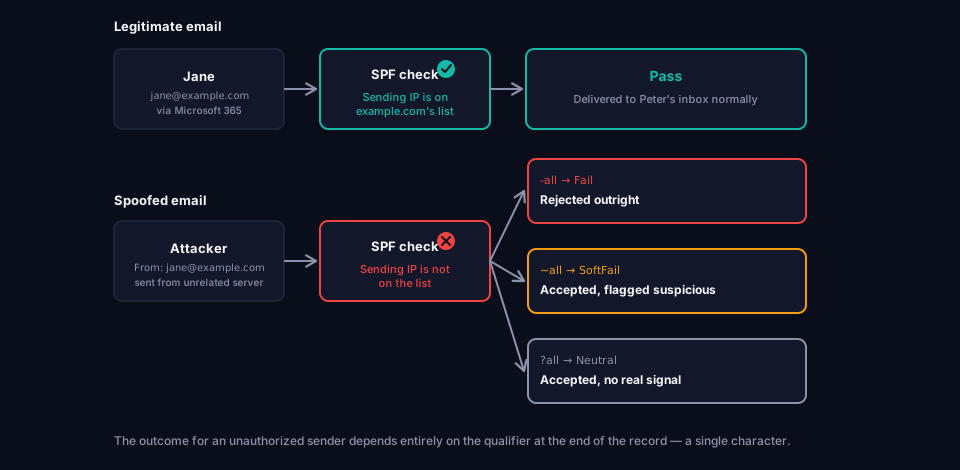
Jane sends a real email to Peter
Jane's email leaves through example.com's actual mail server — say, Microsoft 365. When the message arrives, Peter's mail server does two things:
- It looks up the SPF record published at example.com's DNS.
- It checks whether the server that actually sent the message (Microsoft 365's sending IP) is listed as authorized in that record.
It is, so SPF passes.
An attacker sends a spoofed email
Now imagine an attacker sends Peter an email with the From address forged to look like jane@example.com, but sent from their own server — one that has nothing to do with example.com.
Peter's mail server performs the same lookup: is this sending IP authorized in example.com's SPF record? It isn't, so SPF fails.
What is an SPF record
An SPF record is a single DNS TXT record published at your domain's root — not a subdomain like _dmarc, and not a separate DNS record type. It lives at the same level as your domain's main A or MX records and is simply a TXT entry that starts with v=spf1.
A domain can have only one SPF record. If two exist — often because a marketing platform's setup wizard adds one without checking for an existing record — both are invalidated, and SPF fails for the entire domain.
SPF record syntax
A basic record looks like this:
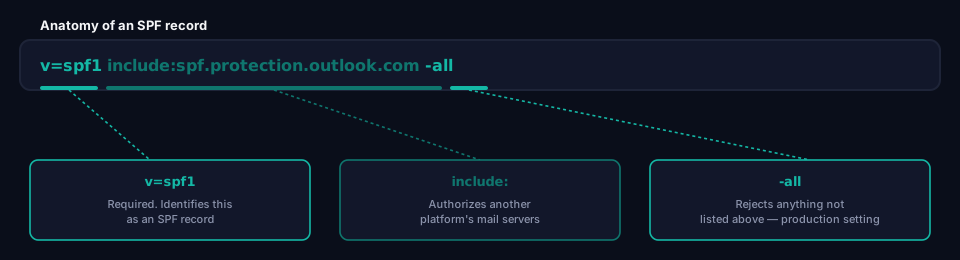
example.com TXT "v=spf1 include:spf.protection.outlook.com -all"
A more complete, real-world record might look like this:
example.com TXT "v=spf1 include:spf.protection.outlook.com include:sendgrid.net include:_spf.google.com -all"
The mechanisms explained
v=spf1 Required. Identifies this as an SPF record. Always the first term.
ip4: / ip6: Authorizes a specific IP address or range directly.
ip4:203.0.113.25
a Authorizes any server listed in the domain's own A record. Rarely useful on its own for cloud-hosted mail, but common in older records.
mx Authorizes the domain's own mail servers (its MX records) to send mail. Also increasingly rare in modern cloud setups, where sending and receiving infrastructure are different services.
include:
Authorizes another domain's entire SPF record — this is how you bring in a mail platform's servers without listing individual IPs. Almost every modern SPF record is built primarily from include: statements.
include:spf.protection.outlook.com
all The catch-all at the very end of the record, always paired with a qualifier that decides what happens to anything not explicitly authorized above it.
SPF results
When a receiving server evaluates SPF, it doesn't just get a pass or fail — RFC 7208 defines seven possible outcomes:
- Pass — The sending server is authorized. This is the outcome you want.
- Fail — The sending server is explicitly not authorized (the record ends in
-all). - SoftFail — The sending server isn't authorized, but the record only weakly says so (
~all). Often treated as suspicious rather than rejected outright. - Neutral — The record explicitly declines to make a statement (
?all). Treated similarly to no record at all. - None — No SPF record exists for the domain.
- TempError — A temporary DNS problem prevented evaluation (e.g. a DNS server timeout). Usually resolves on retry.
- PermError — A permanent problem with the record itself — most often the 10-lookup limit being exceeded, or a syntax error. This is the result you need to actively fix; it doesn't resolve on its own.
SPF qualifiers
Each mechanism can be prefixed with a qualifier. It's almost always applied to all, at the end of the record:
-all(Fail) — Anything not explicitly listed is rejected. This is the correct setting for a production record.~all(SoftFail) — Anything not listed is accepted but marked as suspicious. Useful during testing, not for a finished setup.?all(Neutral) — No real statement either way. Effectively provides no protection.+all(Pass) — Authorizes literally anyone to send as your domain. This is a critical misconfiguration, not a testing setting — it should never appear in a real SPF record.
Why SPF alone is not enough
SPF checks the envelope sender (the technical return-path address used for bounces), not necessarily the visible From address a recipient actually sees. An attacker can sometimes pass SPF using their own domain in the envelope while still forging the visible From address to look like a trusted sender. On its own, SPF has no way to catch that.
SPF also breaks on forwarding. When an email is forwarded, the forwarding server becomes the new sending server — and it's very unlikely to be in the original domain's SPF record. A perfectly legitimate email can fail SPF simply because someone forwarded it.
This is exactly the gap DMARC closes — by requiring the domain that passes SPF to align with the visible From address, and by allowing DKIM to serve as an alternative path when SPF fails due to forwarding. SPF is a necessary building block, not a complete solution by itself. See What is DMARC? for how these results become an actual enforcement decision.
SPF record examples
Most SPF records are built almost entirely from include: statements pointing at whichever platforms actually send mail for the domain. Common ones:
Microsoft 365
include:spf.protection.outlook.com
Google Workspace
include:_spf.google.com
Mailchimp
include:servers.mcsv.net
SendGrid
include:sendgrid.net
A domain using Microsoft 365 as its main mail platform plus Mailchimp for marketing and SendGrid for transactional mail would combine these into one record:
example.com TXT "v=spf1 include:spf.protection.outlook.com include:servers.mcsv.net include:sendgrid.net -all"
Every additional platform means one more include: — and, as covered next, one step closer to a limit that's easier to hit than most people expect.
SPF lookup
"Doing an SPF lookup" means resolving your domain's SPF record and following every include:, a, mx, exists:, and redirect= mechanism it references, the same way a receiving mail server does when it evaluates your domain.
You can check your own record manually with a DNS query tool:
dig TXT example.com +short
This shows the record itself, but not the total number of lookups it triggers once every nested include: is followed out — which is the number that actually matters.
SPF 10 DNS lookup limit
This is the single most common reason SPF breaks, and most explanations of it are too vague to actually help.
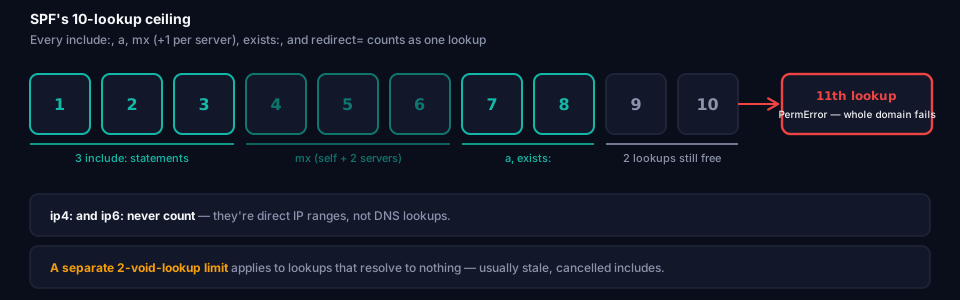
The SPF standard (RFC 7208) caps the number of DNS lookups a record is allowed to trigger at 10. If resolving your record requires more than that, receiving servers are required to treat the entire record as a PermError — meaning SPF fails for all your mail, including messages from services that were correctly configured.
What counts as a lookup:
include:— 1 lookup, plus every lookup required to resolve that domain's own SPF record (this is how the count adds up fast)a— 1 lookupmx— 1 lookup, plus 1 additional lookup for every MX server returnedexists:— 1 lookupredirect=— 1 lookup
What does not count:
ip4:andip6:— these are direct IP addresses, no DNS lookup required
A related, lesser-known limit: SPF also caps void lookups — lookups that return no answer or a domain-not-found error — at 2. Exceed that, and you get a PermError even if you're nowhere near the 10-lookup ceiling. Stale include: statements pointing at services you no longer use are the usual cause.
SPF flattening
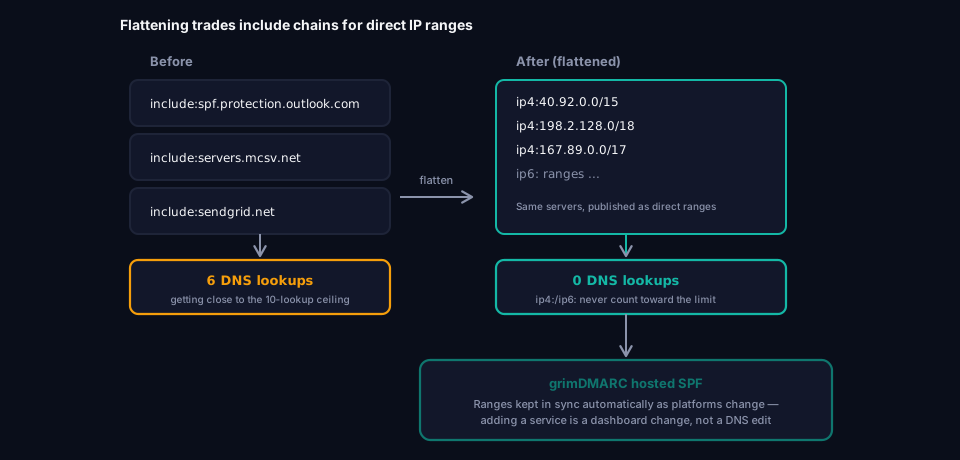
SPF flattening is the standard fix once a record is approaching (or has already exceeded) the 10-lookup limit: resolving every include: down to the actual ip4:/ip6: ranges it represents, and publishing those directly instead of the include chain. Since raw IP ranges don't count against the lookup limit, a flattened record can authorize the exact same servers using zero lookups instead of five or six.
The catch is that flattening isn't a one-time fix — mail platforms rotate and expand their IP ranges over time. A flattened record that isn't actively kept in sync with the platforms it represents will quietly drift out of date, either blocking legitimate mail from a new IP range or leaving old, no-longer-used ranges authorized indefinitely.
This is precisely the operational problem grimDMARC's hosted SPF is built to remove. Instead of your team manually resolving and re-flattening records every time a mail platform changes its infrastructure, the record lives in a managed DNS zone that's kept current automatically — you get the lookup-count benefits of a flattened record without taking on the maintenance burden of one. Adding or removing a sending service becomes a dashboard change, not a DNS edit, and it's built specifically so lookup-count creep and stale IP ranges stop being something your team has to track by hand.
SPF lookup tools
A few ways to check where your SPF record actually stands before it becomes a production problem:
digornslookup— shows you the raw record, but not the resolved lookup count- MXToolbox's SPF checker — a widely used free tool that resolves the full include chain and reports your lookup count
- Google Admin Toolbox's Check MX — useful if Google Workspace is part of your setup
- grimDMARC's free SPF Analyzer — resolves your full SPF record, reports your current lookup count against the 10-lookup ceiling, and flags stale or void
include:statements before they cause aPermError— the same checks a hosted SPF setup handles automatically going forward
Managing this by hand gets tedious once you have more than a couple of sending platforms — every new tool means editing raw DNS again and re-checking the lookup count. Hosted SPF keeps the record automatically flattened and within the 10-lookup limit as your sending platforms change, instead of you doing that audit manually every time.
Checking your lookup count before adding a new service, rather than after something breaks, is the difference between an easy fix and a confusing outage.
Common SPF mistakes
Mistake 1: Exceeding the 10-lookup limit
Every new marketing tool, CRM, or notification service adds another include:, and each one carries its own nested lookups. Nobody notices until the count silently tips past 10.
Impact: SPF fails for all mail from the domain, not just the newest addition — including mail from services that were working fine.
Fix: Regularly audit which include: statements are actually still needed, and flatten wherever you can.
Mistake 2: Using +all or leaving off a qualifier
Someone copies an SPF record from an old guide or gets it wrong while testing, and +all ends up in production.
Impact: Anyone, anywhere, can successfully send email that passes SPF for your domain.
Fix: Production records should end in -all. There is no legitimate reason for +all to exist outside of a deliberate, temporary test.
Mistake 3: Multiple SPF records
A domain can only have one SPF record. If a second one gets added, both are invalidated.
Impact: SPF returns PermError for the whole domain, exactly as if the record didn't exist.
Fix: Merge every required include: into a single TXT record. Search your DNS zone for v=spf1 before adding anything new — grimDMARC's Domain Scanner will flag a duplicate SPF record automatically.
Mistake 4: Forgetting subdomains
The root domain's SPF record does not automatically apply to subdomains. A subdomain sending its own mail — newsletter.example.com, for instance — needs its own SPF record if it sends mail independently.
Impact: Legitimate mail from a subdomain fails SPF, or an unprotected subdomain becomes an easy spoofing target.
Fix: Publish an SPF record for any subdomain that sends its own mail, and confirm your DMARC subdomain policy (sp= and np=) covers the rest.
Mistake 5: Stale includes causing void lookups
Old marketing tools or long-cancelled services stay in the SPF record long after they stopped being used, and their DNS entries eventually disappear entirely.
Impact: Each one now resolves to nothing, counting against the 2-void-lookup limit — a slow, invisible path to PermError.
Fix: Remove include: statements for services you no longer use, not just ones you assume are still fine.
SPF limitations
Beyond the mistakes above, some limitations are built into the protocol itself and can't be configured around:
- No content integrity check — SPF says nothing about whether a message was altered in transit. That's DKIM's job entirely.
- Doesn't protect the visible From address — SPF validates the envelope sender, not necessarily what the recipient sees.
- Breaks on forwarding — a forwarding server is rarely in the original SPF record, by design.
- One record per domain — no way to layer multiple independent SPF policies.
- Hard lookup ceiling — a protocol-level limit that gets harder to stay under as a business adds more sending services over time.
- Says nothing about encryption in transit — SPF confirms which servers are authorized, not whether the connection between them was actually encrypted. That's a separate concern entirely, covered by MTA-STS.
None of these are configuration mistakes to fix — they're structural reasons SPF is meant to work alongside DKIM and DMARC, not replace them.
SPF vs DKIM vs DMARC
| SPF | DKIM | DMARC | |
|---|---|---|---|
| Checks | Which servers can send | Whether the message was altered | Alignment + policy enforcement |
| Method | IP address against a DNS list | Cryptographic signature | Combines SPF/DKIM results with the visible From address |
| Survives forwarding | No | Usually yes | Depends on SPF/DKIM |
| On its own, stops spoofing? | Partially | Partially | Yes — it's the enforcement layer |
None of the three replaces the others. SPF authorizes servers, DKIM authorizes content, and DMARC is what turns their combined results into an actual delivery decision — accept, quarantine, or reject.
Frequently asked questions
Does SPF alone stop spoofing?
Not completely. SPF confirms the sending server is authorized, but it checks the technical envelope sender rather than the visible From address a recipient actually sees. DMARC is what ties SPF's result to the visible sender and turns it into an actual delivery decision.
Why did my SPF record suddenly stop working?
The most common cause is crossing the 10-lookup limit after adding a new service, or a nested include: service changing its own SPF record and pushing your total over the limit without you changing anything yourself.
Can I have SPF without DMARC?
Yes, but it provides limited practical protection on its own — SPF failures don't do anything unless something is reading and acting on them. DMARC is what turns an SPF failure into an actual policy decision.
Does Microsoft 365 need a special SPF setup?
No — just a single include: include:spf.protection.outlook.com. Most SPF lookup-limit problems come from other services layered on top of this, not from Microsoft 365 itself.
What's the difference between SPF and DKIM?
SPF authorizes servers — it checks where a message came from. DKIM authorizes content — it checks that the message wasn't altered and really was signed by the claimed domain. DMARC needs at least one of them to pass and align with the visible sender.
Conclusion
SPF is simple in concept — a list of approved servers — but that simplicity hides a hard operational ceiling that catches almost every growing organization eventually. The 10-lookup limit doesn't announce itself; it just quietly turns your entire domain's SPF into a PermError the moment you cross it, usually right after adding a service that had nothing to do with the problem.
Keeping a record clean over time — flattened where it matters, free of stale includes, correctly authorizing every platform that's actually sending mail — is a maintenance job, not a one-time setup task. That ongoing maintenance is exactly what grimDMARC's hosted SPF is built to take off your plate: no manual lookup-counting, no re-flattening records by hand every time a platform changes its IP ranges, and no DNS access required from your customers every time something needs to change. For MSPs managing this across dozens or hundreds of domains, that's the difference between SPF being a recurring fire drill and being something that simply stays correct.
If you haven't already, What is DMARC? covers how SPF's results get turned into actual enforcement — SPF on its own authorizes servers, but DMARC is what decides what happens next. Need a version to share with a non-technical team first? DMARC Explained covers the same ground without DNS records or jargon.
About this guide
This guide was written by the team building grimDMARC — a managed DMARC and SPF platform for MSPs and their customers. If you have questions about SPF or feedback on this guide, reach us at hello@grimdmarc.com.
Last updated: July 2026 Reading time: 14 minutes Reviewed by: grimDMARC team