What is BIMI? A Complete Guide to Displaying Your Verified Logo in Inboxes
BIMI (Brand Indicators for Message Identification) displays your verified logo next to your emails in a recipient's inbox — in Gmail, Yahoo, Apple Mail and a handful of others that support it. It's the one part of email authentication that's actually visible to the people receiving your mail, which is also why it gets attention from marketing and brand teams, not just IT.
There's a catch that trips up almost everyone approaching this for the first time: BIMI doesn't work as a standalone feature. It only activates once DMARC is already enforced. This guide covers why that prerequisite exists, what a BIMI record and a compliant logo actually look like, what a VMC certificate does and doesn't get you, and the mistakes that leave a published BIMI record showing nothing at all.
Who this is for:
- IT managers who've already got DMARC enforced and are asked "can we get our logo showing in Gmail"
- Marketing and brand teams who want to understand why this isn't just a logo upload
- MSPs fielding BIMI requests from customers who don't yet realize DMARC has to come first
What you will learn:
- Why BIMI requires DMARC enforcement before it does anything at all
- How to read a BIMI DNS record
- What makes an SVG logo actually compliant, and where to convert one if you only have a JPG or PNG
- What a VMC certificate is, what it costs, and when you actually need one
- The mistakes that leave a published record with no logo showing anywhere
What is BIMI?
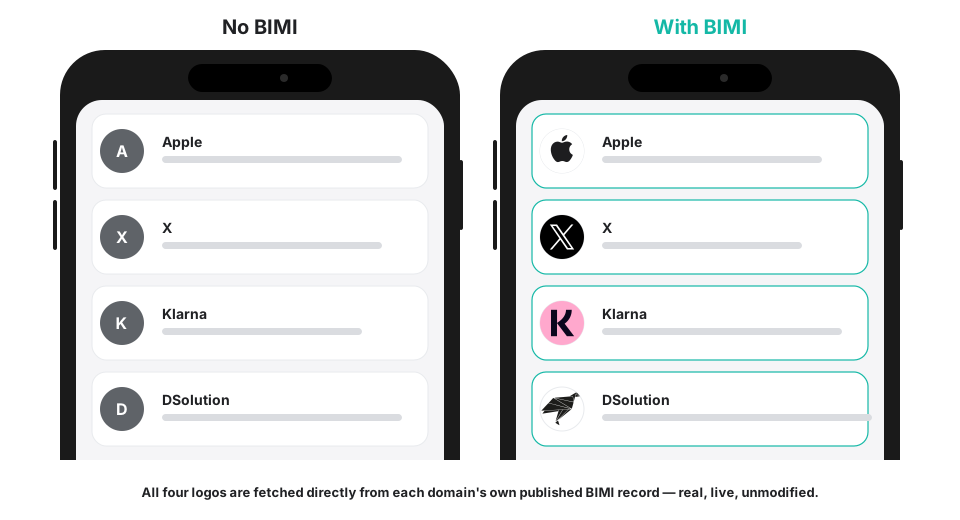
BIMI is a DNS-published declaration of two things: where to find your brand's logo, and optionally, where to find a certificate proving you're legally entitled to use it. Mailbox providers that support BIMI check both, and if everything validates — including your domain's existing DMARC enforcement — they display the logo as your email's avatar in the inbox.
It doesn't authenticate anything on its own. It's a reward layered on top of authentication that already exists.
Why BIMI exists
BIMI grew out of an effort informally called the AuthIndicators Working Group, bringing together mailbox providers and brand-focused companies around 2019 with a shared goal: give domain owners something visible to gain from properly enforcing DMARC, rather than treating email authentication as invisible plumbing only IT ever sees the benefit of. The specification is maintained by the BIMI Group as an ongoing Internet-Draft rather than a ratified IETF standard, but that hasn't stopped it from being implemented and enforced in production by the mailbox providers that support it.
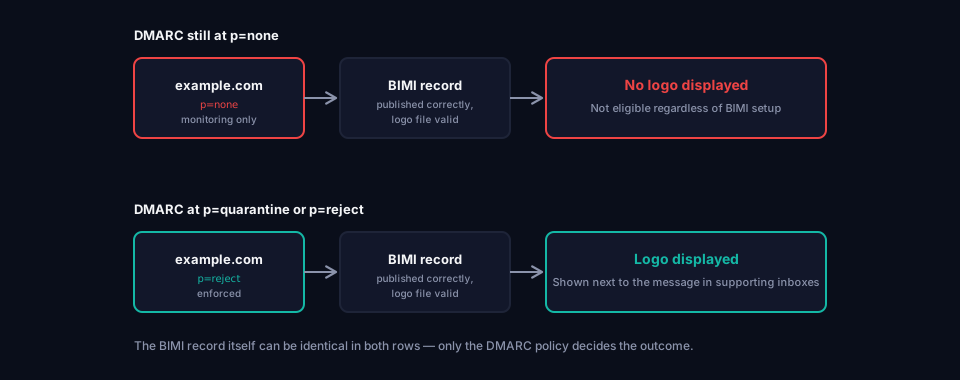
The design is deliberately gated. A logo next to your name in someone's inbox is a trust signal, and handing that out to any domain that asks — regardless of whether it can be spoofed — would make the signal worthless. So BIMI simply doesn't function until DMARC is already doing its job.
The DMARC prerequisite
This is the single fact that determines whether BIMI is even worth attempting yet: your domain's DMARC policy has to be p=quarantine or p=reject. p=none — DMARC's monitoring-only mode — isn't enough, and there's no workaround. If you're still in the early stages of a DMARC rollout, BIMI isn't next, DMARC enforcement is.
If your domain isn't there yet, What is DMARC? covers the realistic timeline for getting from a fresh setup to enforcement — usually a few months, not something to rush just to unlock a logo sooner. Check where your domain currently stands with the DMARC Analyzer.
What is a BIMI record
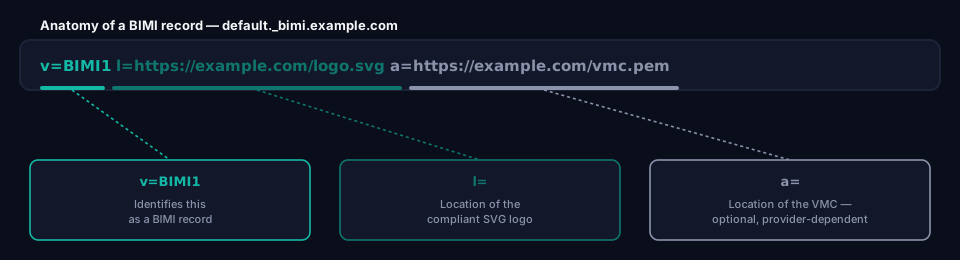
A BIMI record is a DNS TXT record at a fixed, predictable location:
default._bimi.example.com TXT "v=BIMI1; l=https://example.com/logo.svg; a=https://example.com/vmc.pem"
The tags explained
v=BIMI1 Identifies this as a BIMI record.
l= The location of your logo file — an HTTPS URL pointing to a compliant SVG. Required.
a= The location of your VMC (or CMC) certificate, also over HTTPS. Optional in the specification, but frequently required in practice by mailbox providers that check for one — covered in detail below.
The default selector at the start of the record name works the same way DKIM selectors do: it allows different logos for different purposes if you ever need that, though most domains only ever publish one.
Not sure whether your own BIMI setup is correct? The BIMI Analyzer checks a live domain's record, logo file and VMC in one pass, including whether DMARC is actually enforced behind it.
The BIMI logo requirements
This is where most first attempts at BIMI go wrong, and it's rarely a DNS problem.
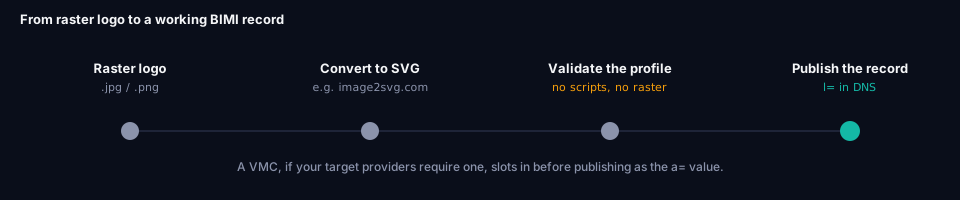
The logo has to be an SVG, but not just any SVG your design software happens to export. BIMI requires a restricted, security-conscious subset of SVG — no embedded scripts, no external references, no raster images embedded inside it, just clean vector paths. A typical SVG exported from Illustrator, Figma or Canva usually fails this on the first attempt, because those tools export general-purpose SVG, not the locked-down profile BIMI expects.
On top of the format itself:
- Square aspect ratio — the logo needs to fit a 1:1 frame, not a wide wordmark or a rectangular lockup.
- Hosted over HTTPS — same requirement as the certificate, served from a URL that's actually reachable.
- Clean vector artwork — a photo or a raster logo has to be redrawn as vector shapes, not just wrapped in an SVG file with an embedded image inside it, which technically produces an SVG file but not one that passes validation.
If your logo currently only exists as a JPG or PNG, it needs to be redrawn or converted into compliant SVG before any of the DNS work matters. image2svg.com is a straightforward option for that conversion step. Whatever tool you use, validate the output afterward with the BIMI Group's own SVG Assistant Tool rather than assuming any SVG export is good enough — this is the step that silently breaks the most BIMI setups.
What is a VMC
A VMC (Verified Mark Certificate) is a certificate that proves you legally hold a trademark on the logo you're publishing. It's issued by a small number of certificate authorities authorized to verify trademark ownership, and getting one involves a real trademark registration — it isn't something you can self-issue.
Whether you actually need one depends on which mailbox providers you care about. Some have historically required a VMC before they'll display a logo at all; others have shown logos without one, particularly for domains that have clearly established authentication. Provider requirements in this area have shifted over time and continue to, so treat "do we need a VMC" as a question worth checking against current provider documentation rather than assuming a fixed answer.
A lower-cost alternative called a CMC (Common Mark Certificate) also exists, aimed at organizations with a registered logo that isn't a formal trademark. It's worth knowing this option exists if a full trademark-backed VMC isn't realistic for your organization.
Who issues VMCs
Only a small number of certificate authorities are authorized to issue VMCs, since each one has to verify an actual trademark registration before signing anything. The main issuers today are DigiCert and Entrust, both of which also cover CMCs for organizations without a formal trademark. Pricing, turnaround time and the exact documentation required vary between issuers and change over time, so treat any specific figures as a starting point for a conversation rather than a quote — check directly with the issuer before budgeting for one.
Common BIMI mistakes
Mistake 1: Publishing BIMI before DMARC is enforced
By far the most common one. A BIMI record gets published while DMARC is still sitting at p=none.
Impact: No logo shows anywhere. The record is syntactically fine and completely non-functional.
Fix: Confirm DMARC is actually at p=quarantine or p=reject — not just configured, but genuinely enforced — before spending any time on BIMI.
Mistake 2: Using a non-compliant SVG
The logo file is a valid SVG in the general sense, but doesn't meet BIMI's restricted profile — it has an embedded raster image, a script tag left over from an export, or references an external resource.
Impact: The logo fails validation silently. Providers don't display it, and there's rarely a clear error message pointing at why.
Fix: Convert raster logos to clean vector SVG using a tool built for it, and check the result specifically against BIMI's requirements rather than just confirming it opens correctly in a browser. The BIMI Analyzer flags scripts, embedded raster images and external references automatically once your record is live.
Mistake 3: Wrong aspect ratio
The logo is a rectangular wordmark or lockup instead of something that fits a square frame.
Impact: Providers that enforce the square requirement won't display it, or will display it distorted.
Fix: Use or create a square version of the mark specifically for BIMI — usually an icon or monogram rather than a full horizontal logo.
Mistake 4: Assuming BIMI works the same everywhere
Treating "BIMI is set up" as a single pass/fail state rather than something that varies by mailbox provider.
Impact: The logo shows correctly in one inbox provider and not another, which looks like a bug but is actually different providers applying different requirements — some wanting a VMC, others not.
Fix: Check actual rendering across the major providers you care about rather than assuming one working inbox means it's fully working everywhere.
Mistake 5: Letting the certificate expire
A VMC gets issued once during setup and nobody tracks its renewal date.
Impact: The logo simply stops appearing when the certificate expires, often without anyone noticing until someone asks why it's gone.
Fix: Track the VMC's expiration the same way you'd track a TLS certificate, and renew before it lapses.
BIMI vs SPF vs DKIM vs DMARC
| SPF / DKIM / DMARC | BIMI | |
|---|---|---|
| Purpose | Prevent spoofing | Reward domains that already can't be spoofed |
| Required for delivery? | Effectively yes, in 2026 | No — purely visual |
| Works on its own? | Yes | No — requires DMARC at quarantine or reject |
| Visible to recipients? | No | Yes — that's the entire point |
BIMI isn't a fourth authentication layer. It's a visible payoff for having the first three actually working.
Frequently asked questions
Can I set up BIMI without DMARC?
No. A BIMI record with no DMARC enforcement behind it is syntactically valid and functionally invisible. There's no partial credit — DMARC has to be at p=quarantine or p=reject first.
Do I definitely need a VMC?
It depends on which mailbox providers matter to you and their current requirements, which have changed over time. Some providers have shown logos without one; others have required it. Check current documentation for the specific providers you care about rather than assuming either way.
Why isn't my SVG logo working even though it opens fine in a browser?
Because "opens in a browser" and "meets BIMI's restricted SVG profile" are different bars. Browsers render almost any valid SVG; BIMI validation is much stricter, rejecting anything with scripts, external references or embedded raster content. The BIMI Group's validator will check a finished record and logo against the actual requirements rather than leaving you to guess from a failed inbox test.
Can I use my existing brand logo, or does it need to be a special version?
You can use your real brand mark, but it usually needs a square-cropped or icon version prepared specifically for BIMI, converted to compliant vector SVG. A wide wordmark logo generally won't fit the required frame as-is.
Does BIMI improve deliverability?
Not directly. It's a visual trust signal for recipients, not a factor mailbox providers use to route mail to the inbox versus spam. The deliverability work is what SPF, DKIM and DMARC already handle.
Conclusion
BIMI is the rare piece of email authentication that a marketing team will actually notice and care about, which makes it tempting to jump to first. It doesn't work that way — DMARC enforcement has to exist before BIMI can do anything, the logo has to be a properly restricted SVG rather than a generic export, and depending on which inboxes matter to you, a VMC may or may not be part of the picture.
Get the DMARC side genuinely enforced first. Everything about BIMI after that is a matter of preparing the right logo file and publishing one DNS record.
If you're still working through DMARC enforcement, What is DMARC? covers the realistic path there. If DMARC is already solid and DKIM is the piece you haven't looked at yet, What is DKIM? covers that ground.
Ready to act on this? Check an existing record with the BIMI Analyzer, or let Hosted BIMI handle the logo prep, VMC guidance and DNS record for you.
About this guide
This guide was written by the team building grimDMARC — a managed DMARC and SPF platform for MSPs and their customers. If you have questions about BIMI or feedback on this guide, reach us at hello@grimdmarc.com.
Last updated: July 2026 Reading time: 12 minutes Reviewed by: grimDMARC team