RUA Tag: The Complete Guide to DMARC Aggregate Reporting Addresses
rua= is a single tag in a DMARC record, and it's arguably the one that matters most. Every other tag controls what happens to a message. This one controls whether you ever find out what happened at all.
This guide covers the tag itself in full technical depth — syntax, multiple addresses, the third-party authorization mechanism most references skip entirely, and the operational case for treating it as a prerequisite rather than an afterthought. For a plain-language introduction with no jargon, start with What Is the RUA Tag?; for how to actually read what arrives once it's configured, see Reading DMARC Aggregate Reports.
What you will learn:
- The complete syntax of a
rua=value, including the size modifier almost nothing documents clearly - How to correctly list more than one reporting address
- The
_report._dmarcauthorization mechanism that lets a domain send its reports to a third party - How RUA and RUF actually differ at the protocol level
- Realistic report frequency and volume patterns
- Why
rua=has to be running, and actually being read, before enforcement goes on - How to diagnose reports that never arrive
What rua= does
rua= tells every mail provider evaluating messages against your DMARC record where to send a daily aggregate report — a summary of every sending source seen using your domain, and whether each one passed or failed authentication. It's the tag that turns DMARC from a policy statement into a monitored system. Skip it, and enforcement runs with no feedback loop at all.
v=DMARC1; p=quarantine; rua=mailto:reports@example.com
That's the minimum viable configuration: a policy, and somewhere for the data to go.
Full syntax reference
The value after rua= is a comma-separated list of mailto: URIs, each with an optional size modifier:
rua=mailto:reports@example.com,mailto:backup@vendor.com!10m
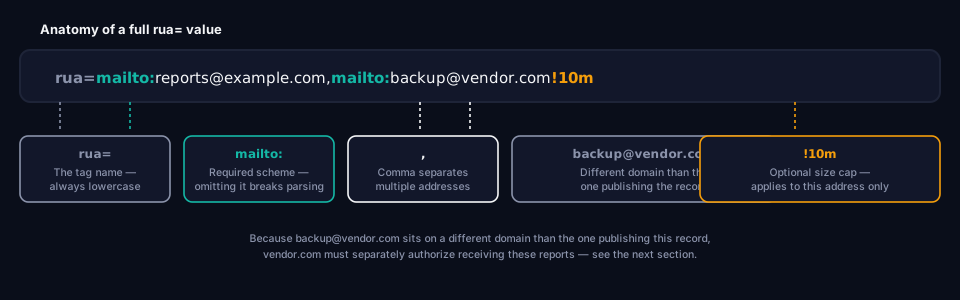
Breaking that down field by field:
The mailto: scheme is mandatory, not optional decoration. rua=reports@example.com — missing the scheme — is malformed. Some validators reject it outright; others silently ignore the tag, which is worse, because the record still looks published and correct at a glance.
Multiple addresses are comma-separated, with no limit specified by the standard. In practice, most records list one to three.
The optional size modifier is a ! followed by a number and a unit letter — k for kilobytes, m for megabytes, g for gigabytes, or t for terabytes (e.g. !10m, !2g). It tells the reporting provider not to send a report larger than that size to this specific address. It's rarely used in practice — most domains never generate reports large enough to matter — but it exists for exactly the scenario where a high-volume domain's daily XML file exceeds what a receiving mail server or inbox quota can handle. The modifier applies per-address, not to the tag as a whole, so different addresses on the same line can carry different limits.
Whitespace is tolerated but not required between addresses — mailto:a@x.com, mailto:b@y.com and mailto:a@x.com,mailto:b@y.com are both valid.
Adding more than one address
The syntax itself is simple — comma-separate the addresses — but a few practical details determine whether it actually works the way people expect:
rua=mailto:security@example.com,mailto:dmarc-reports@msp-provider.com
Every address gets a complete, independent copy of every report. This isn't a distribution list where the load is shared — it's more like CC'ing multiple recipients on the same email. List three addresses expecting reports and you have three full daily inboxes' worth of XML, not one report split three ways.
Order doesn't affect anything. Reporting providers don't treat the first address as primary and the rest as secondary; each is sent to independently and identically.
The common patterns in practice:
- An MSP or managed DMARC provider gets one copy for automated processing, while the domain owner keeps their own copy — neither party depends on the other for access to the raw data.
- One address feeds a human inbox for spot-checking, another feeds a tool built to parse and flag the data automatically.
- A backup address exists purely as insurance against the primary address being decommissioned without the DNS record being updated to match — which happens more often than DNS hygiene would suggest.
For an MSP managing DMARC across many customer domains, this is usually where a dedicated reporting mailbox per customer stops scaling — see why grimDMARC is built around customers, not domains for the broader version of that problem.
Third-party reporting authorization: the mechanism most references skip
This is the part of the rua= tag that trips up the most implementations, largely because it's underdocumented: a domain cannot simply redirect its DMARC reports to an address on a different domain without that domain's explicit permission.
If example.com publishes rua=mailto:reports@vendor.com, and vendor.com is not the organizational domain publishing the DMARC record, receiving mail servers won't just forward reports there on request. Before sending anything, they perform a lookup to confirm vendor.com has actually agreed to receive reports on example.com's behalf:
example.com._report._dmarc.vendor.com TXT ?
If vendor.com has published a TXT record at that exact name — typically containing v=DMARC1 — the authorization is confirmed and the report is sent. If that record doesn't exist, the report for example.com is silently withheld from that address. Not bounced, not flagged — just never sent, which is exactly why third-party reporting integrations that stop working often fail invisibly.
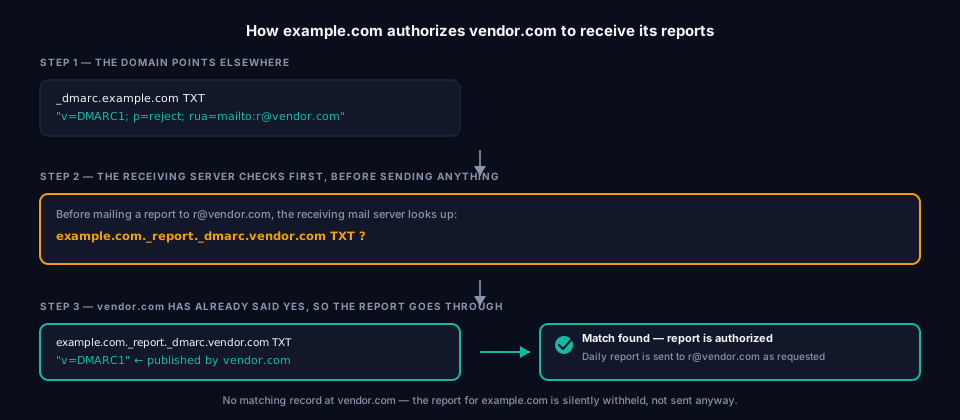
This mechanism exists specifically to prevent abuse: without it, anyone could publish a DMARC record pointing rua= at an arbitrary stranger's mailbox and use every DMARC-checking mail server on the internet to flood it with reports. Requiring the destination to opt in first closes that off.
What this means in practice for MSPs and DMARC platforms: this is the exact mechanism that lets a provider legitimately collect and process reports for a customer's domain without owning that domain — the customer's record points rua= at the provider, and the provider's domain carries the matching authorization record. If you're troubleshooting a customer integration where reports for one domain never seem to arrive despite others working fine, this authorization record — not the customer's rua= syntax — is the first thing worth checking.
RUA vs RUF: the protocol-level difference
Both tags request reporting, but they specify genuinely different mechanisms:
rua= requests aggregate reports — a batched, daily XML summary (application/gzip or application/zip, containing the feedback XML schema covered in Reading DMARC Aggregate Reports) of every sending source and its pass/fail counts. No message content, no headers beyond what's needed to identify the sending source.
ruf= requests forensic reports — individual, near-real-time reports per failing message, using the message/feedback-report MIME format, which can include portions of the original message's headers and sometimes body content.
In practice today, ruf= is close to inert. Gmail, Microsoft, and most other large mailbox providers stopped honoring forensic report requests years ago, citing the privacy implications of forwarding fragments of someone else's email around the internet. A domain publishing ruf= today is very likely publishing a tag that produces nothing. Nearly all functional DMARC visibility in production today runs through rua= alone — which is precisely why this guide, and most real-world DMARC tooling, treats aggregate reporting as the whole story.
Report frequency and volume: what to actually expect
"Daily" is the spec's target, but it's not a precise, synchronized schedule across every provider. A few things worth knowing before you're staring at an inbox trying to make sense of what arrived:
Reports don't arrive at the same time from every provider, and some providers split a single day's data across multiple files rather than sending one consolidated report — this is normal batching behavior, not something to troubleshoot.
Volume scales with mail volume, not with domain size. A low-traffic domain might see a handful of <record> blocks a day; a domain sending meaningful transactional or marketing volume can see records numbering in the hundreds once every sending platform is accounted for.
Reports are aggregated specifically to keep volume manageable. Ten thousand messages from the same source producing the same result become one <record> with count=10000, not ten thousand individual lines — this is precisely why "aggregate" is in the name.
Not every provider sends a report every single day for every domain. If there was no mail from your domain observed during a given window, some providers simply don't generate a report for that period rather than sending an empty one.
Why rua= has to be running before you enable p=reject
This is the operational stakes, stated plainly: p=reject refuses mail that fails DMARC, and it does not ask permission first. If a legitimate sender — an old invoicing platform, a newsletter tool, a CRM — was never properly authorized in SPF or DKIM, p=reject starts silently blocking it the moment it goes live. The sender gets a bounce; you get nothing, unless something is actually reading the aggregate reports that would have flagged that sender as a problem beforehand.
A working rua= address isn't a nice-to-have alongside enforcement — it's the only mechanism DMARC provides for finding out whether enforcement is safe to turn on. The realistic sequence:
- Publish
rua=and confirm reports are actually arriving — not just that the tag is published, but that mail is landing in the inbox or tool behind it. - Let it run long enough to catch periodic senders — weekly digests, monthly billing runs, quarterly mailings. A one-week window will miss anything that doesn't send daily.
- Cross-reference every
source_ipagainst known senders, authorizing anything legitimate in SPF and DKIM. - Move policy up gradually —
p=nonetop=quarantineat a lowpct=, watching reports the whole time, before reachingp=reject. - Keep
rua=running after reachingp=reject. It's not just a pre-launch checklist item — it's the ongoing signal that tells you when a sender changes infrastructure, a new tool gets added, or something legitimate starts failing months later.
Why p=none Is Like Locking the Door and Leaving the Key in It covers the policy side of this rollout in more depth; What is DMARC? covers the full implementation timeline.
Troubleshooting: reports aren't arriving
A handful of causes account for nearly every case of "I published rua= and nothing showed up":
The mailto: scheme was left off. The single most common syntax mistake — the tag looks correct to a human reading it, but fails machine parsing.
DNS hasn't propagated yet. A freshly published or edited record can take anywhere from minutes to around 48 hours to be visible everywhere, depending on TTL and caching. Reports won't start until receiving providers can actually see the new record.
Third-party authorization is missing. Covered in full above — if rua= points to a different domain than the one publishing the record, that domain must carry a matching _report._dmarc authorization record, or reports to that address are withheld.
No mail was seen for that domain during the reporting window. If nothing sent mail using your domain during a given period, some providers don't generate a report for it at all rather than sending an empty one — this is a non-issue, not a bug.
Reports landed somewhere unexpected. Automated reporting emails from unfamiliar senders can trigger spam or bulk-mail filters on the receiving mailbox — worth checking before assuming the sending side is broken.
Frequently asked questions
What does the rua tag stand for?
Reporting URI for Aggregate reports. It specifies the address, or addresses, that receive daily aggregate DMARC reports.
Is rua= required by the DMARC specification?
No — a record is technically valid with just v= and p=. But without rua=, DMARC provides zero visibility into what's actually happening to mail sent as your domain, which undermines most of the practical value of running it at all.
Can one address receive reports for multiple domains?
Yes, as long as each domain's rua= value points to that address and, where the address's domain differs from the domain publishing the record, that address's domain carries the matching _report._dmarc authorization record for each customer domain it's meant to receive for.
What happens if a listed rua= address bounces or no longer exists?
Reports to that address simply fail to deliver, generally without any notification back to the domain owner — DMARC doesn't include a delivery-confirmation mechanism. This is exactly why an unmonitored rua= address can go stale for months without anyone noticing.
Do subdomains need their own rua= address?
Not necessarily. rua= set on the organizational domain's DMARC record applies to subdomain reporting as well, unless a subdomain publishes its own separate DMARC record with a different rua= value.
How long should rua= run before moving to enforcement?
Long enough to observe a full sending cycle — a few weeks at minimum, long enough to catch monthly or quarterly senders that a shorter window would miss entirely.
Putting it into practice
Checking what's currently published, and whether reports are actually configured to go anywhere useful, takes seconds with grimDMARC's free DMARC Analyzer. The Domain Scanner gives the wider authentication picture if you're starting from scratch, and the DMARC Builder generates a correct record, rua= included, without requiring you to hand-write any of the syntax above. And if the reports are already arriving but nobody's reading them, that gap — not the DNS syntax — is usually the real blocker to safe enforcement, which is exactly what Hosted DMARC is built to close.
About this guide
This guide was written by the team building grimDMARC — a managed DMARC, SPF and BIMI platform for MSPs and their customers. If you have questions about your own rua= configuration or feedback on this guide, reach us at hello@grimdmarc.com.
Last updated: August 2026 Reading time: 11 minutes Reviewed by: grimDMARC team