Reading DMARC Aggregate Reports: A Field-by-Field Guide to RUA XML
The moment you publish a DMARC record with an rua= address, aggregate reports start arriving — as raw XML files, usually zipped, usually several per day per receiving provider. Nobody enjoys opening these by hand, but understanding the structure once is worth it: it's the difference between DMARC being a black box and being an actual source of truth about who's sending mail as your domain.
This guide walks through how to read a DMARC aggregate report — also called a DMARC RUA report, after the rua tag that requests it — field by field. For the broader implementation picture, see What is DMARC?; this guide assumes a record is already live and reports are already arriving.
What you will learn:
- What the
ruatag is and how it triggers aggregate reporting - The overall structure of a DMARC aggregate (RUA) report
- What each field in a
<record>block actually means - How to distinguish a legitimate sender from a spoofing attempt in the data
- Why you almost never need to read raw XML by hand once you know what it contains
What the rua tag actually does
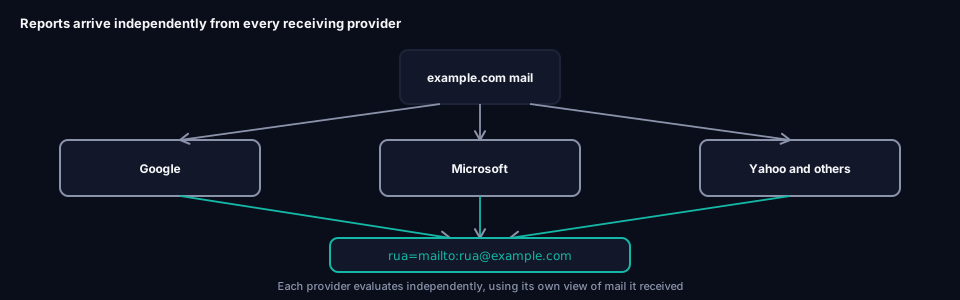
rua= is the DMARC record tag that tells receiving mail providers where to send aggregate reports. A record like v=DMARC1; p=none; rua=mailto:reports@example.com; asks every major provider that gets mail claiming to be from your domain — Google, Microsoft, Yahoo, and others — to email a daily XML summary to that address. No rua tag means no aggregate reports at all; you'd be running DMARC blind, with a policy but no visibility into what it's actually doing. Everything below is what shows up once that address starts receiving mail — for a plain-language introduction to the tag itself first, see What Is the RUA Tag?, or RUA Tag: The Complete Guide for the full syntax, multiple-address setups, and how third-party reporting authorization works.
The report envelope
Every DMARC RUA report starts with metadata about who sent it and what period it covers. This is the first thing to check when you're learning how to read DMARC reports, since it tells you the reporting window and provider before you look at any individual record:
<feedback>
  <report_metadata>
    <org_name>google.com</org_name>
    <email>noreply-dmarc-support@google.com</email>
    <report_id>12345678901234567890</report_id>
    <date_range>
      <begin>1735689600</begin>
      <end>1735776000</end>
    </date_range>
  </report_metadata>
  <policy_published>
    <domain>example.com</domain>
    <adkim>r</adkim>
    <aspf>r</aspf>
    <p>quarantine</p>
    <sp>quarantine</sp>
    <pct>100</pct>
  </policy_published>
  ...
</feedback>
org_name — Which mail provider generated this report. Google, Microsoft, and Yahoo are the most common sources for most domains, since they receive the highest mail volume.
date_range — The period this report covers, as Unix timestamps (seconds since 1 January 1970). Most reports cover a 24-hour window.
policy_published — What DMARC policy the reporting provider observed when they looked up your record during this period. Useful as a sanity check: if this doesn't match what you actually have published, you may be looking at a stale or cached lookup, or a DNS propagation delay.
Note that pct= still appears in policy_published in reports from providers whose reporting schema hasn't yet caught up with the tag's removal from the specification — see Every DMARC Tag Explained for why pct= shouldn't appear in a record you write today, even though older report schemas may still reference it.
The record block: the part that actually matters
Everything above is bookkeeping. The real content is in one or more <record> blocks, each describing a group of messages that shared the same authentication outcome:
<record>
  <row>
    <source_ip>40.107.20.58</source_ip>
    <count>147</count>
    <policy_evaluated>
      <disposition>none</disposition>
      <dkim>pass</dkim>
      <spf>pass</spf>
    </policy_evaluated>
  </row>
  <identifiers>
    <header_from>example.com</header_from>
  </identifiers>
  <auth_results>
    <dkim>
      <domain>example.com</domain>
      <selector>selector1</selector>
      <result>pass</result>
    </dkim>
    <spf>
      <domain>example.com</domain>
      <result>pass</result>
    </spf>
  </auth_results>
</record>
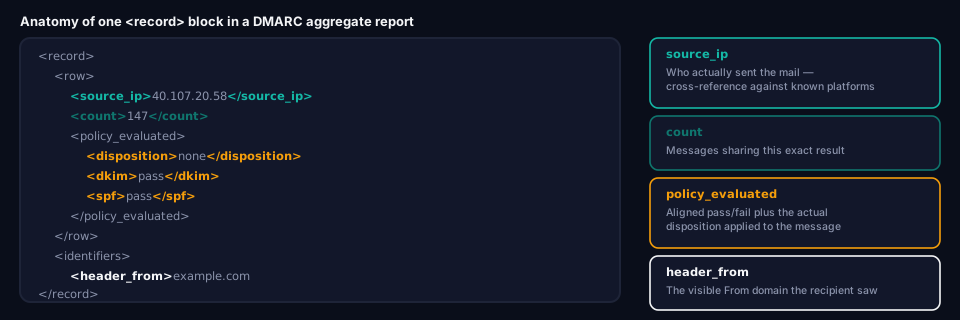
source_ip
The IP address that actually sent the message. This is the single most useful field for identifying who is sending — cross-reference it against known ranges for your mail platforms (Microsoft 365, Google Workspace, your marketing platform, and so on). An unfamiliar IP sending mail as your domain is either a legitimate service you haven't accounted for yet, or something worth investigating.
count
How many messages from this source_ip, during this reporting period, produced this exact combination of results. Reports are aggregated this way specifically to avoid sending one line per individual message — a provider that received 10,000 messages from the same sending IP with identical results reports it as one record with count=10000, not 10,000 separate entries.
policy_evaluated
What actually happened to these messages, according to the reporting provider's own DMARC evaluation:
disposition— The outcome applied:none,quarantine, orreject. This reflects the receiving provider's own decision, which can occasionally differ slightly from what you'd expect based on your published policy (some providers apply local overrides or leniency in edge cases).dkim— Whether DKIM aligned for this message (not just whether it authenticated — see Alignment vs Authentication for that distinction).passorfail.spf— Same, for SPF alignment.
identifiers
header_from — The visible From domain the recipient actually saw. This is the domain DMARC alignment is measured against.
auth_results
The raw, underlying authentication results — separate from the aligned pass/fail shown in policy_evaluated. This is where you can see which domain and selector actually authenticated, even when that domain doesn't align with header_from.
dkim > domain— Thed=domain from the DKIM signature (see Every DKIM Attribute Explained).dkim > selector— Which selector's key was used.dkim > result— Whether the DKIM signature itself verified correctly (independent of alignment).spf > domain— The domain the SPF check was actually evaluated against.spf > result— Whether SPF passed, failed, or produced another RFC 7208 result.
Spotting a legitimate sender you forgot about
A record with source_ip pointing to a known email platform's range, count in the dozens or hundreds, spf and dkim both failing in policy_evaluated, but header_from matching your domain — that's almost always a legitimate service you haven't fully authenticated yet, not an attack. The fix is adding that platform's SPF include (see Every SPF Mechanism Explained) and configuring its DKIM signing, not blocking it.
Spotting a likely spoofing attempt
A record with an unfamiliar source_ip — not matching any platform you recognize — count that's small and sporadic rather than a steady daily volume, both spf and dkim failing, and header_from matching your domain exactly: this pattern is consistent with someone attempting to spoof your domain. It's exactly the kind of activity p=reject exists to stop outright, and p=none merely documents without blocking.
Why you rarely need to read this by hand
A single day's reports from just Google and Microsoft can easily add up to hundreds of individual <record> blocks once you're sending meaningful mail volume. Reading that manually, every day, isn't a realistic workflow — which is exactly why DMARC monitoring tools exist: they ingest this XML automatically and present it as a searchable, filterable dashboard instead.
Skip the XML parsing. grimDMARC's DMARC Analyzer ingests your aggregate reports automatically and surfaces exactly the patterns described above — new senders, alignment failures, and suspicious source IPs — as a readable dashboard instead of a folder of zipped files.
Frequently asked questions
What is the rua tag in a DMARC record?
rua stands for "reporting URI for aggregate reports." It's the DMARC tag that specifies where daily aggregate (RUA) reports should be sent, formatted as one or more mailto: addresses, e.g. rua=mailto:reports@example.com. It's optional per the spec, but without it you get no visibility at all into who's sending mail as your domain — see Every DMARC Tag Explained for how it fits alongside the record's other tags.
Why do I get multiple report files per day from the same provider?
Some providers split reports by internal infrastructure boundaries or send incremental updates throughout the day rather than one consolidated file. This is normal and not something to troubleshoot — your monitoring tool should merge them automatically.
What's the difference between the dkim result in policy_evaluated and in auth_results?
policy_evaluated > dkim reflects DMARC's aligned result — did a passing, aligned DKIM signature exist for this message. auth_results > dkim > result reflects the raw signature verification outcome, independent of alignment. A message can show pass in auth_results and still show fail in policy_evaluated if the signing domain didn't align with the visible From address.
Do forensic (ruf) reports use the same format?
No. Forensic reports use a different format (typically message/feedback-report) and, where still sent at all, contain details about a single failing message rather than an aggregated summary. Most major providers no longer send forensic reports at all, which is why this guide focuses on aggregate (rua) reports — the ones you'll actually receive.
How do I know which IP addresses belong to which mail platforms?
Most major platforms publish their sending ranges as part of their own SPF records — the include: values covered in Every SPF Mechanism Explained resolve to exactly these ranges. Cross-referencing an unfamiliar source_ip against your existing SPF includes is usually the fastest way to identify it.
Turning reports into action
Once you can read a report, the natural next step is deciding what to do with what it tells you — which senders need SPF or DKIM fixes, and when you're ready to move policy from p=none toward enforcement. What is DMARC? covers that rollout timeline in full, and grimDMARC's free Domain Scanner is a fast way to check where your domain's authentication currently stands before diving into report data.
About this guide
This guide was written by the team building grimDMARC — a managed DMARC and SPF platform for MSPs and their customers. If you have questions about reading DMARC reports or feedback on this guide, reach us at hello@grimdmarc.com.
Last updated: August 2026 Reading time: 10 minutes Reviewed by: grimDMARC team