Every SPF Mechanism Explained: include, a, mx, ip4, all and More
An SPF record looks simple — a short string of v=spf1 followed by a handful of terms. But each term is a distinct mechanism with its own syntax, its own DNS lookup cost, and its own failure modes. Given that SPF caps you at 10 total DNS lookups before the entire record breaks, knowing exactly what each mechanism costs is not optional trivia — it's the difference between a record that works and one that silently fails.
This guide covers every SPF mechanism and qualifier in detail. For the broader picture of how SPF fits into email authentication, see What is SPF? first if you haven't already.
What you will learn:
- Every SPF mechanism, its syntax, and what it authorizes
- The exact DNS lookup cost of each mechanism
- The four qualifiers and what each one actually does to a message
- How
redirect=andexp=differ from ordinary mechanisms
How SPF records are structured
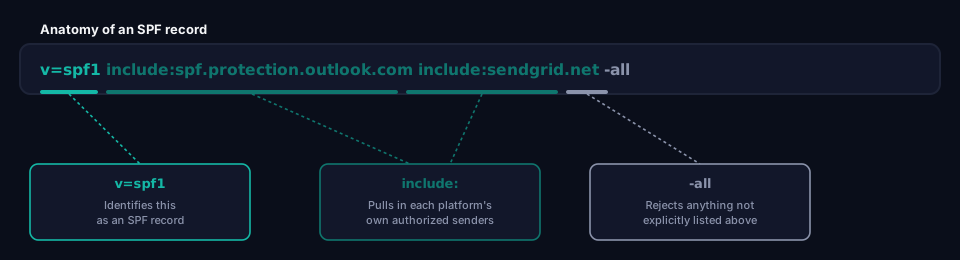
An SPF record is a DNS TXT record starting with v=spf1, followed by a space-separated list of mechanisms, ending in an all mechanism with a qualifier that decides what happens to anything not explicitly matched:
example.com TXT "v=spf1 include:spf.protection.outlook.com include:sendgrid.net -all"
Each mechanism below either directly authorizes something (an IP, a domain's mail servers) or triggers a DNS lookup to resolve another list of authorizations. Only some of them count against the 10-lookup limit — see SPF PermError: The 10-Lookup Limit for exactly how that ceiling gets calculated and what to do when you're near it.
ip4: and ip6:
Authorizes a specific IPv4 or IPv6 address, or a CIDR range, directly.
ip4:203.0.113.25
ip4:203.0.113.0/24
ip6:2001:db8::/32
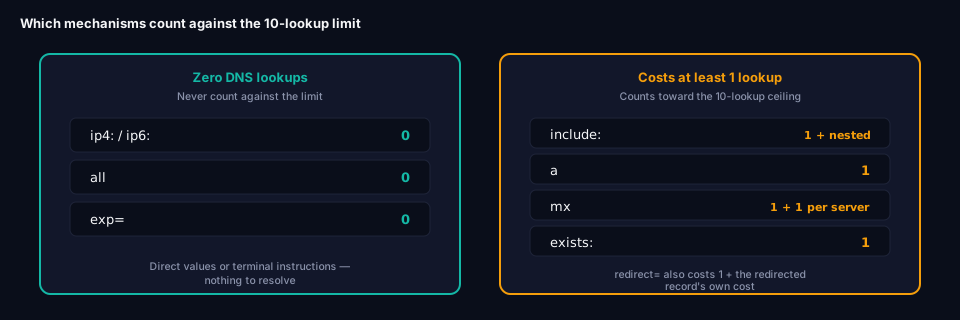
DNS lookup cost: zero. This is the only category of mechanism that doesn't count against the 10-lookup limit, because the receiving server already has the address to check — no DNS resolution is required to evaluate it. This is exactly why SPF flattening (replacing include: chains with their resolved IP ranges) reduces lookup count to zero for the flattened portion.
a
Authorizes any server listed in the domain's own A (or AAAA) record.
a
a:mail.example.com
DNS lookup cost: 1 lookup. Used bare, it checks the current domain's own A record. With a domain argument, it checks that domain's A record instead. This mechanism is a holdover from an era when a domain's mail server and its website often lived on the same machine — increasingly rare with cloud-hosted mail, so it shows up mostly in older records.
mx
Authorizes the domain's own mail servers, as listed in its MX records, to send mail.
mx
mx:example.com
DNS lookup cost: 1 lookup for the MX record itself, plus 1 additional lookup for every MX server it returns. This is one of the most easily underestimated costs in SPF — a domain with three MX records costs four lookups total for a single mx mechanism, not one. Like a, this mechanism is less relevant for domains using cloud email platforms, where the servers that receive mail (MX) aren't necessarily the same ones authorized to send it.
include:
Pulls in another domain's entire SPF record as a set of additional authorized sources. This is how virtually every modern SPF record is built — one include: per mail platform you actually use.
include:spf.protection.outlook.com
include:_spf.google.com
include:sendgrid.net
DNS lookup cost: 1 lookup, plus every lookup required to resolve that included domain's own SPF record. This nested cost is the single biggest reason SPF records exceed the 10-lookup limit. A single include: might resolve to a record with three more include: statements inside it, silently costing four lookups instead of one. There's no way to know the true cost without actually resolving the chain — which is exactly what grimDMARC's SPF Analyzer does automatically.
exists:
Performs a DNS lookup against a constructed domain name and treats any successful response (regardless of content) as a match. Used for advanced, often macro-based validation logic.
exists:%{i}.spf.example.com
DNS lookup cost: 1 lookup. Rare in ordinary business SPF records; mostly seen in specialized anti-abuse or rate-limiting setups built by SPF library authors, not something typical IT teams need to write themselves.
redirect=
Not a mechanism in the same sense as the others — a modifier that replaces the current record's evaluation entirely with another domain's SPF record. Unlike include:, which pulls in additional sources alongside the current record, redirect= hands off evaluation completely.
v=spf1 redirect=_spf.example-parent.com
DNS lookup cost: 1 lookup, plus whatever the redirected record itself costs. redirect= is typically used when multiple domains should share exactly one SPF policy, maintained in one place — for instance, several regional or brand domains all pointing at one central record. If a record uses redirect=, it should not also have its own trailing all mechanism; the redirected record's all mechanism takes over.
exp=
A modifier that specifies a domain to look up for a custom explanation message, returned to the sender when a message fails SPF with -all. Largely cosmetic — it changes the bounce message text a rejected sender sees, not the pass/fail outcome itself.
exp=explain.example.com
DNS lookup cost: not counted against the 10-lookup limit, since it's only resolved in the failure case, and many receiving servers don't bother fetching it at all. Rarely used in practice — most organizations don't need custom bounce explanations for spoofed mail attempts.
all
The catch-all mechanism, always placed last in the record. It matches everything not already matched by an earlier mechanism, and its qualifier determines the outcome.
-all
DNS lookup cost: zero. all never triggers a DNS lookup on its own — it's a terminal instruction, not a lookup.
The four qualifiers
Every mechanism can be prefixed with one of four qualifiers. In practice, qualifiers are almost always applied to all specifically, since that's the one that determines what happens to everything not explicitly authorized:
+(Pass) — Explicitly authorizes a match. This is the default qualifier if none is written —include:sendgrid.netand+include:sendgrid.netmean the same thing.+allauthorizes literally anyone to send as your domain and should never appear in a real record; it's a critical misconfiguration, not a testing setting.-(Fail) — Rejects a match outright.-allis the correct, production-ready ending for a finished SPF record: anything not explicitly listed above it is treated as unauthorized.~(SoftFail) — Accepts a match but flags it as suspicious rather than rejecting it.~allis common during the testing phase of an SPF rollout, when you want visibility into what would fail without actually blocking anything yet.?(Neutral) — Makes no real statement either way.?allis treated by most receiving systems roughly the same as having no SPF record at all — it exists mostly as a placeholder value and provides essentially no protection.
v=spf1 include:spf.protection.outlook.com ~all    ← testing
v=spf1 include:spf.protection.outlook.com -all    ← production
Mechanism cost summary
| Mechanism | Typical use | DNS lookups |
|---|---|---|
ip4: / ip6: |
Direct IP authorization | 0 |
a |
Domain's own A record | 1 |
mx |
Domain's own mail servers | 1 + 1 per MX record |
include: |
Pull in a platform's SPF record | 1 + nested lookups |
exists: |
Macro-based conditional match | 1 |
redirect= |
Replace evaluation with another record | 1 + redirected record's cost |
exp= |
Custom failure explanation text | 0 (not counted) |
all |
Catch-all, always last | 0 |
A complete example, mechanism by mechanism
example.com TXT "v=spf1 ip4:203.0.113.25 include:spf.protection.outlook.com include:sendgrid.net -all"
Reading this left to right: v=spf1 identifies the record. ip4:203.0.113.25 authorizes one specific server directly, at zero lookup cost. include:spf.protection.outlook.com pulls in Microsoft 365's authorized servers (1 lookup, plus whatever Microsoft's own record costs internally). include:sendgrid.net does the same for SendGrid. -all rejects anything not covered by the mechanisms above it. Total direct lookup cost here: 2, before counting what each include: resolves to internally.
Frequently asked questions
Which mechanisms count against the 10-lookup limit?
include:, a, mx, exists:, and redirect= all count — each at least 1 lookup, with include:, mx, and redirect= potentially costing more depending on what they resolve to. ip4:, ip6:, all, and exp= do not count.
What's the difference between include: and redirect=?
include: adds another domain's authorized sources to your existing record, alongside whatever else you've listed. redirect= replaces your entire record's evaluation with another domain's record — including its all qualifier. Use include: when combining multiple sending platforms; use redirect= only when several domains should share one identical policy.
Should I ever use +all?
No. +all authorizes anyone in the world to send email that passes SPF for your domain. It's not a valid testing setting — use ~all for testing instead, which flags unauthorized senders without pretending they're legitimate.
Why does mx cost more than one lookup?
Because resolving mx requires first looking up the domain's MX records, then a separate lookup for each individual mail server those records point to. A domain with several MX servers listed for redundancy multiplies this cost accordingly — it's one of the more easily miscounted mechanisms.
Checking your own mechanism cost
Counting mechanisms by hand across nested include: chains is exactly the kind of task that's easy to get wrong manually. grimDMARC's free SPF Analyzer resolves your full record, follows every nested include, and reports your total lookup count against the 10-lookup ceiling — along with flagging any mechanisms that aren't contributing anything useful.
If you're closer to the limit than you'd like, SPF PermError: The 10-Lookup Limit covers exactly how that ceiling is calculated and the standard fixes once you're near or over it. And once your SPF mechanisms are sorted, What is DMARC? covers how SPF's pass/fail result actually becomes an enforcement decision.
About this guide
This guide was written by the team building grimDMARC — a managed DMARC and SPF platform for MSPs and their customers. If you have questions about SPF mechanisms or feedback on this guide, reach us at hello@grimdmarc.com.
Last updated: August 2026 Reading time: 10 minutes Reviewed by: grimDMARC team