SPF PermError: Understanding the 10 DNS Lookup Limit
PermError is the single most common way SPF quietly breaks — and it's rarely caused by anything obviously wrong with the record. It's caused by a hard numeric ceiling almost nobody counts correctly by hand: SPF allows a maximum of 10 DNS lookups when resolving a record, and crossing that number invalidates the entire record, not just the mechanism that pushed it over.
What you will learn:
- Exactly what counts as a lookup, and what doesn't
- Why nested
include:chains are the usual cause - How to count your own record's true lookup cost
- The standard fix, and why it's not a one-time task
What PermError actually means
When a receiving mail server evaluates SPF, it can return one of several results defined in RFC 7208: Pass, Fail, SoftFail, Neutral, None, TempError, or PermError. Most of those map to a specific finding about the sending server. PermError is different — it means the record itself is structurally broken and couldn't be evaluated at all.
The 10-lookup limit is the most common cause of PermError by a wide margin. The specification requires receiving servers to stop evaluating and return PermError the moment the lookup count would exceed 10 — and critically, this applies to the entire domain's mail, not just the specific message being checked. A domain with a broken, over-limit SPF record fails SPF for every message from every legitimate sender, simultaneously, until the record is fixed.
What counts as a lookup
Not every term in an SPF record costs a DNS lookup. Here's the exact breakdown — see Every SPF Mechanism Explained for the full mechanism reference this is drawn from:
Counts as 1 lookup each:
include:— plus every lookup required inside the domain it referencesa— resolves the domain's own A recordexists:— a conditional macro-based lookupredirect=— plus the redirected record's own cost
Counts as 1 lookup, plus 1 per result:
mx— 1 lookup for the MX record itself, plus 1 additional lookup for each mail server it returns. A domain with three MX records costs four lookups total for a baremxmechanism.
Does not count at all:
ip4:andip6:— direct IP addresses require no DNS resolution to checkall— a terminal instruction, not a lookupexp=— only resolved in the failure case, and not universally fetched even then
Why nested includes are the real problem
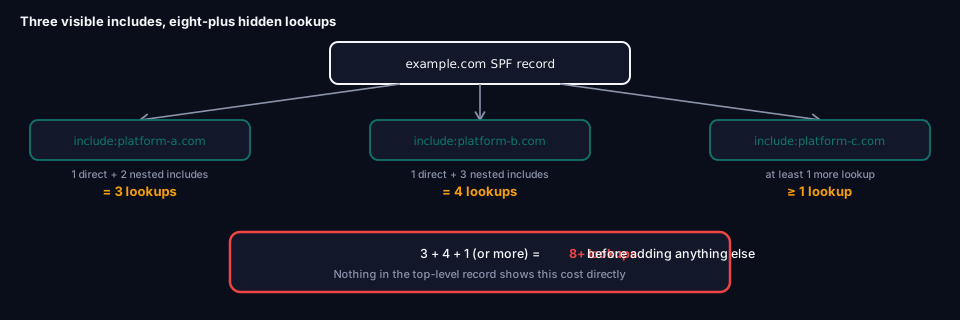
A record with three include: statements might look like it costs three lookups. In practice, it rarely does — because each include: pulls in another domain's entire SPF record, and that record can have its own include: statements nested inside it, each adding to your total.
example.com: v=spf1 include:platform-a.com include:platform-b.com include:platform-c.com -all
If platform-a.com's own SPF record itself contains two more include: statements, and platform-b.com's contains three, your actual total isn't 3 — it's 3 (the direct includes) + 2 (nested inside platform-a) + 3 (nested inside platform-b), or 8, before even counting anything from platform-c.com. Nobody adding a fourth marketing tool to this record can see that nested cost just by reading the top-level record — you have to actually resolve the full chain to know the true number.
This is precisely why SPF records tend to break gradually, then suddenly: each new service feels like "just one more include," and the record works fine right up until the one that finally tips the total past 10 — which is often not even the newest addition, since a vendor changing their own SPF record can silently push you over the limit without you touching your record at all.
The void lookup limit — a related, lesser-known ceiling
Separately from the 10-lookup limit, SPF also caps void lookups — lookups that return no answer, or a domain-not-found error — at 2. Exceed that and you get PermError even if you're nowhere near the 10-lookup ceiling.
The usual cause is a stale include: pointing at a service you no longer use, whose DNS entry has since been deleted or expired entirely. This is one of the sneakier ways SPF breaks, because the record can look completely reasonable and well under 10 lookups while still failing due to void lookups from dead references.
How to actually count your lookups
Reading the raw record with a DNS query tool shows you the text, but not the resolved cost:
dig TXT example.com +short
To get the true number, you need to manually follow every include:, a, mx, exists:, and redirect= mechanism, then repeat the process for every nested record they reference — which is tedious and error-prone to do by hand, especially across dozens of customer domains if you're managing this for multiple clients.
grimDMARC's free SPF Analyzer resolves the full chain automatically, reports your true lookup count against the 10-lookup ceiling, and separately flags void lookups from stale includes — the two most common causes of PermError — before either one causes an actual outage.
Fixing a record that's over the limit
Remove what you don't need
Start with an audit: which include: statements correspond to services you're actually still using? Marketing tools that were trialed once and abandoned, old CRM integrations, discontinued notification services — these accumulate in SPF records because removing an include: feels riskier than leaving it, even when nothing depends on it anymore.
Consolidate where possible
If multiple services can be authorized through a single, broader include (or if you can eliminate redundant a/mx mechanisms that duplicate what an include: already covers), each removal buys back lookup budget.
Flatten the record
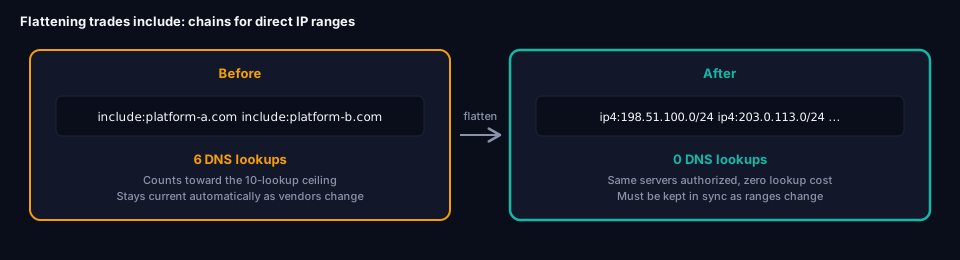
SPF flattening resolves include: chains down to their actual ip4:/ip6: ranges and publishes those directly, instead of the include statements themselves. Since raw IP ranges cost zero lookups, a flattened record can authorize the exact same servers using none of your 10-lookup budget.
Before flattening: include:platform-a.com include:platform-b.com   (6 lookups)
After flattening:   ip4:198.51.100.0/24 ip4:203.0.113.0/24 ip4:...  (0 lookups)
The tradeoff: flattening isn't a one-time fix. Mail platforms rotate and expand their IP ranges over time, and a flattened record that isn't kept in sync will drift out of date — either silently blocking legitimate mail from a new IP range, or leaving old, no-longer-used ranges authorized indefinitely. This is exactly the ongoing maintenance problem grimDMARC's hosted SPF is built to remove: the record lives in a managed DNS zone that's kept current automatically as the underlying platforms change, so you get the lookup-count benefit of flattening without taking on the maintenance burden of doing it by hand.
A common mistake: flattening Microsoft 365 or Google Workspace
One flattening mistake worth calling out specifically: large cloud mail platforms like Microsoft 365 and Google Workspace use dynamic, frequently changing IP ranges as a matter of normal operation. Flattening their include: to static IPs is likely to break within weeks as their infrastructure shifts underneath you. Flattening is best applied to smaller, more stable third-party services with documented, rarely-changing ranges — not your primary mail platform.
Frequently asked questions
How do I know if I'm close to the 10-lookup limit?
You need to resolve the full nested chain, not just count the top-level include: statements — grimDMARC's SPF Analyzer does this automatically and shows your exact current count.
Does exceeding the limit break all my mail or just the newest sender?
All of it. PermError invalidates the entire SPF record for the domain — mail from services that were working perfectly fine yesterday fails today, simply because a different, unrelated service pushed the total lookup count over 10.
Can a vendor break my SPF without me changing anything?
Yes. If a service you include: changes its own SPF record to add more nested lookups, your total lookup count can silently increase without you touching your DNS at all. This is one of the reasons periodic re-checking matters, not just checking once at setup.
Is flattening always the right fix?
Not always — it works best for smaller, stable third-party services. For large platforms with dynamic IP ranges (Microsoft 365, Google Workspace), flattening creates an ongoing maintenance burden that's easy to fall behind on. Removing unused includes and consolidating where possible should usually come first.
Where this fits
PermError is one of the clearest examples of how a single, easily overlooked technical limit can undermine an otherwise correctly configured DMARC setup — see What is DMARC? for how an SPF PermError cascades into DMARC failures even when your DMARC record itself is perfectly fine. If you're building or auditing an SPF record from scratch, Every SPF Mechanism Explained covers exactly what each mechanism costs before you add it.
About this guide
This guide was written by the team building grimDMARC — a managed DMARC and SPF platform for MSPs and their customers. If you have questions about SPF PermError or feedback on this guide, reach us at hello@grimdmarc.com.
Last updated: August 2026 Reading time: 9 minutes Reviewed by: grimDMARC team