Every DMARC Tag Explained: p, sp, rua, ruf, adkim, aspf and More
A DMARC record is a single line of text, but that line can carry more than a dozen distinct tags, each controlling a different piece of behavior. Most guides cover p= and stop there. This reference covers every tag that appears in a modern DMARC record — what it does, its valid values, and how it actually changes what receiving mail servers do with your mail.
If you're new to DMARC itself, start with What is DMARC? for the full picture of how the protocol works end to end. This guide assumes you already understand the basics and want the exact tag-by-tag reference.
What you will learn:
- Every currently valid DMARC tag, in the order it typically appears
- Syntax and valid values for each tag
- Which tags were deprecated by the 2026 DMARCbis update
- A complete, annotated example record
DMARC record basics
A DMARC record is a DNS TXT record published at _dmarc.yourdomain.com. It's built from semicolon-separated tag=value pairs:
_dmarc.example.com TXT "v=DMARC1; p=reject; rua=mailto:rua@example.com"
Order doesn't strictly matter except for v=, which must come first. Every tag below is optional except v= and p= — those two are required for a record to be valid at all.
v= (version)
Required, and always first. Identifies the record as a DMARC record.
v=DMARC1
There is only one valid value: DMARC1. If this tag is missing, malformed, or not first, receiving servers treat the entire record as absent.
p= (policy)
Required. The core instruction: what should happen to mail from your domain that fails DMARC alignment.
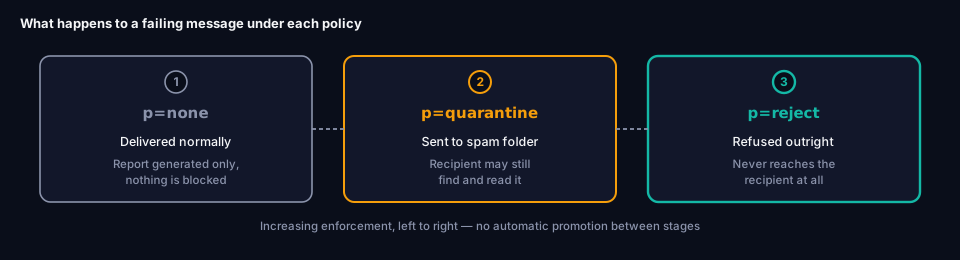
p=none— Take no action. Deliver the message normally, but still generate reports. This is monitoring mode.p=quarantine— Treat failing messages as suspicious, typically routed to the spam folder.p=reject— Refuse failing messages outright. They never reach the recipient's mailbox.
_dmarc.example.com TXT "v=DMARC1; p=reject"
p=none provides zero actual protection — it only observes. See What is DMARC? for the full case against staying there permanently, and a realistic timeline for moving through all three stages.
sp= (subdomain policy)
Optional. Sets a separate policy specifically for subdomains, overriding what they'd otherwise inherit from p=.
_dmarc.example.com TXT "v=DMARC1; p=reject; sp=quarantine"
Without sp=, every subdomain inherits the parent's p= value. This matters because organizations often have subdomains — marketing.example.com, dev.example.com — that send mail through entirely different, less-controlled systems than the main domain. Setting sp= explicitly, rather than relying on inheritance, makes the intended behavior visible in the record itself and avoids silent gaps.
np= (non-existent subdomain policy)
Optional, introduced by the 2026 DMARCbis update (RFC 9989). Applies specifically to subdomains that don't exist at all — closing a gap where attackers spoof a subdomain your organization never registered.
_dmarc.example.com TXT "v=DMARC1; p=reject; np=reject"
Before np= existed, non-existent subdomains fell under sp= (or p= if sp= wasn't set), but implementations varied in how strictly this was enforced. np= makes the intent explicit and is now the correct tag to use for this case in any current record.
pct= — deprecated, no longer used
Historically, pct= let you apply your policy to only a percentage of failing messages, as a way of rolling out enforcement gradually — for example p=quarantine; pct=25, increasing over time toward 100.
pct= has been removed from the specification under DMARCbis. Modern rollout is staged through reporting and, where extra caution is needed, through applying policy to a lower-risk subdomain first — not through a percentage tag. If you see pct= in an existing record or an older guide, it's safe to remove; it should not appear in a record written today.
rua= (aggregate report address)
Optional but strongly recommended — without it, you get DMARC enforcement with no visibility into who's actually sending mail as your domain. Specifies where receiving servers should send daily aggregate XML reports.
_dmarc.example.com TXT "v=DMARC1; p=none; rua=mailto:rua@example.com"
Multiple addresses are allowed, comma-separated:
rua=mailto:rua@example.com,mailto:reports@thirdparty-vendor.com
These reports are how you discover every service sending mail on your domain's behalf, and whether each one is passing or failing SPF and DKIM alignment. See Reading DMARC Aggregate Reports for how to actually interpret the XML these reports arrive as, What Is the RUA Tag? for a plain-language walkthrough of the tag itself, or RUA Tag: The Complete Guide for the full syntax reference and how third-party addresses like reports@thirdparty-vendor.com above actually get authorized to receive your reports.
ruf= (forensic report address)
Optional. Specifies where to send detailed, per-message forensic reports about individual DMARC failures.
ruf=mailto:ruf@example.com
In practice, this tag has limited value today: most major mail providers, including Google and Microsoft, no longer send forensic reports at all, citing the privacy implications of forwarding full message content. Aggregate reports (rua=) cover the vast majority of what organizations actually need for DMARC management. Many current records omit ruf= entirely.
adkim= (DKIM alignment mode)
Optional, defaults to relaxed if omitted. Controls how strictly the d= domain in a DKIM signature must match the visible From domain.
adkim=r— Relaxed. The DKIMd=domain just needs to share the same organizational domain as the From address (mail.example.comaligns withexample.com).adkim=s— Strict. Thed=domain must match the From domain exactly, with no subdomain variation permitted.
adkim=s
See Alignment vs Authentication for why this distinction — not just "did SPF or DKIM pass" — is the part of DMARC most people misunderstand.
aspf= (SPF alignment mode)
Optional, defaults to relaxed if omitted. Same concept as adkim=, applied to SPF.
aspf=r— Relaxed. The domain that passed SPF just needs to share the same organizational domain as the From address.aspf=s— Strict. The domain that passed SPF must exactly match the From domain.
aspf=s
Most organizations run relaxed alignment for both tags, since strict alignment can break legitimate mail sent through subdomains of your own infrastructure. Strict mode is worth considering only if you understand exactly which subdomains send mail and want to lock alignment down tightly.
fo= (failure reporting options)
Optional. Controls when forensic reports (governed by ruf=) are generated — irrelevant if you haven't set ruf=.
fo=0— Generate a report only if the message fails both SPF and DKIM alignment. This is the default.fo=1— Generate a report if either SPF or DKIM fails alignment. Recommended if you do use forensic reporting, since it surfaces partial failures too.fo=d— Generate a report specifically on DKIM failure.fo=s— Generate a report specifically on SPF failure.
fo=1
rf= — deprecated, no longer used
Historically specified the format of forensic reports (almost always afrf, the standard format). Removed under DMARCbis. Since forensic reporting itself has fallen out of common use, this tag rarely appeared in practice even before deprecation.
ri= (report interval) — deprecated, no longer used
Historically set how often aggregate reports should be sent, in seconds (the default was 86400, or 24 hours). Removed under DMARCbis — in practice, virtually every mail provider sent reports once daily regardless of what this tag specified, so its removal reflects existing behavior rather than a functional change.
psd= (public suffix domain)
Optional, introduced by DMARCbis. Declares whether this domain functions as a public suffix — relevant almost exclusively to registries and TLD operators, not ordinary organizations.
psd=y— This domain is a public suffix.psd=n— This is an ordinary organizational domain. The typical, correct value for almost every business domain.psd=u— Unknown. The default if the tag is omitted.
psd=n
Setting this explicitly to n communicates organizational-domain status clearly and controls how DNS Tree Walk (DMARCbis's replacement for the Public Suffix List) resolves your domain boundaries.
t= (testing mode)
Optional, introduced by DMARCbis. Signals that a record is being tested or newly deployed.
t=y
Important: t= does not override or soften p=. Setting p=reject; t=y still results in real rejection of failing mail — t= is informational metadata for tooling and report parsers, not a safety switch. If you want a genuinely cautious rollout, use p=none or apply enforcement to a subdomain first, rather than relying on t=.
A complete annotated example
Putting the current, correct tag set together:
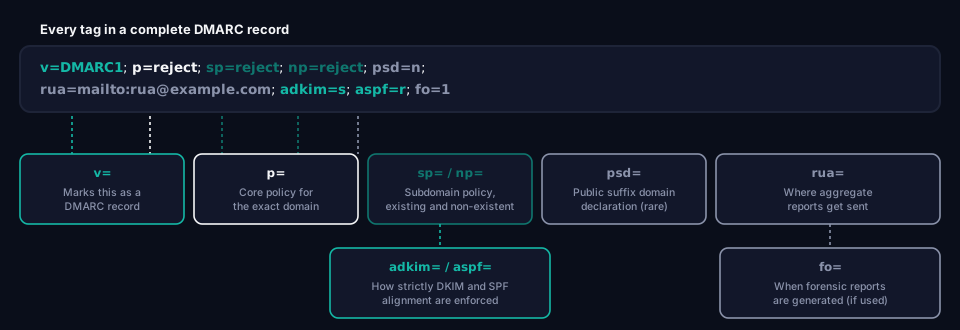
_dmarc.example.com TXT "v=DMARC1; p=reject; sp=reject; np=reject; psd=n; rua=mailto:rua@example.com; adkim=s; aspf=r; fo=1"
Reading it left to right: this is a valid DMARC record (v=), enforcing full rejection of misaligned mail on the main domain, subdomains, and non-existent subdomains alike (p=, sp=, np=), explicitly marked as an ordinary organizational domain (psd=n), sending aggregate reports to one address (rua=), requiring strict DKIM alignment but relaxed SPF alignment (adkim=, aspf=), with forensic reporting configured to trigger on any partial failure if it were enabled (fo=).
Frequently asked questions
Do I need every tag in this list?
No. v= and p= are the only required tags. A minimal, valid record is just v=DMARC1; p=none. Most production records add rua= for visibility and sp=/np= to close subdomain gaps, but the rest are situational.
What happens if I use a deprecated tag like pct= today?
Including a deprecated tag generally won't break your record — most receiving servers simply ignore tags they don't recognize or no longer act on. But it signals an outdated configuration, and tools like grimDMARC's DMARC Analyzer will flag it. There's no reason to keep it in a record written or updated today.
What's the difference between p= and sp=?
p= sets the policy for the exact domain the DMARC record is published on. sp= overrides that policy specifically for subdomains. Without sp=, subdomains inherit p= automatically — sp= exists for when you want subdomains handled differently.
Should I set adkim=s and aspf=s for maximum security?
Not necessarily. Strict alignment (s) is more rigid and can break legitimate mail sent through subdomains of your own sending infrastructure. Relaxed alignment (r, the default) is what most production records use safely. Strict mode is worth it only once you've confirmed, through your aggregate reports, exactly which domains and subdomains send your mail.
Building and checking your own record
Rather than hand-writing tag combinations, grimDMARC's free DMARC Builder generates a syntactically correct record from a guided form, and the DMARC Analyzer checks an existing record against this exact tag set — flagging deprecated tags, missing rua= addresses, and alignment settings worth reviewing.
For the full picture of how these tags combine into an actual enforcement decision, see What is DMARC?. If SPF or DKIM alignment is the part that's unclear, Alignment vs Authentication covers exactly what "aligned" means and why passing SPF or DKIM alone isn't the same thing.
About this guide
This guide was written by the team building grimDMARC — a managed DMARC and SPF platform for MSPs and their customers. If you have questions about DMARC tags or feedback on this guide, reach us at hello@grimdmarc.com.
Last updated: August 2026 Reading time: 11 minutes Reviewed by: grimDMARC team