Every DKIM Attribute Explained: Signature Header and DNS Key Tags
DKIM splits its configuration across two separate places: a DNS TXT record that publishes a public key, and a DKIM-Signature header attached to every outgoing message that carries the actual signature. Each has its own set of tags, and they're easy to confuse since several tag letters — v=, h= — appear in both with different meanings.
This guide covers every tag in both locations. If you haven't already, What is DKIM? covers the broader mechanics of how signing and verification work end to end — this guide is the detailed tag-by-tag reference for both halves.
What you will learn:
- Every tag in the DNS DKIM record, and what each controls
- Every tag in the DKIM-Signature email header, and what each protects
- Why the same letter (v=, h=) means something different in each location
- How canonicalization (c=) actually affects whether a signature survives transit
Two records, two tag sets
It helps to be explicit about this distinction before diving into tags, because it's a common source of confusion: the DNS record is published once per selector and stays mostly static. The signature header is generated fresh, per message, by the sending mail server at the moment it sends. One publishes a key; the other uses it.
DNS record:     selector1._domainkey.example.com  TXT  "v=DKIM1; k=rsa; p=..."
Email header:   DKIM-Signature: v=1; a=rsa-sha256; d=example.com; s=selector1; ...
Part 1: The DNS record tags
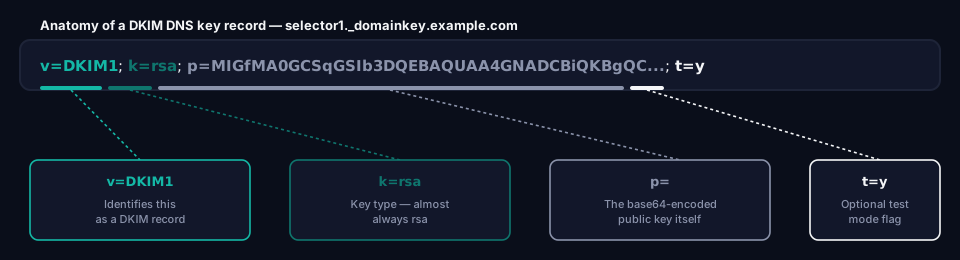
Published at selector._domainkey.yourdomain.com, this record's entire job is to publish a public key and a small amount of metadata about it.
v= (version)
Identifies this as a DKIM record.
v=DKIM1
Optional per the formal specification (RFC 6376), but essentially universal in real-world records — nearly every mail platform includes it by default.
k= (key type)
The cryptographic algorithm the public key uses.
k=rsa
rsa is standard and supported everywhere. ed25519 is defined in the specification as an alternative but isn't yet universally supported by receiving mail servers, so RSA remains the safe default for production use.
p= (public key)
The public key itself, base64-encoded. This is the long block of characters that makes DKIM records look intimidating in a DNS panel — it's just the key, not a mechanism you need to understand or edit by hand.
p=MIIBIjANBgkqhkiG9w0BAQEFAAOCAQ8AMIIBCgKCAQEAw6L...
A 2048-bit key, the current standard, produces a p= value long enough that it typically needs to be split across multiple quoted strings in the DNS record, since a single TXT string is capped at 255 characters. Most DNS providers and mail platforms handle this splitting automatically.
An empty p= value (p=) is a defined, valid way to revoke a key — receiving servers treat any signature referencing that selector as invalid going forward, without removing the record entirely.
t= (flags)
Optional testing flag.
t=y
t=y marks the key as being in test mode — receiving servers are advised not to treat a verification failure as a hard fail while this flag is set. Useful while first rolling out signing on a new selector; it should be removed once you've confirmed signing and verification work correctly, since leaving it in production signals an unfinished setup.
t=s is a separate flag meaning strict subdomain matching — that the d= domain must exactly match the signing domain, with no subdomain substitution allowed. Rarely used in practice.
h= (acceptable hash algorithms)
Optional. Restricts which hash algorithms are acceptable for signatures referencing this key.
h=sha256
sha256 is the current standard. sha1 is deprecated under the specification and should not appear in a newly created record — some receiving servers now reject SHA-1-based DKIM signatures outright.
s= (service type)
Optional. Restricts what kind of service this key is valid for.
s=email
email is the only commonly used value, restricting the key to email signing specifically (as opposed to other, non-email uses of DKIM-style signing that the specification technically permits but which see negligible real-world use).
Part 2: The DKIM-Signature header tags
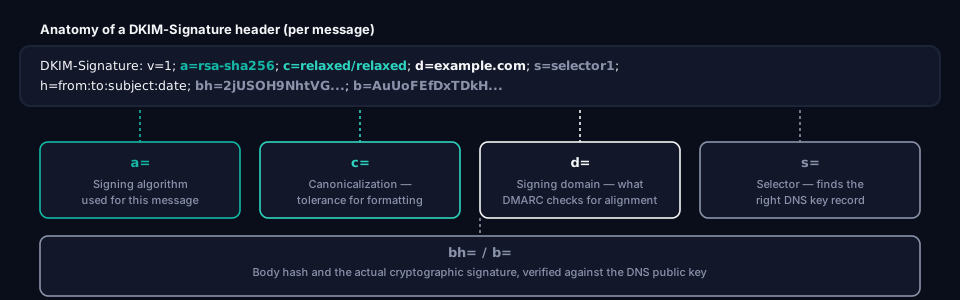
Added to every outgoing signed message. This is what you'll actually see if you view a raw email's headers, or what shows up referenced in a DMARC aggregate report's dkim result field.
DKIM-Signature: v=1; a=rsa-sha256; c=relaxed/relaxed; d=example.com;
  s=selector1; h=from:to:subject:date; bh=2jUSOH9NhtVGCQWNr9BrIAPreKQjO6Sn7XIkfJVOzv8=;
  b=AuUoFEfDxTDkHlLXSZEpZj79LICEps6eda7W3deTVFOk4yAUoqOB4nujc7YopdG5dWLSdNg6xNAZpOPr+kHxt1IrE...
v= (version)
The DKIM specification version. Always 1 — note this is a plain integer here, unlike the DNS record's v=DKIM1.
a= (signing algorithm)
The algorithm actually used to generate this specific signature.
a=rsa-sha256
Must be compatible with the key type (k=) and hash restrictions (h=) published in the DNS record. rsa-sha256 is the standard choice today.
c= (canonicalization)
Controls how tolerant the signature is of formatting changes made to the message in transit. Written as header/body, with two independent settings:
simple— Requires an exact, byte-for-byte match. Even a single added space or a changed line ending breaks the signature.relaxed— Tolerates minor whitespace normalization (collapsing repeated spaces, trimming trailing whitespace) without breaking the signature.
c=relaxed/relaxed
relaxed/relaxed is the standard choice, because mailing lists, forwarding services, and intermediate mail servers routinely make small formatting adjustments that simple treats as tampering. A record set to simple/simple produces DKIM failures that have nothing to do with an actual security problem.
d= (signing domain)
The domain claiming to have signed this message.
d=example.com
This is the tag DMARC actually checks during alignment — it compares d= against the visible From address domain. See Alignment vs Authentication for exactly how that comparison works and why it's not the same as simply checking whether DKIM passed.
s= (selector)
Identifies which DNS record to fetch. Combined with d=, this tells the receiving server exactly where to look: s=selector1 plus d=example.com means fetch selector1._domainkey.example.com.
s=selector1
h= (signed headers)
The list of header fields covered by this signature — different from the DNS record's h=, which restricts hash algorithms instead.
h=from:to:subject:date
Only headers listed here are protected by the signature. Anything not included could theoretically be altered in transit without breaking verification — which is why From is essentially always included, since that's the field DMARC alignment depends on.
bh= (body hash)
A hash of the message body, included so the signature also covers the actual content, not just the listed headers.
bh=2jUSOH9NhtVGCQWNr9BrIAPreKQjO6Sn7XIkfJVOzv8=
If even one byte of the body changes after signing (beyond what the canonicalization setting tolerates), this hash no longer matches and verification fails.
b= (signature value)
The actual cryptographic signature — computed over the headers listed in h= and the body hash in bh=, using the sending domain's private key.
b=AuUoFEfDxTDkHlLXSZEpZj79LICEps6eda7W3deTVFOk4yAUoqOB4nujc7YopdG5dWLSdNg6xNAZpOPr+kHxt1IrE...
This is what the receiving server actually verifies against the public key published in the DNS record's p= tag.
i= (identity, optional)
Optional. An identifier for the specific user or agent that signed the message, formatted as an email-like address on the signing domain.
i=jane@example.com
Rarely set explicitly by most mail platforms — when present, it must be a subdomain of (or equal to) the d= domain.
DNS record tags vs header tags at a glance
| Tag | In DNS record | In signature header |
|---|---|---|
v= |
Record version (DKIM1) |
Signature version (1) |
h= |
Allowed hash algorithms | List of signed headers |
d= |
— | Signing domain (checked by DMARC) |
s= |
— | Selector (finds the DNS record) |
p= |
Public key | — |
k= |
Key type | — |
a= |
— | Signing algorithm |
c= |
— | Canonicalization |
bh= / b= |
— | Body hash / signature |
Frequently asked questions
Why does h= mean two different things?
Because it appears in two independent tag sets with no shared namespace — the DNS record's h= restricts which hash algorithms a key accepts, while the signature header's h= lists which headers were actually signed. They're unrelated beyond sharing a letter, and the specification doesn't try to reconcile them.
What happens if b= (the signature) doesn't match?
DKIM verification fails for that message. The receiving server recomputes the expected signature from the message content and the published public key, and if it doesn't match what's in b=, the message is either altered, corrupted, or was never actually signed by the claimed domain.
Do I need to set t=y when first configuring DKIM?
It's optional but a reasonable precaution while confirming a new selector works correctly, since it tells receivers not to hard-fail on a verification problem during that window. Remove it once you've confirmed signing and verification are both working — leaving it in permanently is a common, low-severity misconfiguration.
Why is my DKIM signature failing after a message goes through a mailing list?
Most likely the canonicalization setting. simple/simple breaks on nearly any content modification, and mailing lists routinely add footers or adjust formatting. relaxed/relaxed, the standard setting, tolerates minor whitespace changes but still breaks if the list rewrites the subject line or body content meaningfully — a structural limitation, not a misconfiguration, and part of why DMARC only requires SPF or DKIM to pass rather than both.
Where this fits
Understanding both tag sets is mainly useful for troubleshooting — when a DMARC report shows dkim=fail for a sender you expected to pass, checking the actual DKIM-Signature header (not just the DNS record) usually reveals why. See Reading DMARC Aggregate Reports for how these results actually surface in the XML reports DMARC generates.
If SPF is the piece you're less clear on, Every SPF Mechanism Explained covers the equivalent tag-by-tag reference for SPF records. And What is DKIM? covers the full picture of why multiple selectors typically exist per domain and how key rotation works in practice.
About this guide
This guide was written by the team building grimDMARC — a managed DMARC and SPF platform for MSPs and their customers. If you have questions about DKIM attributes or feedback on this guide, reach us at hello@grimdmarc.com.
Last updated: August 2026 Reading time: 10 minutes Reviewed by: grimDMARC team