SPF and DKIM for Amazon SES: Custom MAIL FROM and Easy DKIM Setup
Amazon SES has more moving parts than most platforms, mainly because it separates two concerns that other providers bundle together: the MAIL FROM domain (which affects SPF alignment) and DKIM signing (handled through a feature called Easy DKIM). Getting full alignment — not just authentication — requires understanding both.
If you're new to why alignment matters separately from authentication passing, read Alignment vs Authentication first — SES is one of the platforms where this distinction shows up most concretely in setup steps.
What you will learn:
- Why SES's default MAIL FROM domain doesn't align with your sending domain
- How to configure a custom MAIL FROM domain, with exact MX and TXT records
- How Easy DKIM's three CNAME records work
- Common mistakes specific to SES setups
Why SES needs a custom MAIL FROM domain
By default, Amazon SES sends mail using a subdomain of amazonses.com as the MAIL FROM (envelope sender) address. This passes SPF — because it's authenticated against Amazon's own SPF record — but it doesn't align under DMARC, because the envelope sender domain doesn't share an organizational domain with your actual sending domain. See Alignment vs Authentication for exactly why that distinction matters.
To get SPF alignment working, you configure a custom MAIL FROM domain — a subdomain of your own domain, dedicated specifically to this purpose.
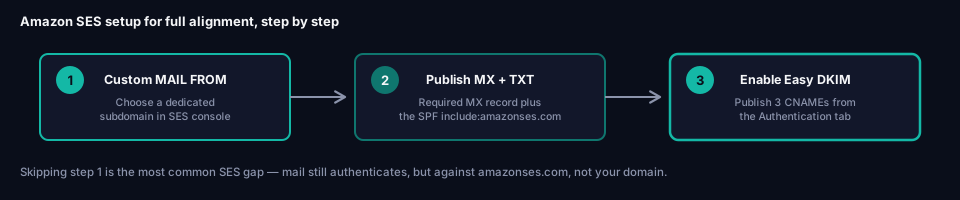
Step 1: Choose your custom MAIL FROM subdomain
Pick a subdomain of a domain you've already verified in SES — commonly something like mail.example.com. This subdomain must not be used for anything else: not for receiving mail, and not as a domain you also send from directly.
In the SES console, go to Configuration → Identities, select your verified domain, and under Custom MAIL FROM domain, enter your chosen subdomain.
Step 2: Publish the MX and SPF (TXT) records
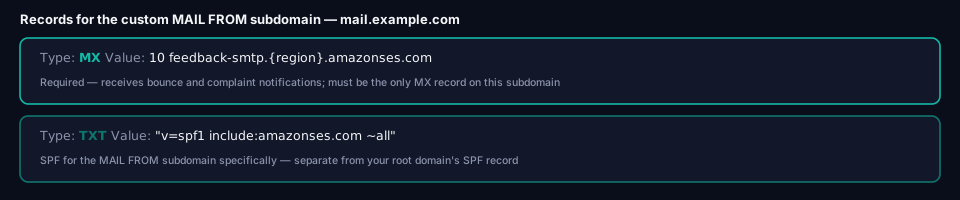
SES displays the exact records to publish after you save the MAIL FROM domain configuration. They follow this pattern:
Host:  mail.example.com
Type:  MX
Value: 10 feedback-smtp.{region}.amazonses.com
Host:  mail.example.com
Type:  TXT
Value: "v=spf1 include:amazonses.com ~all"
Replace {region} with the AWS Region your SES sending identity is configured in — for example us-east-1 or eu-west-1. Use the exact value SES shows you in the console rather than guessing, since it must match your actual sending region.
The MX record is required, not optional — it's how the MAIL FROM subdomain receives bounce and complaint notifications from other mail providers. A domain can have only one MX record for this to work correctly; if your MAIL FROM subdomain has multiple MX records, custom MAIL FROM setup fails outright.
Step 3: Configure the fallback behavior
SES asks how to behave if the MX record isn't correctly detected: either fall back to the default amazonses.com MAIL FROM domain (safer — mail keeps sending, just without alignment) or reject messages outright until the record is fixed. Most setups should start with the fallback option during initial configuration, then reconsider once the record is confirmed working.
DKIM setup: Easy DKIM
Amazon SES's Easy DKIM feature generates a DKIM key pair automatically and publishes it as three CNAME records — similar in spirit to Microsoft 365's approach, though the exact mechanism differs.
Enable Easy DKIM
In the SES console, under your verified domain identity, go to the Authentication tab and enable DKIM. SES generates three unique CNAME records.
Publish the three CNAME records
They follow this pattern, with the selector portion (abc123... below) unique to your account:
Host:  abc123def456._domainkey.example.com
Type:  CNAME
Value: abc123def456.dkim.amazonses.com
Host:  ghi789jkl012._domainkey.example.com
Type:  CNAME
Value: ghi789jkl012.dkim.amazonses.com
Host:  mno345pqr678._domainkey.example.com
Type:  CNAME
Value: mno345pqr678.dkim.amazonses.com
Each of the three selectors is independent — publishing all three (rather than just one) is what SES's console expects before it will show the domain's DKIM status as verified.
Verifying your setup
Check the MAIL FROM MX and SPF records
dig MX mail.example.com +short
dig TXT mail.example.com +short
Check the three DKIM CNAMEs
dig CNAME abc123def456._domainkey.example.com +short
(repeat for each of the three selectors SES generated)
Confirm in the SES console
The Identities page shows a verification status for both the custom MAIL FROM domain and DKIM independently — both need to show as verified, not just the base domain identity.
Send a real test
Send a message through SES to a mailbox where you can inspect headers, and confirm the envelope sender (Return-Path) shows your custom MAIL FROM subdomain rather than an amazonses.com address, and that DKIM's d= value matches your domain.
Common mistakes with Amazon SES
Never configuring a custom MAIL FROM domain at all. Without it, SES mail authenticates via SPF but against amazonses.com, not your domain — meaning SPF passes but doesn't align, which is functionally the same as SPF failing for DMARC purposes. This is the single most common gap in SES setups.
Using the sending domain itself as the MAIL FROM subdomain. The MAIL FROM domain must be a subdomain dedicated to this purpose, not the same domain (or subdomain) you also send regular mail from.
Multiple MX records on the MAIL FROM subdomain. SES requires exactly one. If the subdomain has other MX records from a previous configuration, custom MAIL FROM setup fails until they're removed.
Forgetting Easy DKIM entirely and relying on SPF alone. SPF alignment via the custom MAIL FROM domain covers one of DMARC's two alignment paths — see Alignment vs Authentication for why having both SPF and DKIM aligned, not just one, gives you a more resilient setup, particularly since SPF doesn't survive forwarding.
Frequently asked questions
Do I need a custom MAIL FROM domain if I already have DKIM configured?
Technically DMARC only requires one of SPF or DKIM to align, so DKIM alone can satisfy DMARC. But relying on DKIM exclusively means losing alignment entirely if a signature ever breaks (mailing lists, some forwarders) — having both configured is more resilient.
What region value do I use in the MX record?
The AWS Region your SES sending identity is actually configured in — the SES console shows you the exact, correct value for your setup rather than requiring you to look it up separately.
Can I use the same MAIL FROM subdomain for multiple SES identities?
No — each MAIL FROM subdomain should be dedicated to one identity's sending, per SES's requirements. Use a different subdomain per identity if you have multiple.
Does Easy DKIM require me to manage key rotation?
No — Amazon manages the underlying keys behind the three CNAME targets, similar to how Microsoft 365's CNAME-based DKIM works. You publish the records once and SES handles the rest.
Next steps
Once both the custom MAIL FROM domain and Easy DKIM show as verified in the SES console, confirm your full domain authentication status with grimDMARC's free Domain Scanner. If SES is one of several sending platforms on this domain, check your combined SPF lookup budget with the SPF Analyzer before moving toward DMARC enforcement — see What is DMARC? for that rollout sequence.
About this guide
This guide was written by the team building grimDMARC — a managed DMARC and SPF platform for MSPs and their customers. If you have questions about Amazon SES authentication or feedback on this guide, reach us at hello@grimdmarc.com.
Last updated: August 2026 Reading time: 9 minutes Reviewed by: grimDMARC team